WordPress MU 1.3.2

WordPress MU 1.3.2 was tagged earlier today. This is a major security update that brings together the fixes in WordPress 2.3.2 and a number of critical WordPress MU specific security problems.

Details of the fixes will be posted to the WordPress MU forum next week to give administrators time to upgrade. This release should be seen as an urgent upgrade.
Thanks to Alex Concha for his help with this release.

Please note: If you have plugins that uses options.php to save it’s options you must whitelist those options using the new add_option_update_handler() API. More information on this can be found on this forum post.

Download WordPress MU here

Biosphere 2

Can you imagine staying inside a sealed building for two years without physical contact with the outside world? That’s what happened at Biosphere 2 in 1991. It makes an interesting story and the Wikipedia page has a lot more on that mission and a second one that followed.

We visited there today, here are a few photos!

Biosphere 2
Matt wants us to go live in Biosphere 2, away from the Nintendo Wii distractions to help get WordPress 2.5 out on time.
Biosphere 2Biosphere 2Biosphere 2Biosphere 2Biosphere 2Biosphere 2
A room with a view
I asked for a room with a view and they gave me this. WiFi reception is spotty but the view is stunning!

Blogging in Arizona

Most of the Automattic team are in the wilds of Arizona this week. Looking out the window I see an environment as alien to the green Irish landscape I’m familiar with as I’ll probably ever see. Cactus grows everywhere, dark green bushes cover the hills and the dirt on the ground is bone dry. The sun beats down out of a clear blue sky. It’s warm outside, but so cold in the shade. It’s still winter after all, even if it doesn’t feel like it to me.

Cactus

It’s WordPress this, WordPress that. Despite the broadband going down yesterday there’s plenty going on here. Stay tuned for new developments!

PS. Act Two, Automattic Fundraising. Great news for Automattic and WordPress!

Ping. The ping heard across the world

If you’re wondering why trackbacks and pings aren’t working on your blog then you might want to do what I did earlier today: allow your blog to talk to other servers.

WordPress needs either allow_url_fopen to be set On or to have the Curl extension loaded. If you’re having problems receiving pings from other blogs then both of these are probably turned off or missing. Wouldn’t it be nice if Options->Discussion warned that pings wouldn’t work?

Look in your php.ini, or the output of phpinfo() to check for both. If you want to enable fopen, then the entry in php.ini should look like this:

;;;;;;;;;;;;;;;;;;
; Fopen wrappers ;
;;;;;;;;;;;;;;;;;;

; Whether to allow the treatment of URLs (like http:// or ftp://) as files.
allow_url_fopen = On

I switched to Litespeed web server a while back and by default allow_url_fopen is set to Off and the curl library isn’t included. Check /opt/lsws/php/php.ini and make sure remote fopens are allowed!

Thanks Barry for helping me fix that.

PS. if you linked to this blog recently, feel free to save your post again. WordPress will ping my site again and this time the ping will get through.

20f1aeb7819d7858684c898d1e98c1bb

What is the significance of “20f1aeb7819d7858684c898d1e98c1bb”? It’s the MD5 hash of the name “Anthony” and was the password used by someone who broke into lightbluetouchpaper.org. Searching for the md5 hash was clever, but it won’t work for long because Ryan is working on securing the WordPress cookies and passwords.
In case you’re wondering, the hacker got in because the blog was running an outdated version of WordPress.

Tips to help keep your blog safe:

  • Keep all your software updated, not just WordPress. Make sure your plugins are updated.
  • Use a strong password. Don’t use words or sequences of characters like “12345” as your password. Make it a mix of characters and numbers.
  • Don’t ever store your database dump online in a place Google will index it. It is very easy to use a Google search to find it.
  • If you use public WiFi or a net cafe regularly, use SSL to secure the communication with your blog. Use the secure admin plugin for just this purpose.
  • If you use Firefox, install PwdHash. It’s simple to use and works really well.

WordPress MU admins – Fire up phpmyadmin and look at wp_users. Try these sql queries to find weak passwords in your database:

SELECT count(*) FROM `wp_users` WHERE user_pass = md5(‘wordpress’);
SELECT count(*) FROM `wp_users` WHERE user_pass = md5(‘12345’);
SELECT count(*) FROM `wp_users` WHERE user_pass = md5(‘qwerty’);
SELECT count(*) FROM `wp_users` WHERE user_pass = md5(‘anthony’);
SELECT count(*) FROM `wp_users` WHERE user_pass = md5(‘Anthony’);
and because of the season:
SELECT count(*) FROM `wp_users` WHERE user_pass = md5(‘christmas’);

Scary isn’t it how many people still use simple passwords? I must release that “Strong password” plugin we use on WordPress.com soon. That will certainly help avoid account hijacking.

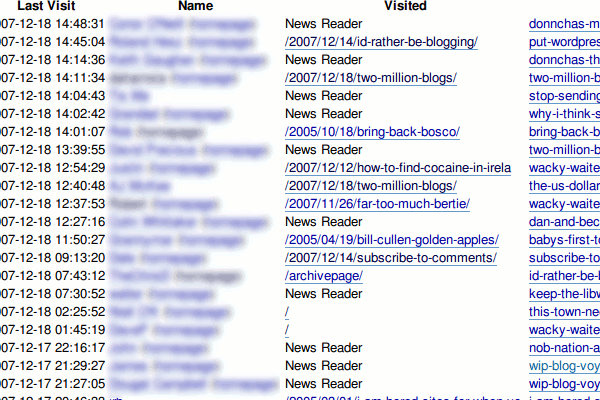
Spy on your visitors with Blog Voyeur

Do you ever wonder what pages your regular visitors look at? Do they dig deep into your blog exploring old posts or do they sit in their feed reader and only read your latest posts?

By using my Blog Voyeur plugin you can find out.

This is the first release of the plugin. It appears to work well on the couple of blogs I tried but your mileage may vary. Download link is on the Blog Voyeur homepage above.

blogvoyeur screenshot

Subscribe to comments?

Pass the word around. If you use the very popular Subscribe to Comments plugin by Mark Jaquith, you should download version 2.1.1 download the development version instead. (thanks Baris!)

The previous version has a small but annoying bug. If you approve comments from several posts at one time, everyone subscribed to those posts will get notifications for all the approved comments! Mark applied my patch 3 weeks ago but people are slow to update.

In the last 3 days I’ve received extra notifications from 2 blogs. I emailed the first blog owner, but then Pat moderated some comments this morning and I decided this was the easiest way to get the word out!

Go on, update your plugin! Your blog visitors will thank you!

Fair use of photos on Youtube?

You probably remember the Web 2.0 bubble video that did the rounds recently. Funny wasn’t it? Unfortunately the authors of that video never asked for permission to use many of the photos featured in it. Jim asks if that was fair? Lane Hartwell is one of those photographers. She wrote of her frustration with people stealing her work. The video is viral in nature, and features the website of the creators at the end so it’s got commercial value for them.

Unfortunately the video is not available any more. Doesn’t that suck? If only they had respected the rights of the photographers involved.

Links …

  • I finally upgraded Blogs.linux.ie to the very latest WordPress MU, with caching by WP Super Cache. The version that was on there was so old the table names still used blognames, rather than blog_ids. A small shell script I wrote and a database backup made it easy to script the upgrade. Registration is disabled for the moment, and email me if you have problems logging in. On another note, if you use Tribby Board, add a few indexes to the board table. That app dragged the whole of linux.ie down with all the spam that was going into it.
  • Movabletype went GPL yesterday! That’s great news for the MT community!
  • Did you know that RTE Radio 1 is for sale? Going cheap at a 1 Euro. (via Kae)
    rteradio1forsale
  • Oh oh. mbr love note. Thanks nikolay!
  • The WordPress Podcast gave my super cache plugin a glowing review. Charles did murder my surname, but I’ll forgive him. Must put an mp3 of me saying my name on the about page or something.
  • Two amazing photos from flak photo: Moving—Eric and Many Shades of Pink

Blogs in Plain English

What’s the big deal about blogs? Haydn rang me this morning because he’s doing research on blogs and I remembered Joseph mentioned this video on IRC. This is a reminder from the Common Craft folk that not everyone knows what a blog is, or why they’re a great communication tool.

If you’re reading this and thinking about setting up your own website, watch this short three minute video and you may well decide to start a blog. Nice to see WordPress.com get a mention too!