How well did Super Cache handle the digg?

I must admit making the front page of Digg.com wasn’t the nail biting experience I expected.

$ grep "GET /2007/11/05/wordpress-super-cache-01/" access.log.1|grep digg -c
4686

digg.com

My Super Cache announcement only drew 4686 visitors which is an ultra-light Digg. The Digg page for the post received 808 diggs as of a few minutes ago which is great. Thank you for voting! Judging by the sheer number of comments on that post, there’s a lot of interest out there in the plugin.
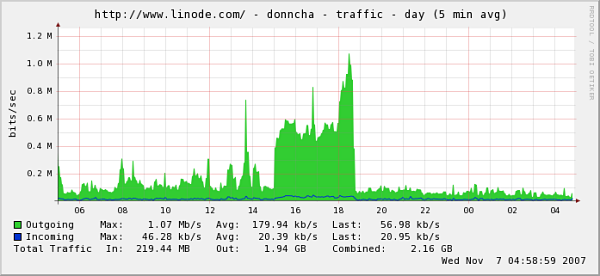
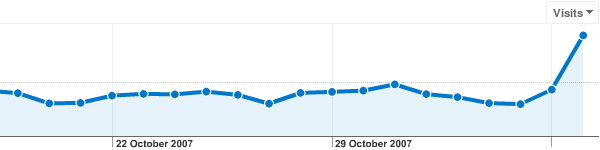
What about traffic graphs? The spike at the end of the first graph is my nightly Backuppc service kicking in. The second is from Google Analytics. My server could certainly handle a lot more traffic!

digg.com traffic
analytics-digg

A quick look at my uptime shows the server hardly broke a sweat dealing with the extra traffic except where some idiot spammer bots tried to download my archives a few times. Unfortunately the first time that happened the archives weren’t cached and the load climbed.

For maximum performance, download Xcache and install it. The Xcache WordPress plugin uses Xcache to cache data structures and makes WordPress much faster, even if you don’t use any other caching tool.

Donncha's Wednesday Links

Post digg.

  • Ireland’s Prime Minister or Taoiseach Bertie Ahern, recently received a nice pay rise of €38,000. He is now one of the highest paid heads of state in Europe. He even earns more than George Bush! Here are 50 ways his party, Fianna Fail, laugh at Irish voters. (via). Twenty Major elaborates on a possible discussion between Bertie and a member of Government. It’d be funny if it wasn’t based on fact. (via)
  • Damien is lusting after the Eee PC. Toni already bought one and he has the same complaints I had reservatioons about,

    * The screen and keyboard are tiny
    * I was hoping for a longer battery life (seems like it gets about 3 hours)

  • I Broke Blogspot.
  • How to scale WordPress MU is a work in progress. I’ve only skimmed it so far but I’ll dig into it later.
  • Make Linux look like a Mac is a Gnome theme with instructions and screenshots. Looks pretty.
  • Haha! Niall discovered that the Golden Spiders voting form only does Javascript validation. Vote as many times as you like! (sort of)
  • When I get older. What scares you most about the prospect of being old? Failing eyesight, hearing, physical disability? Memory loss or dementia?
  • The digging yesterday of my Super Cache post wasn’t as heavy as I thought it would be. More on that later.

Donncha's Tuesday Links

  • HolisticNetworking is now on WordPress MU 1.3 describes some of the issues one admin found when upgrading to the latest WordPress MU. Thomas – you should package that signup key system in a plugin and put it on the WordPress plugin site or WPMU Dev!
  • More discussion on the WordPress.com theme marketplace and some interesting comments from theme designers too.
  • Gamma Goblin is looking forward to the ballet at the Opera House methinks. The linked mp3 is hilarious!
  • The next generation Jpeg compression could be Microsoft’s HD Photo and will be called Jpeg XR. “XR stands for “extended range,” a reference to the format’s ability to show a wider and finer range of tonal gradations and a richer color palette.” (Via Thomas Hawk)

Digg users! Want to help test the Super Cache? You might see this server go down in flames, or it might survive and keep serving files. Who knows? Digg it to find out! πŸ™‚

WordPress Super Cache 0.1

It’s time to lift the veil of secrecy on my latest project. With help from friends who diligently tested and reported bugs on this I can now present version 0.1 of WP Super Cache!

It is an extensive modification of the famous WP-Cache 2 plugin by Ricardo Galli Granada. This plugin creates static html files that are served directly by the webserver as well as the usual WP-Cache data files. It also goes one step further fixing a couple of bugs, adding some hooks and new features and making WP-Cache more flexible.
From the plugin page, here are some of the major changes and updates:

  • A plugin and hooks system. A common complaint with WP Cache was that hacking was required to make it work nicely with other plugins. Now you can take advantage of the simple plugin system built in to change how or when pages are cached. Use do_cacheaction() and add_cacheaction() like you would with WordPress hooks. Plugins can add their own options to the admin page too.
  • Works well with WordPress MU in VHOST or non-VHOST configuration. Each blog’s cache files are identified to improve performance.
  • Normal WP-Cache files are now split in two. Meta files go in their own directory making it much faster to scan and update the cache.
  • Includes this WP-Cache and protected posts fix.
  • Automatically disable gzip compression in WordPress instead of dying.
  • As Akismet and other spam fighting tools have improved, the cache will only be invalidated if a comment is definitely not spam.

If your server is struggling to cope with the traffic your site gets this plugin could be just right for you. If your site regularly gets hit by spikes of traffic like a digging or slashdotting it’s definitely the right choice, and even for everyday use, you may very well notice your webserver is a little bit more responsive.

I contacted Ricardo last week and sent him on an earlier copy of the plugin but I haven’t heard from him yet however. I’d love to know what he thinks of my modifications!

Update! this post has been dugg, please digg it and we can really test the cache out!

Nov 6th: WP Super Cache 0.2 is out! I think all the bugs mentioned below are now fixed. I applied Tummbler’s patch (from Elliott and Reiner) that enables gzip compression of the WP-Cache data files and fixes feed content types.
Please note: PHP’s internal zlib compression must be disabled for this to work. Look in your php.ini for the zlib.output_compression and zlib.output_compression_level directives and comment them out by placing a “;” at the start of each line.

Check the plugin page above for the download link.

Donncha's Monday Links

  • Waterworks – great feel to this image.
  • Modsecurity and WordPress paper – I haven’t used ModSecurity myself but it seems like something good to know about.
  • Let’s Dance – I love the long exposure flowing crowd!
  • WiFi in an SD card? No more wires or plugging your camera’s flash card into a reader! Now, I want a CF version, and one that’s certified outside the US!
  • Another new WordPress MU user blogs.

    And now, having this multi-user version, we can literally host hundreds of blogs using the same WordPress instance. Imagine a company with several brands or locations that wants to have their sites all look and behave similarly but also wants each to manage their own content.

  • A GIMP plugin rss feed has been created by Garrett. I’m subscribed!
  • If you thought morning traffic was bad, be glad you don’t need to take a detour like this. (via) detour
  • Heroes in Cork – Heroes comes to Cork apparently and the Irish accents are awful!

Donncha's Friday Links

Anyone who knows me knows I’m an avid photographer.

  • Thomas Hawk was in a train station in San Francisco when a body was discovered on the tracks. He snaps literally *everything* and took a photo of the poor guy who died, but then he questioned if he should publish the photo? I admire how he stands up for his rights on the street. Jeremy Brooks who is featured in the previous link did the same, much to the ire of a shop keeper.
  • In Synthetic technical style in digital photography Doug has quoted a Mike Johnston piece on photographer’s style saying that digital photography lacks a distinctive style, and that it lacks integrity because it can be manipulated so easily. As Mike says in his longer piece, every image can be taken as a separate case, but I disagree that that is a bad thing. I’m not limiting myself to one technical style.
  • Paul Indigo has had some interesting encounters while photographing people on the street, but he’s got great advice if you want to do it yourself.

    This gentleman agreed to pose for me. He wanted to know whether my camera was digital or film. He said he would pose if it was digital but not if it was film. I am not sure exactly what his reasons were.

  • Avant Window Manager for Linux is like the Mac OS X Dock for our little free OS. I haven’t tried it but it looks pretty. This is a nice screenshot with screenlets too.
  • Amber Jack describes itself as, “a lightweight Open Source library, enabling webmasters to create cool site tours.” Take the tour. It’s nice!
  • Barry reveals all, about how WordPress.com serves files and pages that is.
  • This video of Vista Vs Ubuntu Makes me wish I had gone for the higher end video card for my laptop. There’s not a hope in hell the onboard Intel video will handle all the eye candy in Beryl!
  • Go Maith are experiencing technical difficulties but still manage a very entertaining dancer and fiddler!
  • Matt announced the new WordPress.com Theme Marketplace. Some sites unfairly jumped the gun before Matt posted details of the Marketplace on his blog. I love the idea that .org users get the themes for free because they have to be GPLed. That’s great!
  • If you were adding hooks and a plugin system to WP-Cache, where would you put them? wp_cache_get_cookies_values() definitely, maybe at cache generation too? What about the admin page?

What has Web 2.0 done for you then? (via)

PS. I installed Xcache and the Xcache WordPress plugin I mentioned on Wednesday. I don’t think it’s any faster than the Memcached backend I was using but I have one less service running now, and the admin stats page is nice.

xcache stats

Donncha's Wednesday Links

  • Find out what your site’s pagerank is at livepr. Does it matter any more? My traffic hasn’t changed much with the drop in PR.
  • I want to look at the xcache and eaccelerator wp plugins. The wp-hackers thread looks promising! Ryan’s working on a new caching module and says he has managed to load many pages with 0 queries, adding, “I’ve been testing with your xcache backend for the object cache and things are pretty freakin’ fast.”
  • WordPress MU tutorials. Good stuff.
  • Tom says a hacked version of Leopard installs on regular PCs now. He just announced he’s off to Spain next year. Good luck! You’ll be missed!
  • If you thought your library needed updating or that the librarian was too strict, it’s worse in Beijing.

    I once seriously considered starting to borrow books from NLC, but was later very disappointed to find that borrowing certain books there and taking them home to read required at least a postgraduate degree if a card-holding borrower wishes to do so. They include imported foreign-language books.

  • XSS? Cross site scripting? What’s that? If that means nothing to you, read xss hacking exposed. The new $wpdb->prepare() function makes protecting SQL queries in WordPress much easier now. via
  • Ryan blogged about Haydn’s Gallery ICA where in Kinsale he and I have prints on display. If you’re in the area, pop in and say hi to Haydn!
  • Lloyd writes about many of the great contributors to WordPress in WordPress 2.3 Heroes. If you use WordPress, take a moment to read about the people who made this major release possible.

With the release of WordPress MU 1.3 yesterday I can once again concentrate on other WordPress projects. Apart from some interesting WordPress.com priorities I really need to get that caching plugin out the door.

WordPress MU 1.3

Finally, after what seems like an age, the download page has been updated with the new WordPress MU 1.3 release.

WordPress MU is a multi-blog version of WordPress which runs on millions of blogs all over the world. The major blogging site, WordPress.com uses it as do many others.

This is a sync of WordPress 2.3.1 which includes native tagging support as well as many bug and security fixes.
WordPress MU specific features include:

  • Better admin controls for the signup page. It can be disabled in various ways.
  • Upload space functions have been fixed.
  • The signup form is now hidden from search engines which will help avoid certain types of spamming.
  • Profile page now allows you to select your primary blog.
  • Database tables are now UTF-8 from the start.
  • If you’re using virtual hosts, the main blog doesn’t live at /blog/ any more.
  • The WordPress importer now assigns posts to other users on a blog.
  • A taxonomy sync script is included in mu-plugins but commented out. It hasn’t been tested much but if your site has many hundreds of blogs it might be worth spending some time on a test server. Replicate normal traffic patterns and see if the server can cope with the upgrade process. If not, then look at the sync script, uncomment it and iterate over all your blogs with a script.

Developers – get_blog_option() will never return the string “falsevalue” again. That bug has been squished and it now returns the boolean value false.

This forum thread on the new release is worth watching. Any problems will surface their first.

Thanks to:
Everyone on the MU forums for your help in tracking down bugs.
ktlee and momo360modena for all your patches. They’re very welcome and a huge help.

Extensive documentation is being built up on the WordPress MU Codex by many people, including Martin Cleaver who bugged me about moving the docs from Trac and about telling everyone that documentation help is always needed.

Donncha's Tuesday Links

There’s nothing like the laughter of your baby to perk up one’s morning after a bank holiday weekend!

What time is it WordPress?

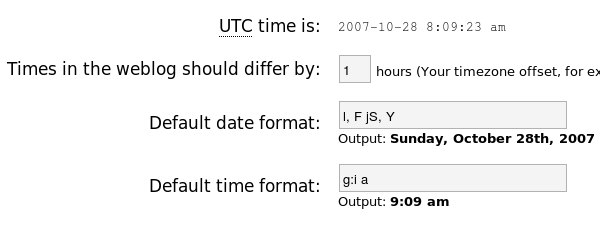
Daylight Saving Time (DST) kicked in this morning in Ireland, the UK and many other parts of the world when the clocks went back 1 hour. The US is next week from what I remember. If your server is using UTC time, check Options->General, the “Times in the weblog should differ by” textbox in your blog and adjust accordingly!

wordpress-time.png

Here’s a discussion on the WordPress.com forums about the issue from last year and I found this extend idea that has already been implemented in the Time Zone plugin, but it only works on UNIX-like systems and if you’re not using PHP’s safe mode.

PHP5 has the date_default_timezone_set function, but not enough hosts are using PHP5 to make that a universal choice. It would be nice if all this was done automatically, but hopefully with the further adoption of PHP5 that will happen eventually.

And don’t forget to check your other gadgets, especially digital cameras. I doubt many of them know anything about timezones!