
(via)

(via)
Worth watching when you come out of yet another game with a negative KDR because you’ve been rushing and rushing and playing for the objective. I’ll always be happy when my KDR approaches 1 after a game but this is Bad Company 2. Your win/loss ratio is a lot more important in my opinion (and mine is a healthy 1.45 or so!) If you really want to massage your KDR, just go use an aimbot.
Read his post too. I can’t imagine how frustrating that game must have been for him and the guys.

Wow! Where did the day go? Last night’s games were decidedly odd. I joined Mike on a game of rush and the first thing I noticed was my lack of weapons! They were all gone!
I’d heard of this happening before but not experienced out myself. Yikes! Luckily after the first game they came back.
Still, the server we were on was buggy. Thankfully not laggy but at the end of each round our medals were duplicated! Weird!

It was a good night. We defended port valdez on the first base and I even went flawless, 10-0! I pity the other team. My team pushed almost right into their spawn.

I also got a platinum medal for the AN94! First weapon I’ve done that on.
Unfortunately there was a share of C4ing and using mines to destroy the MCOM stations. Even on my own team. Grrr. We didn’t need to do that.
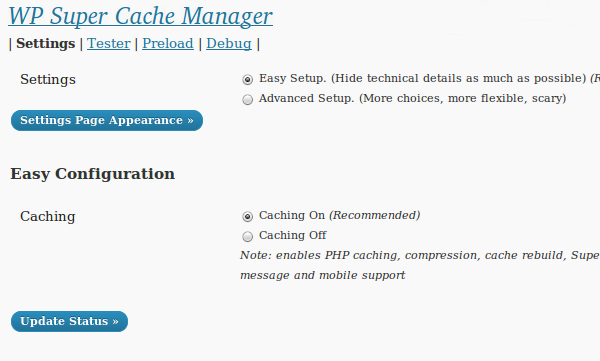
One of the things that has bugged me about the WP Super Cache settings page was how it was laid out. Well, the next version of the plugin will display a simplified settings page to new users. If you’re upgrading, you’ll get the same old page as ever, don’t worry.
This version also adds a new method of serving cache files. It uses PHP, but serves supercache files. So, it’s a halfway house between using mod_rewrite (difficult to install for some users), and the legacy caching of WP Cache. That caching will be what is activated for users who use the simplified settings page.
There are lots of other bug fixes. The cache tester works if WordPress is installed in a sub directory, the admin page is separated out into tabs now to make it easier to find things. Error messages show up as “update messages” at the top of the browser now, making it easier for new users to figure out when mod_rewrite rules need updating and when other house keeping tasks need doing.
The code is red hot, liable to bend and break and may cause problems but it works fine here and on a test multi site install but I need testers to hammer on it and do things I don’t expect. If you’re brave, grab the development version off the download page. Thanks!
Battery usage on all so called “smart phones” is almost universally woeful. Big high-res colour screens, fast processors, sound, wifi and 3g networking all consume gobs of battery power.
Here are some battery saving tips for Android phones. I’m going on a long flight in a few days time so I’ll be trying these tips out before I go!
I’d love if Android phones totally disconnected from the Internet when I closed the browser, Tweetdeck or whatever app was using the network. My old Nokia 5800 did that. It connected each time I opened the browser and had wonderful battery life.
So, what other tips can you suggest for power hungry smartphones?
Update! With wifi and the 3G radio on the other night 6% of battery was used over about 6 hours. I switched off wifi and 3G (using Juice Extender) and the phone only burned through 2% of battery power over the same period last night.
Smoke rocked the games of Bad Company 2 we played last night. David and I joined a game of rush and I was mostly assault, and smoking it up on defense and attack for most games and it paid off. We won every game played I think!
On past experience I remembered running out of smoke grenades, even with an ammo box at my feet so I equipped the extra explosives perk giving 4 grenades. I was able to lay down a never ending barrage of smoke to protect us. We successfully defended on the first base on White Pass and Laguna Presa.
The enemy were down to about 30 tickets on White Pass. They had blown the MCOM station on the ground and did some serious damage to the walls surrounding the upstairs one. We had clear line of sight out to the construction site, and of course our backs were exposed through the window behind us. Eventually, the enemy took out all the cover inside the room too, and did arm it a few times. We had a few medics on our team who did sterling work reviving me after a few 40mm grenade deaths. We didn’t have a wall, but we did have smoke, and because of it the attackers couldn’t see into the room. We successfully defended by the skin of our teeth. Thanks David, Wiid, Ogga and later Tye for some superb games.
Oh, i’m 10 kills away from a platinum on my AN94. Wooh.
Can’t say the same thing about World at War. The evenings seem to bring on the loudmouthed idiots. Screaming, shouting, playing music through the intermission. Each time I’ve played earlier in the day that has never happened. Perhaps the kids are still asleep or at school. So, for the next session of Call of Duty I’m going to use a Skype session if possible, or at the very least mute VOIP. If you play WAW with me DM me on Twitter and we’ll sort something out.
We didn’t do so well at WAW team deathmatch. I read yesterday that Treyarch don’t try to match players of similar skills and I’d believe it.
Check out David’s post about the night’s gameplay too!
Update! David posted a great video of our attack and defence on White Pass. Like him, I was amazed when we won that game defending Alpha!


They quit, not us! I was enjoying that game too. Next game was the complete opposite. We got mauled but we stuck with it.
In other news I joined arkanoid for a game of conquest in bad company 2 and did fairly well!

A familiar face in little big planet. John locke and the rest of the cast of Lost make an appearance in a Lost inspired level.
The Skorpian in COD4 Modern Warfare is a beast, for a starter gun. I leveled up to rank 4 last night and at random chose this gun in one of my custom classes. It’s incredibly powerful at close range. I won numerous 1 on 1 close quarter battles with it, even earning a few UAVs against more experienced players.
(Not me playing, obviously)
Score wise I didn’t do particularly well in any game as my KDR was rarely positive but later on we jumped into Bad Company 2 Conquest. I did alright, until the server started throwing me out at regular intervals. Level 50 medics with M60s are getting to be a bit of cliche in that game. After suffering one too many deaths at the hands of the AN-94 I swapped back to that weapon myself and rediscovered how utterly powerful it is. (Sorry Mike for scaring you, I wanted to practise rapid firing the fire button!)
I had a few games of squad deathmatch too, losing the first but then almost everyone backed out for the second game and most teams only had one player. I led the game for the first 11 kills. Good buzz, but it got so boring and it was late so I didn’t have time to waste.
You may have read that a USB dongle went on sale that basically put Playstation 3s into debug mode, thus allowing you to do things not normally allowed. Well, Sony sued and stopped them selling it, but of course the software on the dongle has been reverse engineered and made available online.
Where is the code? Well, slashdot linked to it. It’s on github and there’s a slight mod required to play “backups” of games. On a brighter note, any potential pirates will need a compiler to use the code but I guess it’s only a matter of time before a USB iso becomes available.
I hope Sony figure out a way to stop this working. It’s bad news for software publishers if users can copy their games by just plugging a USB dongle into their machine.