I’ve always wondered, ‘What really happens behind the scenes at Google when I hit the “Google Search” button?’
(via Scott)

I’ve always wondered, ‘What really happens behind the scenes at Google when I hit the “Google Search” button?’
(via Scott)
What you’re about to learn isn’t anything new. It’s not particularly earth shattering either, but a lot of people don’t know it.
NOFOLLOW DOES NOT WORK (properly)
You may have noticed legitimate looking comments on your blog from people with suspect names. Usually the name will be a brand name, service or literally anything that sells. The commenter’s website is obviously related to that business. Why do they bother using special keywords when Google is supposed to not follow those links? Do they know something you don’t? Yup. They know that keywords, even on nofollowed links, matter. I’d provide reference links to SEO blogs explaining this but then they’d know I’m reading and they might shut up.
So, how do you go about spamming blogs? (And how do you defend against those spammers?) Here are two examples:
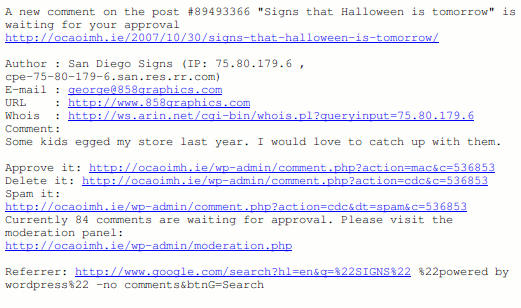
George, who runs 858graphics obviously makes signs in San Diego. I’m sorry that his store was egged last year, but he’s obviously trying to manipulate Google. Unfortunately, he succeeded. He is #2 in Google for “San Diego Signs”. Strangely enough there are no links to his website.

This second guy isn’t quite so successful, and to think he’s spamming my poor Shih Tzu, Oscar. The spammer’s domain is near the bottom of the first page of a Google search for Shih Tzu Checks. That’s still pretty good considering he doesn’t have any links to that page either.
How did these guys find my blog? The first guy searched for WordPress blog posts with comments. The second looked for a page saying, “leave a reply”, an open invitation to spam if ever there was one!
Out of curiosity I followed the Google search a recent spammer used. On the blogs surrounding my blog in that search I found traces of him everywhere. He left legit looking comments but the link was always full of keywords for his business.
Stuffing keywords in nofollowed links certainly helps rank for keywords.
So, you want to know how to fight back? It’s very simple if you’re using WordPress:
So, chances are a few more people are going to try this technique now that I’ve blogged about it. I bet many more blog owners will be more vigilant of it now though. It’s your blog. If you don’t want to be pawn to a spammer then fight back!
Edit: Here is my version of Lucia’s Linky Love. Just rename this file to .php and drop into your plugins folder. If you’re not logged in or have a comment cookie in your browser you should see some comment author’s names won’t be linked.
This WordPress Map on ohloh.net is nicely populated, but I’m feeling rather lonely on the WordPress MU one!

Looks like I’m the only WordPress banner waving fanatic in Ireland. Come on everybody, add yourselves! 🙂
(via Barry)
There is no vulnerability in WP Super Cache. Chris blogged about it after we spent a late night of debugging it until 1.30am. But if:
then you should head to the download page and try the development version of the plugin. Official release tomorrow probably.
I tell ya, I have learned more about Apache, content types, mod_rewrite, IIS and Red Hat vs Debian differences with this project than I ever could have considered healthy.
He arrived in the hospital at 10:15am, He was wheeled into the doctor at 10:30am and then taken for an X-Ray. By 11am it was confirmed that his ankle was broken and it was reset. By 11:15am his ankle had been placed in a cast and by 11:30am he was back in his hotel eating his lunch. 1 hour 15 minutes, done and dusted.
I use Google Analytics to track visitor numbers to my site as well as a custom written referrers package some of the early users of WordPress.com may remember. That only records 7 days of data because of the data size so when I wanted to know how many visitors come from Google to my blog I went looking at Analytics.
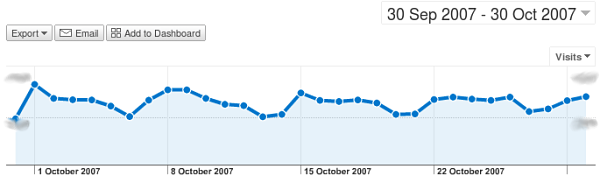
To do the same on your site, open Google Analytics and select your site. Click on “Traffic Sources”, then look at the list of top sources. Chances are Google will be near the top of that list. Click on that link and you’ll see a graph like the one above. Done!
Hi, my name is Donncha and I used to have text-link-ads on my blog. They’re gone now but only after Google slapped me into submission and reduced my page rank to 4. Initially I felt angry and shocked that this happened but I have no excuse, I heard it from the horses mouth, I knew it was coming. I was one of those evil unscrupulous demons who manipulated the pagerank of other sites for money. My guilty conscience is somewhat alleviated by the fact that I refused to show a text link ad for a Viagra spammer yesterday morning. Oh well.
Google’s own advertising, Adsense, is still running here, as is Kontera, (leave a comment and you’ll never see them, isn’t that nice?) and the competitive ad filter advice I gave out a few days ago really makes a difference to your bottom line. Just ask Justin!
What’s in store for the future? Keep an eye on this blog. WordPress MU 1.3 is coming real soon now. There are going to be lots more free and GPLed WordPress plugins, including a pretty cool digg proof cache that also works in WordPress MU. Think of it as WP-Cache on afterburner! A couple of sites are already testing it with positive results. I’m watching the access_log roll by on a server as a digg is happening now. Load average is hovering around 1 and the page loads quickly. Sweet.
While it didn’t invent search-triggered ads, Google figured out a far more efficient way of turning web-users into buyers. Rather than doling out premium space to the highest bidder, as its competitors did, Google used another algorithm to work out how relevant the ad text was to a given query and the odds someone would actually click on it. This meant ads were targeted at the users most likely to respond to them. The result was that Google’s ‘click through’ rate (the number of times users click on ads) was twice as high as its nearest competitor’s.
You signed up for Google Adsense, verified your home address, typed in the secret code they sent you and now you have adverts on your website. Are you earning the most you can from them? Probably not. Read the quote above again. I’ll wait.
Done? Many advertisers already know this and exploit how Google pick their adverts so their low-paid adverts show in preference to higher paid ads. A whole industry has sprung up around this to create “Made For Adsense” or MFA sites. MFA sites make money because the link clicked to get to them costs them less than the money they make from the adverts your visitors click on their sites. Google took action earlier in the year and disabled many MFA accounts but it’s easy enough to get an Adsense account and they’re coming back. Here are the Alexa graphs for a couple of MFA sites who were stopped in their tracks in June:


And here’s an inappropriate site I don’t want advertising on my site.

Unfortunately despite the culling of MFA sites in June there are still plenty of low-paid adverts in the Adsense inventory. That’s where the Competitive Ad Filter comes in useful. At least once a week, or maybe more often I browse through the most popular posts on my sites looking at the adverts. If a URL looks particularly suspect I manually type it into a new browser window (don’t ever click on your own ads!). If the page that loads looks like an MFA site it gets added to my ad filter.
Criteria for MFA Sites:
Basically, spammy behaviour.
How do I know if cheap adverts are being served? Log in to Adsense and check the “Page eCPM” column on the Reports Overview page. Is it lower than $5? You could probably do much better! eCPM stands for “Effective Cost Per Thousand Impressions”. From the Adsense help page:
From a publisher’s perspective, the effective cost-per-thousand impressions (eCPM) is a useful way to compare revenue across different channels and advertising programmes. It is calculated by dividing total earnings by the number of impressions in thousands. For example, if a publisher earned $180 from 45,000 impressions, the eCPM would equal $180/45 or $4.00. However, please keep in mind that eCPM is a reporting feature that does not represent the actual amount paid to a publisher.
I document changes to my Competitive ad filter on notspam.org. The sites listed in those posts suit my sites, but if you don’t use the ad filter in Adsense it’s a good starting point. Hopefully you can increase the eCPM of your Adsense account above US$5 with only a few small changes.
This post has been a long time in the writing. Ever since I started advertising on my blogs my strategies have been tweaked continuously so consider this post a snapshot description of what I’m doing with Adsense advertising now. This is a long post, but read through it. The plugin I use to do most of this stuff is linked near the end.
Last year at the IT@Cork Web 2.0 conference, Gavin mentioned that he earns enough off his blogs to pay for his hosting, and I thought to myself that it would be handy to have an extra bit of cash to do likewise. I didn’t do anything about it until July when I signed up for an Adsense account and put some ads on the site. Things were slow that month but they’ve steadily improved to the point that it’s a reasonable second income now.
At last year’s WordCamp in San Francisco, one of the talks was about monetizing your blog. It was a fascinating talk with a great discussion afterwards and I brought home some good ideas:
Since then I’ve developed my ad serving strategies further:
I run advertising on my photoblog, In Photos dot org too but the rules there are a bit different:
I’m not the only one only showing adverts to selective visitors. Recently Ben Gillbanks had a great post on increasing Adsense earnings that says some of the same things I summarised here.
I haven’t tried it yet, but the who sees ads plugin from Ozh does most of the same checks I do. That plugin won the WordPress plugin competition so congratulations to Ozh on winning!
The No Adverts for Friends plugin
Announcing my shiny new, rough as anything No Adverts for Friends plugin! This plugin adds new commands that you can use in your templates. Use them to surround your Google Adsense or other advertising code.
The No Adverts for Friends API:
is_regular_user() – returns true if the visitor has left a comment or is logged into your blog.is_whitelisted_site( $url ) – returns true if $url is in a pre-defined list of friend sites like Digg, Delicious and StumbleUpon.is_old_post() – returns true if the current post is over a month old.is_searchengine_user() – if a user comes from one of the listed search engines or this is an old post return true.Each of the API calls depends on the one before it returning a favourable value. For example, is_old_post() won’t return true if is_regular_user() returned true, no matter how old the post is.
Example usage:
<?php if( is_searchengine_user() == false ) { echo "Google adsense code goes here"; }?>
Edit single.php in your current theme and add that code somewhere within the loop. Now either visit an old page on your blog or use a Google search query to bring you to your blog. Hopefully you’ll see the text “Google adsense code goes here”. Replace this text with the Google Adsense Javascript.
Download
Install
Well, you’ve read this far. If some of the advice in this post helps you, if you like this plugin, if it improves the user experience of your regular visitors and maybe even increases your advertising revenue please consider uncommenting the add_action() command at the start of friendsadverts.php. The donnchas_happy_happy_notice() function prints a message in your blog’s footer saying you use this plugin and links back here.
Thanks John for bugging me to write this up. Hopefully I’ll see you at next year’s WordCamp!
Be careful if you forward email to a gmail account. Gmail doesn’t like receiving mail delivery status notices or reports. This server filled up overnight with tens of thousands of email reports bouncing back and forth between it and gmail. If you emailed me in the last 24 hours and I haven’t replied, I may not have received it (yet).
postfix/cleanup[12107]: 9FE58326C1: reject: header Content-Type: multipart/report; report-type=delivery-status;??boundary=”A507733AD3.1188834275/mail.ocaoimh.ie” from local; from=<donncha_@_ocaoimh.ie> to=<xxxx@gmail.com>: no third-party DSNs
I really haven’t had any luck with email recently …
for i in `grep "Undelivered Mail Returned to Sender" * -rl`; do mv $i /tmp/xxx/ -vi; done
:0:

* ^Subject: Undelivered Mail Returned to Sender

POSTMASTER.txt
What caused the problem in the first place? A bounced email from Yahoo. Someone left a comment with a fake email address, subscribed to the post and when another comment was left on that post the subscription email bounced. It’s worked before fine so I’m not sure why Google are complaining now! Over 2GB of bounced mail. My poor server.
Update! It happened again but I stopped Postfix at 9.5MB free on the filesystem and this time I found out what went wrong. I implemented these Postfix rules Justin blogged about without running Spamassassin. Well, I used to run SA but then when I started using Gmail I stopped, which is probably why I didn’t see this earlier. Not Justin’s fault, my own for playing with fire!