How to successfully spam blogs (and how to fight back)

What you’re about to learn isn’t anything new. It’s not particularly earth shattering either, but a lot of people don’t know it.

NOFOLLOW DOES NOT WORK (properly)

You may have noticed legitimate looking comments on your blog from people with suspect names. Usually the name will be a brand name, service or literally anything that sells. The commenter’s website is obviously related to that business. Why do they bother using special keywords when Google is supposed to not follow those links? Do they know something you don’t? Yup. They know that keywords, even on nofollowed links, matter. I’d provide reference links to SEO blogs explaining this but then they’d know I’m reading and they might shut up.

So, how do you go about spamming blogs? (And how do you defend against those spammers?) Here are two examples:
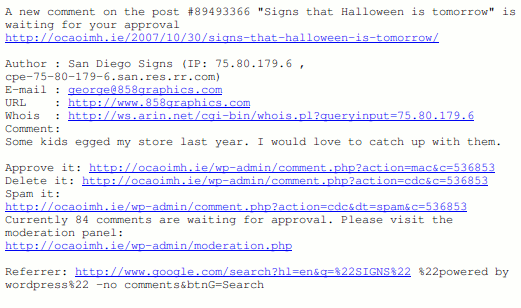
How to spam a niche blog

George, who runs 858graphics obviously makes signs in San Diego. I’m sorry that his store was egged last year, but he’s obviously trying to manipulate Google. Unfortunately, he succeeded. He is #2 in Google for “San Diego Signs”. Strangely enough there are no links to his website.

How to spam a niche blog

This second guy isn’t quite so successful, and to think he’s spamming my poor Shih Tzu, Oscar. The spammer’s domain is near the bottom of the first page of a Google search for Shih Tzu Checks. That’s still pretty good considering he doesn’t have any links to that page either.

How did these guys find my blog? The first guy searched for WordPress blog posts with comments. The second looked for a page saying, “leave a reply”, an open invitation to spam if ever there was one!

Out of curiosity I followed the Google search a recent spammer used. On the blogs surrounding my blog in that search I found traces of him everywhere. He left legit looking comments but the link was always full of keywords for his business.

Stuffing keywords in nofollowed links certainly helps rank for keywords.

So, you want to know how to fight back? It’s very simple if you’re using WordPress:

  1. Install my Comment Referrers plugin. That will add a line at the end of the moderation emails with the referrer of the visitor. Some referrers should ring alarm bells!
  2. Install Delink Comment Author. This plugin removes the link the comment author left as their URL. I modified my install so it removes the email too as I moderate comments from new users.
  3. I was planning on coding this next plugin, but I found Lucia’s Link Love first and that saved me the trouble. I modified mine so it doesn’t hyper link the name of a comment author who has left less than a certain number of comments. See this comment as an example. That “Landscape Artist” never came back to my blog again so his “name” isn’t linked to his site.

So, chances are a few more people are going to try this technique now that I’ve blogged about it. I bet many more blog owners will be more vigilant of it now though. It’s your blog. If you don’t want to be pawn to a spammer then fight back!

Edit: Here is my version of Lucia’s Linky Love. Just rename this file to .php and drop into your plugins folder. If you’re not logged in or have a comment cookie in your browser you should see some comment author’s names won’t be linked.


A right tool

Scanning Gmail’s spam folder (815 emails after 2 days) is much more entertaining when I remember that all those messages about a longer tool refer to a completely different thing in Cork.

Sort of. 9 pages of spam.

I need to scan them because Gmail catches an alarming number of legitimate email, despite all my training. Sheesh.

Sell your soul for a luxury weekend in the country

What would you do for a luxury self catering weekend in the West of Ireland? Would you sell your soul and help launch a Google bomb?

Well, the good people at Glengarrriff Lodge would like you to link to their website with the keywords “Luxury Self Catering” in the link. Do that, and link to someone else who may be interested in the weekend and you’ll be entered in a draw for a weekend at the Lodge worth up to 1175 Euro! Nice eh?

Glengarriff Lodge

Anyway, now that my blog is squeaky clean, I couldn’t possibly consider subverting Google’s search engine. No sirree, but it looks like a gorgeous location so I decided to give it a plug anyway.

Oh, I’ll be in that part of the country in the next few weeks so I might call in and say hi!

Hellloooo to my new StumbleUpon friends!

After asking people to add me to their StumbleUpon network last November I finally logged in again and added about 20 new friends including Ellybabes as you can see from the graphic below.

Add Ellybabes as a friend

StumbleUpon makes it really easy to add friends and I’m glad to see there are a few more Irish people in my network. I’m looking forward to stumbling on more Irish content and I hope you all enjoyed the sites I discovered in my trawling of the web. Thanks everyone for adding me, and sorry for taking so long to do the same!

How to use ssh as a proxy server

Using ssh as a proxy or encrypted tunnel to browse the web can sometimes be necessary:

  1. When you’re at a conference but need to login securely to your blog.
  2. When local access restrictions make life really difficult.
  3. If you have a server in another country and want to see what Google Adsense adverts people see in that country.

I use ssh for the third reason. I want to see what adverts people in the USA see when they look at my blog so I can filter out the low paying and MFA ads (see notspam.org for more). Unfortunately I have a head like a sieve so unless it’s in the bash history I need to go look this up every few months:

ssh -D 8080 -Nf example.com

Replace example.com with your own hostname. That short command will create a socks5 proxy at 127.0.0.1:8080. Just configure your browser to talk to that and you’re surfing again!

Here’s a few external links you might find useful.

(I bet that when I most need to look up this post I’ll be behind a tight firewall that won’t let me at my blog ..)

Ubuntu WiFi problems on the Dell D630 laptop

Wireless networking was always a bit patchy for me on my Dell Latitude D630 while running Ubuntu Gutsy version of Linux. It would work fine for ages and then freeze up suddenly, requiring a hard reboot to get things working (Apache would become unkillable, I guess because it was attached to the broken Wireless networking driver.) Problems always showed up when I transferred large amounts of data between Linux and my Macbook. Files copied fine for a few minutes and then the whole house of cards would collapse. Crash! Boom!

The first time I looked for a solution nothing turned up, but eventually I went searching again, and after digging into all sorts of forums and websites I found the simpe solution on the Dell Linux Wiki:

Create a file called /etc/modprobe.d/blacklist-ipw3945 and add:

blacklist ipw3945

Add to /etc/modules:

iwl3945

Reboot after doing that and all will be fine in the world again! I haven’t had any networking issues since replacing the ipw3945 driver with the iwl3945 one!

How China Digital Times moved from MT to WordPress

Can you improve performance when moving from a statically generated site to a dynamic environment? You can if the conditions are right. In the case of CDT, publishing times were a nightmare with Movable Type. Search performance was horrible, and the comment spam problem caused such a drag on the server that we’d had to disable commenting altogether. Now, with the site fully tag-enabled, searchable and comment-able, loads are down dramatically and publishing times have dropped from 15 minutes to a few seconds.

Notes on a massive WordPress migration. Scot moved the China Digital Times site with 16,000 posts and 6,000 tags from Movable Type to WordPress and saw a huge performance increase. Nice.

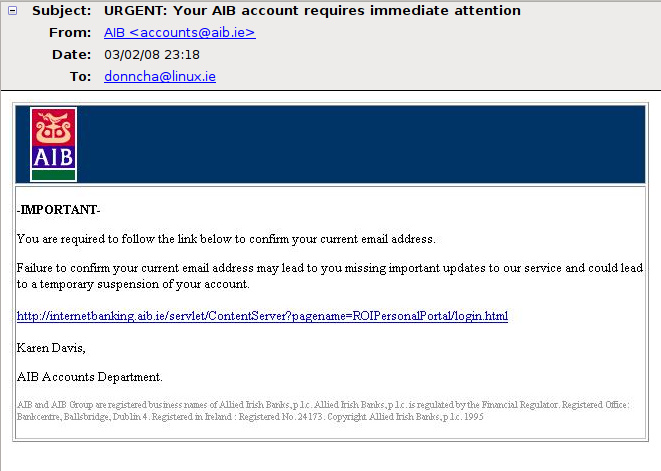
Anatomy of an AIB Phishing Email

I’m well used to getting phishing emails for American or internationally known banks but this morning an email supposedly from AIB made it past Gmail’s spam filters.

AIB phishing email

AIB posted an alert a few days ago to watch out for fraudulent emails, but this one appears to be different. I’m forwarding it on to alert@aib.ie

The content of the email is a Jpeg image, and it links to a php file on http://internetbanking.aib.ie.2.3h8ax3.com/

As the rest of this post has a number of large screenshots click the link below to read the rest. You can probably ignore this if you’re not living in Ireland. 🙂

Continue reading “Anatomy of an AIB Phishing Email”

Tea and Sandwiches with Donncha

Tea and Sandwiches

Anyone for tea? Here’s what I usually put into a sandwich:

  • Cucumber
  • Ham
  • Coleslaw

And all contained within lightly buttered brown sliced loaf bread. Yum.

O’Briens Chocolate Cake

Here’s the delicious chocolate cake we had in O’Briens in Blackpool Shopping Center a few days ago. Beautiful rich chocolate cake, with a layer of chunky chocolate cream through it. You don’t think I’d stop to take a photo of it before eating, do you?

Yes, there is a reason to this post. What do you eat for lunch? If it’s all sensible and boring, pig out once in a while, it’s good for you!

PS. I got nominated in a few sections of the Irish Blog Awards. Thank you to whoever nominated me. (No, it wasn’t me!)