Easy Setup for WP Super Cache

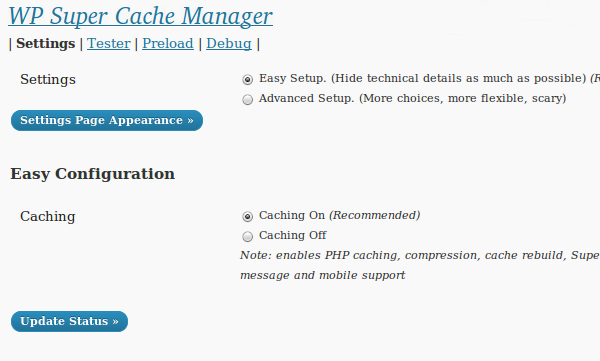
One of the things that has bugged me about the WP Super Cache settings page was how it was laid out. Well, the next version of the plugin will display a simplified settings page to new users. If you’re upgrading, you’ll get the same old page as ever, don’t worry.

This version also adds a new method of serving cache files. It uses PHP, but serves supercache files. So, it’s a halfway house between using mod_rewrite (difficult to install for some users), and the legacy caching of WP Cache. That caching will be what is activated for users who use the simplified settings page.

There are lots of other bug fixes. The cache tester works if WordPress is installed in a sub directory, the admin page is separated out into tabs now to make it easier to find things. Error messages show up as “update messages” at the top of the browser now, making it easier for new users to figure out when mod_rewrite rules need updating and when other house keeping tasks need doing.

The code is red hot, liable to bend and break and may cause problems but it works fine here and on a test multi site install but I need testers to hammer on it and do things I don’t expect. If you’re brave, grab the development version off the download page. Thanks!
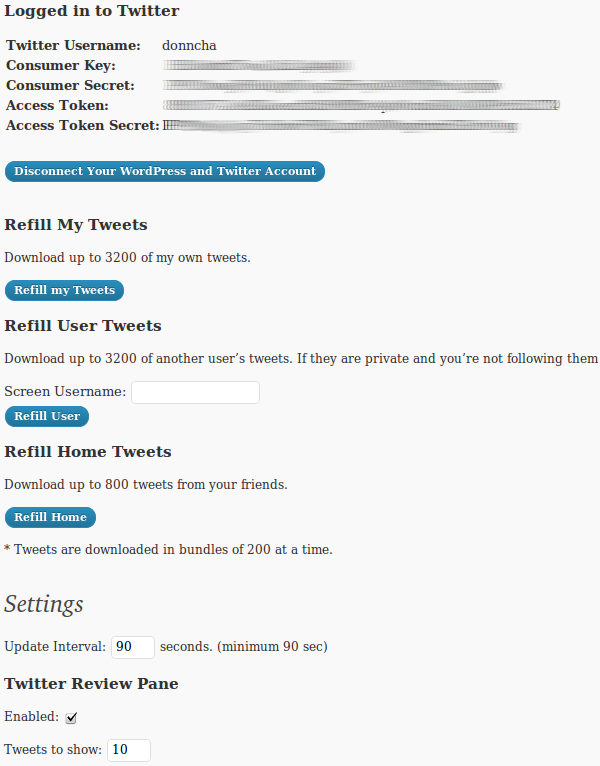
Tweet Tweet dives into the past

I overhauled my Tweet Tweet plugin for WordPress yesterday so it would work with the new Twitter OAuth mechanism. This morning I made it possible to download your older tweets, up to the max limit of 3,200 tweets that Twitter allows.

It’s still a work in progress but I want to get a new release out as soon as I can for current users who are using the basic auth that doesn’t work any more. If you’re feeling adventurous give the development version on the download page a go and tell me what you think!

99% of the OAuth code was ripped from Alex King’s Twitter Tools which in turn uses Abraham Williams’ twitteroauth.php library and OAuth.php from oauth.net. Thank you all for doing the heavy lifting required!

WIP: the Super Cache admin page

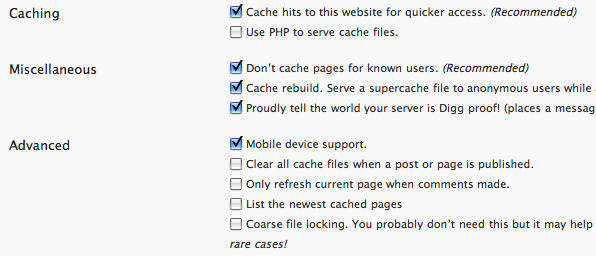
A small update, I’m slowly working through the WP Super Cache admin page in an effort to make it better. You can in fact download the development version if you want to follow along.

What you see above is my first pass. An effort to make the first options section match the look and feel of the standard Settings pages in WordPress. It’s all likely to be mixed around and moved about before the next release, so please, dig in and lend a hand!

The MU forums are moving

The MU forums will shortly be closing up shop.

WordPress 3.0 integrated everything that MU always did so it’s better to consolidate the forums too. There’s a MultiSite forum on WordPress.org and any queries about upgrading or problems using WordPress 3.0 should go there.

The old forums aren’t going anywhere but later today or perhaps tomorrow I’ll be making them read-only. You’ll still be able to browse the forum, and Google will still index the wealth of information already there but posting will be disabled.

So, thank you to everyone who contributed to the forum over the years. You helped make WordPress MU great.

WP Super Cache 0.9.9.2

WP Super Cache 0.9.9.2 has just been released! This version works with WordPress 3.0 and adds a number of new features and bug fixes:

  • Cache Preloading will cache every post on your site.
  • A cache tester that will check if your homepage is cached.
  • Much better support for mobile plugins.
  • Mod rewrite rules can now be updated from within the admin page.
  • Lots and lots of bugs fixed. See the changelog for more details.

Preloading creates lots of files on your server so if you have many thousands of posts please be aware of this. Filesystem limitations may cause problems if you use a flat permalink structure. For example, ext2 or ext3 only allows 32,000 directories in a directory. If you have more than that number of posts you may run into problems.

The plugin does not preload category or tag pages but because your single posts will be cached you’ll find the load on your server will be reduced. Uncached pages will be served more quickly and your visitors will have a quicker and better experience on your site.
You may also see an increase in site traffic if your server was previously underpowered!

Update! I just released 0.9.9.3 to address the (mostly minor) bugs that were reported overnight. If you don’t notice anything wrong there’s no need to upgrade.

Preload the cache in WP Super Cache

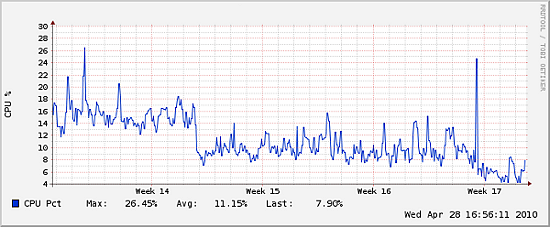
See that nice dip in the graph for this week? I started to preload the cache used by WP Super Cache last Sunday and it’s made a noticeable difference in the load on my server here. The big spike is the preloading process.

I’ve always discouraged users from preloading the cache (Askapache Crazy Cache will do this for any cache plugin), mainly because of the possible problems so many files will cause for hosting companies. If you have thousands of cache files, it’s going to take so much longer to recover from a disk crash.
On the other hand, Google will now be using speed as a metric for judging how “good” a website is. In the past this plugin ignored the pages visited by bots because the bots only visited each page once so caching a page after the fact was pointless. The page, all pages, have to be cached first before Google ever visits.

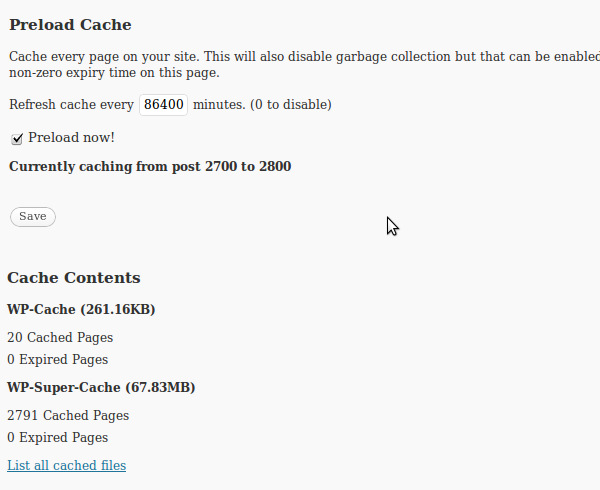
That’s what it looks like. Once you start preloading it launches a wp-cron job to fetch 100 posts, then schedules another job 10 seconds in the future to fetch another 100 posts until it finishes. It also disables garbage collection of old pages, but making comments or posts will still clear out the appropriate cached files.
It only caches single posts right now. It may not be worth caching archive or tag pages because many sites already tell bots to ignore those pages as the server is doing less work it will serve those archive pages more quickly anyway.

The preloading only works if you’re using the plugin in Supercache or “ON” mode. It’s still a work in progress but has worked fine here. As well as the preloader the development version of the plugin has:

  1. Better support for mobile plugins.
  2. A cache tester.
  3. Can be configured to only delete the page a comment is left on, rather than the front page and associated pages.
  4. Works in WordPress 3.0.

It also has a number of bug fixes and other features added too.

I need testers though, so grab the development version from the download page. Install it and please leave feedback here or preferably on the support forum.

First Day at #WCIRL

So, day one of WordCamp Ireland draws to a close, there is a dinner tonight but the talks and sessions are over for the day.

I briefly helped John Handelaar during his talk on WordPress MU, but my main talk was on WP Super Cache. Thank you Hanni, Jane and Sheri for recording the talk. Hopefully it’ll be available online next week. In the meantime here’s the OpenOffice slides of my talk.

I must extend a big thank you to Sabrina Dent and Katherine Nolan for organising a great day and to the sponsors who made the weekend possible.

Looking forward to the dinner tonight, and the rest of the conference tomorrow.

Update! I’ve added a few photos from Day 2. I was shattered tired though as I was up until 1.30am chatting with Donnacha!

Update 2! Sabrina has written a thoughtful post about WordCamp Ireland. I for one had a great time there and so did everyone I spoke to. I totally agree with her about child minding facilities. My son Adam had a whale of a time, and is still talking about it. (and for an almost three year old, that’s a very good sign!)

Continue reading “First Day at #WCIRL”

WordPress MU 2.9.2

WordPress MU 2.9.2 has just been released and is mostly a security and bugfix release based on WordPress 2.9.2. Grab it from the download page.

As well as the security fix mentioned above, this version also fixes a few bugs, makes the blog signup process much faster and adds a new “Global Terms” Site Admin page.

The “Global Terms” page is one I should have added years ago. Currently it’s fairly bare, but hopefully in future versions of WordPress it will be expanded. It allows the Site Admin to “fix” the terms (tags and categories) used in MU blogs. These terms are normally synced with the “sitecategories” table but sometimes they go astray. This can happen if you “import” a blog using PHPMyAdmin without going through the WordPress importer, or if a plugin manipulates the terms table directly.
WordPress MU forces the “slug” used by terms to be a sanitized version of the “name”, which isn’t the case in WordPress. This page can optionally rename the terms so they match the slug. It doesn’t do the opposite because that would break public facing URLs on the site. (I must extend a big thank you to Deanna for helping debug that page)

Enjoy!

Remove unused utm_source from your urls

Sometime last year I noticed that links to my blog on Feedburner had attracted a few extra parameters. A simple link to a post became this huge monstrosity:

http://ocaoimh.ie/exploit-scanner-095/?utm_source=feedburner&utm_medium=feed&utm_campaign=Feed:+HolyShmoly+(Holy+Shmoly!)&
utm_content=Google+Reader

It’s a marketing thing right? It’s all useful information but I don’t really care about it, have never used it and don’t like my URLs getting mangled. It annoys me for two reasons:

  • People will probably use that big long url in their own posts. Other people will use the shortened custom permalink that my blog provides. Won’t the pagerank earned by the post be split in two now?
  • It makes caching less efficient. Supercache won’t create a static cached file of the page. It will create a regular php powered cache file but when you’re running Supercache you want the very best performance don’t you?

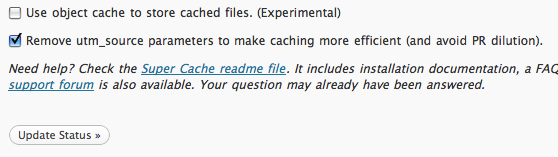
So I added a new option to Supercache to redirect the url and get rid of the utm_source bloat.

If you want to give it a go, grab the development version of the plugin and upgrade.

Oh, and if someone has decent docs on utm_source and it’s friends I’d love to read it. Google didn’t return much when I went looking.

Exploit Scanner 0.95

I’ve just released version 0.95 of WordPress Exploit Scanner.

This release fixes a number of bugs and makes it easier to scan for exploits and read the results.

I’ve added an “Exploits” scan level which looks for obvious code that hackers use. It will return a few false positives but it’s a good first scan to try if you suspect your website has been hacked. You can then use the “Blocker” and “Severe” to scan for ever more suspect strings.

Scans are now done 50 files at a time, with the page reloading after each. The scan results are saved in the database (in your options table as not-autoloaded records to minimize load on your blog) and you can open another browser window or tab on the Exploit Scanner admin page to view the saved results even before the scan is completed.

MD5 hash records for WordPress 2.9.2 have been added, and the hash records for 2.9.1 were corrected.

In other news I’m looking for testers to try out the almost ready WordPress MU 2.9.2. More details are on the forum thread above.