WP Super Cache 0.9.8

WP Super Cache version 0.9.8 is now available. WP Super Cache is a page caching plugin for WordPress that will significantly speed up your website.

New in this release are 2 translations. The Spanish translation is by Omi and the Italian by Gianni Diurno. Please, if you use their translations, drop by their sites and leave a thank you comment! They’ve been very patient with me as I fixed gettext bugs and added new text. Both have blogged about the translations if you need to know more: Gianni, Omi.

The second major feature to go in is an “advanced” section to the debugger. This allows the plugin to check the front page every 5 minutes to make sure everything is ok. It monitors for 2 very rare problems:

  1. Very very occasionally, the front page becomes a gzip file that downloads. It happened here once and I examined the cache file. There was nothing wrong with it. It was perfect. I suspect Apache and mod_rewrite got confused somehow but clearing the cache fixed it. The file generated after was exactly the same size as the old one, so no chance it got “double gzipped”.
  2. In certain rare cases, where a blog has a static front page, and uses a permalink structure of /%category%/%postname%/, the wrong page may be cached as the front page. Even if your blog satisfies the two conditions above it may not suffer from this problem. I tried it on this blog for a few days and couldn’t reproduce it at all!

Nevertheless, if you’re concerned edit your wp-cache-config.php and add this line:

$wp_super_cache_advanced_debug = 1;

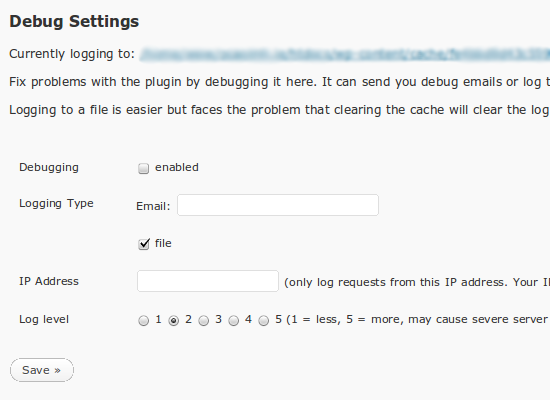
Reload the admin page and you’ll see this added to the debug section:
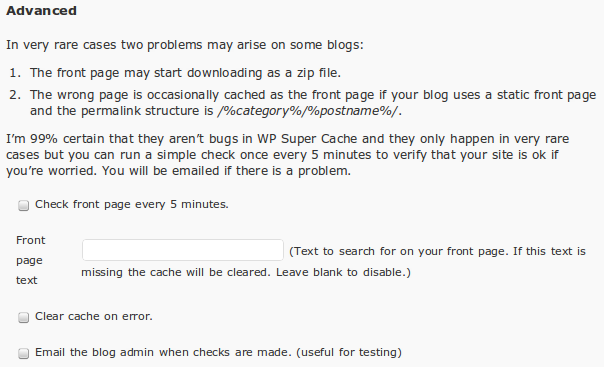
advanced-debug

If activated, it will check your front page every 5 minutes. It’s not activated by default because these errors only happen to a small number of blogs. I’ve also noticed that WordPress seems to randomly forget to run the page checker from time to time. I debugged it and the job simply disappears from the wp-cron system! I’ve no idea why, but reloading the admin page schedules it again.
If you’re still paranoid, set your cache expiry low so at least the cache files will be recycled quickly.

Caching, Minification and CDNs

Oh, there’s a new caching plugin on the scene. W3 Total Cache works like Supercache’s half-on mode but can store to memory as well as disk (like Batcache) but also does minification and supports CDNs. I’ve been asked a few times if I’ll support those features too but I don’t see why as other plugins already have that covered (and frankly, I don’t have time to maintain such complex features):

  1. WP Minify “integrates the Minify engine into your WordPress blog. Once enabled, this plugin will combine and compress JS and CSS files to improve page load time.” Thaya is very responsive and fixed a bug I reported quickly.
  2. There are any number of CDN plugins for WordPress. I don’t use a CDN so I can’t recommend one but OSSDL CDN Off Linker might be worth a shot. This post on it mentions Supercache plus, a fork of this plugin.

Traffic Spikes and Benchmarks

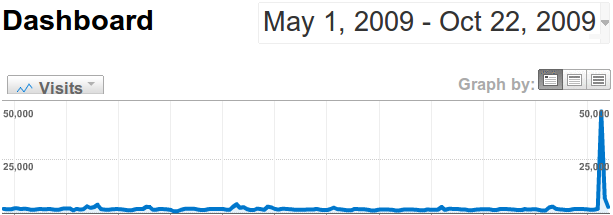
I really should collect more of these. A few weeks ago Mark Pilgrim blogged about how his book had been republished by a 3rd party and put up for sale on Amazon. His book was published under the GNU Free Documentation License so that’s perfectly legal to do, even if a little unusual as it can be downloaded from Mark’s website and is for sale by his publisher. The blog post generated a lot of interest and a few days later I received a donation from Mark, followed by a thank you email. I’m a big fan of what Mark does, so if it had been a physical cheque or a letter I’d have framed it!
A few days after that he tweeted the following graph. Nice spike of traffic eh? His server held up fine with help from WP Super Cache.
diveintomark.org-dashboard

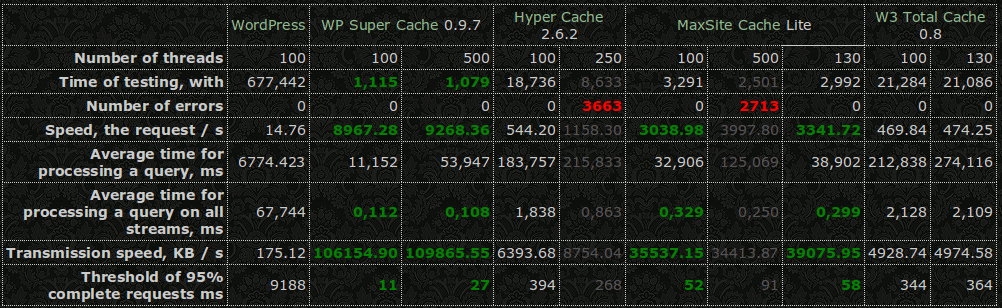
And finally, some benchmarks, in Russian unfortunately but the pages translates well.

caching-benchmarks

Summary of changes in 0.9.8:

  • Added Spanish translation by Omi.
  • Added Italian translation by Gianni Diurno.
  • Addded advanced debug code to check front page for category problem. Enable by setting $wp_super_cache_advanced_debug to 1 in the config file.
  • Fixed wordpress vs wordpress_logged_in cookie mismatch in cookie checking function.
  • Correctly check if WP_CACHE is set or not. PHP is weird.
  • Added wp_cache_clear_cache() to clear out cache directory.
  • Only show logged in message when debugging enabled.
  • Added troubleshooting point 20. PHP vs Apache user.
  • Fixed problem deleting cache file.
  • Don’t delete cache files when moderated comments are deleted.

PS. WordCamp Ireland is on in early March next year in picturesque Kilkenny. Here’s Sabrina’s launch post. Sign up! I’ll be going!
WP Super Cache Developer Documentation

I’ve finally found the time to write up some documentation for developers who want to work with WP Super Cache.

It’s a work in progress but should help other plugin developers who want to interact with the cache.

Suggestions and comments welcome.

PS. If you’re in Cork on November 14th, head along to BarCamp Cork III. I’ll be giving a talk, “How WP Super Cache Works”. It’ll be less technical than this but I’ll answer questions too. Check out the other sessions too.

WordPress MU 2.8.5.1

Update! WordPress MU 2.8.5.2 has a tiny fix for a post publish bug. You can download it from the usual place.

WordPress MU 2.8.5.1 has just been released and may be downloaded immediately.

This is a security and bugfix release and a recommended upgrade for every WordPress MU site. What happened to 2.8.5? I had it tagged and ready for release when Luke reported a little problem. It wasn’t possible to edit blogs! It was an easy bug to fix but code had been tagged and zip/tarball archives created so I had to create new ones. Thanks Luke! Saved the day. πŸ™‚

Thanks to everyone else who contributed and helped in any way during the making of this release. Your help is invaluable.

This release also fixes a problem with slashes in blog and site options. You’ll be prompted to run the site upgrader. Please run it on all your blogs. For a more comprehensive look at what has changed recently, take a look at the Trac Timeline.

Exploit Scanner 0.5

The WordPress Exploit Scanner has been updated, with lots of help from Jon and Ryan.

In recent weeks blogs running older versions of WordPress were exploited. If you’re concerned that your blog might have been broken into, download the plugin and run it. It will find false positive results but it will do a reasonably good job of finding the code that’s inserted into a hacked site.

The plugin works by scanning every directory on your site. This is done recursively which unfortunately takes up quite a bi of memory. If you get an out of memory error please read the readme.txt as it has a suggestion for fixing the problem.

PS. WordPress 2.8.5 was released last night. Make sure you upgrade! A WordPress MU release will follow shortly.

WP Super Cache 0.9.7

WP Super Cache version 0.9.7 is now available. WP Super Cache is a page caching plugin for WordPress that will significantly speed up your website.

Since the last release of the plugin a number of new features have been adding, bugs fixed, and documentation updated. For a taster, here are the changes from the readme.txt:

  1. Fixed problem with blogs in folders.
  2. Added cache file listing and delete links to admin page.
  3. Added “Newest Cached Pages” listing in sidebox.
  4. Made admin page translatable. (work in progress)
  5. Added “How do I make certain parts of the page stay dynamic?” to FAQ.
  6. Disable supercaching when GET parameters present instead of disabling all caching. Disable on POST (as normal) and preview.
  7. Fixed problem with cron job and mutex filename.
  8. Warn users they must enable mobile device support if rewrite rules detected. Better detection of when to warn that .htaccess rules must be updated (no need when rewrite rules not present)
  9. Use the wordpress_test_cookie in the cache key.
  10. Show correct number of cache files when compression off.
  11. Fixed problem with PHP safe_mode detection.
  12. Various bugfixes and documentation updates. See Changelog.txt
  13. Advanced: added “late init” feature so that plugin activates on “init”. Set $wp_super_cache_late_init to true in config file to use.
  14. Advanced: Added “wpsupercache_404” filter. Return true to cache 404 error pages.

If you’re upgrading and your blog is installed in a sub directory the mod_rewrite rules may not have been created correctly. You’ll know this because the timestamp on your cached pages will change on every load. If that happens, remove the Supercache rewrite rules and recreate them through the admin page.

wp-super-cache-list

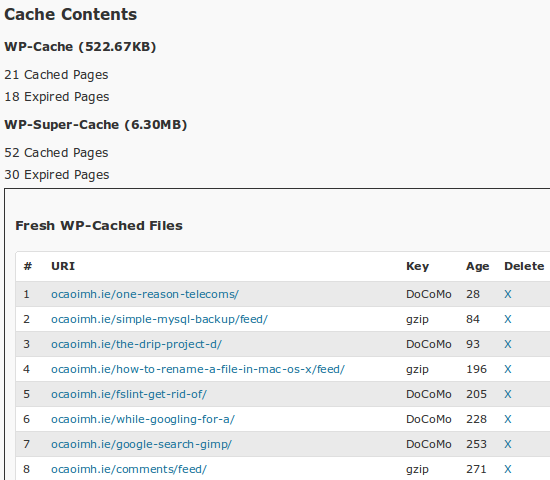
You can list all the blog’s cache files now, ordered by generation time. From that listing you can delete individual files.

wp-super-cache-debug

The debug function is very powerful. You can choose the level of logging. Level 1 logs errors and warnings of a serious nature. Level 5 logs them plus lots of normal functions. Here’s what level 5 logging looks like for one single request:

20:49:34 /was-the-janitor-really-in-the-fugitive/ No wp-cache file exists or user agent rejected.
20:49:35 /was-the-janitor-really-in-the-fugitive/ In WP Cache Phase 2
21:49:35 /was-the-janitor-really-in-the-fugitive/ Setting up WordPress actions
21:49:35 /was-the-janitor-really-in-the-fugitive/ Created output buffer
21:49:35 /was-the-janitor-really-in-the-fugitive/ supercache dir: /www/wp-content/cache/supercache/ocaoimh.ie/was-the-janitor-really-in-the-fugitive/
21:49:35 /was-the-janitor-really-in-the-fugitive/ Output buffer callback
21:49:35 /was-the-janitor-really-in-the-fugitive/ supercache dir: /www/wp-content/cache/supercache/ocaoimh.ie/was-the-janitor-really-in-the-fugitive/
21:49:35 /was-the-janitor-really-in-the-fugitive/ Anonymous user detected. Only creating Supercache file.
21:49:35 /was-the-janitor-really-in-the-fugitive/ Gzipping buffer.
21:49:35 /was-the-janitor-really-in-the-fugitive/ Writing non-gzipped buffer to supercache file.
21:49:35 /was-the-janitor-really-in-the-fugitive/ Writing gzipped buffer to supercache file.
21:49:35 /was-the-janitor-really-in-the-fugitive/ Renamed temp supercache file to /www/wp-content/cache/supercache/ocaoimh.ie/was-the-janitor-really-in-the-fugitive/index.html
21:49:35 /was-the-janitor-really-in-the-fugitive/ Renamed temp supercache gz file to /www/wp-content/cache/supercache/ocaoimh.ie/was-the-janitor-really-in-the-fugitive/index.html.gz
21:49:35 /was-the-janitor-really-in-the-fugitive/ Sending buffer to browser

That’s a lot of text. Keep an eye on the load on your server because logging that much data on a busy server will add extra load. Start by limiting the logging to your own IP and test with various browsers.
The error messages that are normally sent to the browser about “missing html tag”, “404 error” and “blank page” are now only shown if debugging is enabled. This will hopefully avoid problems with PHP scripts that generate Javascript.

This release adds a new “late init” feature. This is only useful in half-on mode however. This causes the plugin to create the “cache key” and display the cached page at the end of the “init” action, after all WordPress include files and plugins have been loaded. This is very useful if your application needs to interrogate the database to modify the cache key. Activate it by setting $wp_super_cache_late_init to true in the config file.

Lots to digest and new toys to try out. Hope you enjoy this new version of the plugin!

Pigs help translate your plugin

I’m in the middle of translating the WP Super Cache plugin (one of my goals before a 1.0 release). The docs make it easy to understand how to do it, but it is such a chore when there is so much text. According to Vim, I’m about 25% of the way through wp-cache.php

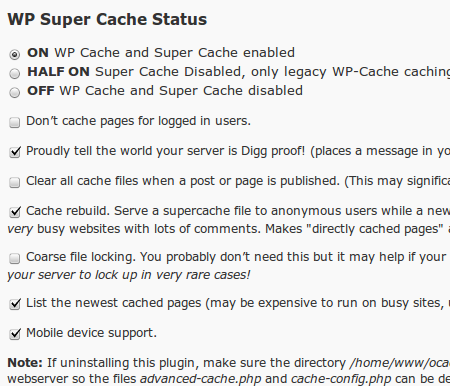
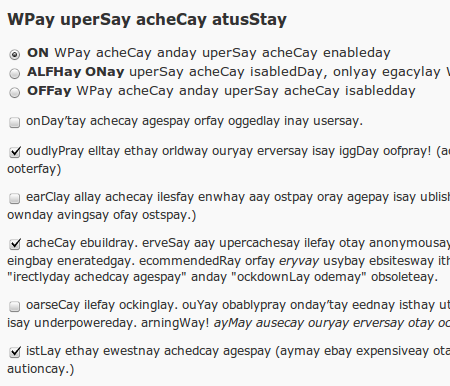
Checking to make sure that all the strings are translated is tiresome but the Pig Latin plugin makes it easier to spot untranslatable strings:

supercache1

supercache2

There will be a new release of supercache soon, but check out the download page and grab the development version if you want an exclusive look at the new debugger, “newest cached files” listing and bug fixes.

WordPress Upgrade Notifications by Email

This weekend will go down in history. It’s the first time I’ve been seriously sick in well over 5 years. A bug infected my son on Wednesday, but he got over it quickly enough. Then the same bug hit my wife and I on Sunday morning and we’re just getting over it now.

Odd that a worm attacks software I work on and I get very sick at the same time. Unfortunately I couldn’t run an exploit scanner and remove the bug but my body’s defenses took care of the bugs eventually.

All this leads me to a handy little plugin called Upgrade Notification by Email written by Konrad Karpieszuk. Install it on your blogs and it will check once a day if a new version of WordPress is out. When that happens it will email the admin with a message saying the blog must be upgraded.

It’s odd that the plugin itself contacts WordPress.org instead of relying on the built-in version checker but it’s only one request a day.

What I’d like to see next is a direct link to the upgrade page on the blog.

Far more challenging would be a plugin to auto upgrade a blog. In case a theme or plugin breaks things the plugin should probably deactivate all plugins and change the theme back to the default theme. Once the upgrade is complete, all plugins should be reactivated and the theme too. The admin has to be emailed before and after the upgrade.

It’s easy to say what it should do, but doing it is another thing altogether. The reactivation process has to be sandboxed in case of failure so the plugin doesn’t die. The plugins page already does this so at least there’s example code to work from. Anyone up for coding it?

WordPress MU 2.8.4

WordPress MU is a multi user or multi blog version of WordPress that is used to run sites like WordPress.com.

Today’s WordPress MU release is 2.8.4, a security release that fixes an annoying bug that allowed any user to reset the admin password. Your password was never at risk however so it’s more an annoyance than anything else.

Oh, thanks to everyone who tested the exploit on my blog. See? You didn’t get my password! πŸ˜›

Upgrade automatically from within your dashboard (first fix the upgrader if you haven’t updated to 2.8.3 yet), or download the new release from the download page and upgrade manually, overwriting your current install with the new files.

Edit: James Collins noticed that line 164 of wp-login.php wasn’t merged properly. If you downloaded 2.8.4, please grab 2.8.4a. Thanks James for the prompt feedback!

WordPress MU 2.8.3

WordPress MU is a multi user or multi blog version of WordPress that is used to run sites like WordPress.com.

WordPress MU 2.8.3 is a security and bugfix release based on the fixes in WordPress 2.8.3 but also contains many other changes.

It’s a required upgrade for security reasons but also fixes a number of annoying bugs, especially #1067 and #1076.

Unfortunately the automatic upgrader in MU 2.8.2 is broken but it’s simple to fix:

  • Before upgrading, edit wp-admin/includes/class-wp-upgrader.php and look for line 697.

    if ( !$wp_filesystem->copy($working_dir . ‘/wordpress/wp-admin/includes/update-core.php’, $wp_dir . ‘wp-admin/includes/update-core.php’, true) ) {

  • See the “/wordpress/wp-admin/includes” bit? Change that to “/wordpress-mu/wp-admin/includes”:

    if ( !$wp_filesystem->copy($working_dir . ‘/wordpress-mu/wp-admin/includes/update-core.php’, $wp_dir . ‘wp-admin/includes/update-core.php’, true) ) {

  • Save the file and auto upgrade. I upgraded this afternoon without a hitch after making that change. It’s fixed in 2.8.3 so it’s the last time you’ll have to do it.

Do not copy and paste the line above as WordPress will have changed the quotes to “smart quotes”. Actually go in and type “-mu” after “wordpress”. No copy and pasting please!

If auto upgrading still doesn’t work, don’t sweat it. Download the new release from the download page and upgrade manually, overwriting your current install with the new files.