Speed up WordPress with Apache and Varnish

Varnish is an open source, state of the art web application accelerator.

What it does is make your existing site faster by caching requests so your web server doesn’t have to handle them. This helps because your web server may be a lumbering giant like Apache that is loaded up with extra functionality like PHP, the GD library, mod_rewrite and all the other tools you need to make your website. All these modules unfortunately make your general purpose web server slower and heavier so by avoiding it your site spits out pages much faster!

Varnish sits in front of your webserver. Most documentation I’ve read on the subject suggest having Apache listen on any port other than port 80 and then have Varnish listen on port 80 of the external IP address. There’s no need to do this as I configured Apache to listen on port 80 of the 127.0.0.1 or localhost address while Varnish sits on the external IP.

Installing Varnish

Setting up Varnish is fairly easy. I’m going to assume that you’re already using Apache and On a Debian based system just use this to install it (as root)

apt-get install varnish

Apache

You need to configure Apache first. It has to listen on port 80 of the localhost interface. Edit /etc/apache2/ports.conf and change the following settings:

NameVirtualHost 127.0.0.1:80
Listen 127.0.0.1:80

Normally Apache listens on port 80 of all interfaces so you’ll probably just have to add “127.0.0.1:” in front of the 80.

Varnish

By default Varnish won’t start. You need to edit /etc/default/varnish. Change the following options in that file:

START=yes

DAEMON_OPTS="-a EXTERNAL_IP_ADDRESS:80 \
             -T localhost:6082 \
             -f /etc/varnish/default.vcl \
             -S /etc/varnish/secret \
             -s file,/var/lib/varnish/$INSTANCE/varnish_storage.bin,1G"

Replace EXTERNAL_IP_ADDRESS with the IP of your external IP address.

Now edit /etc/varnish/default.vcl. The file should already exist but most of it is commented out. First of all change the “Backend default”:

backend default {
    .host = "127.0.0.1";
    .port = "80";
}

This tells Varnish that Apache is listening on port 80 of the localhost interface.

I’m going to define several functions in the default.vcl now. Comments in the code should explain what most of it does.

# Called after a document has been successfully retrieved from the backend.
sub vcl_fetch {
    # Uncomment to make the default cache "time to live" is 5 minutes, handy 
    # but it may cache stale pages unless purged. (TODO)
    # By default Varnish will use the headers sent to it by Apache (the backend server)
    # to figure out the correct TTL. 
    # WP Super Cache sends a TTL of 3 seconds, set in wp-content/cache/.htaccess

    # set beresp.ttl   = 300s;

    # Strip cookies for static files and set a long cache expiry time.
    if (req.url ~ "\.(jpg|jpeg|gif|png|ico|css|zip|tgz|gz|rar|bz2|pdf|txt|tar|wav|bmp|rtf|js|flv|swf|html|htm)$") {
            unset beresp.http.set-cookie;
            set beresp.ttl   = 24h;
    }

    # If WordPress cookies found then page is not cacheable
    if (req.http.Cookie ~"(wp-postpass|wordpress_logged_in|comment_author_)") {
        set beresp.cacheable = false;
    } else {
        set beresp.cacheable = true;
    }

    # Varnish determined the object was not cacheable
    if (!beresp.cacheable) {
        set beresp.http.X-Cacheable = "NO:Not Cacheable";
    } else if ( req.http.Cookie ~"(wp-postpass|wordpress_logged_in|comment_author_)" ) {
        # You don't wish to cache content for logged in users
        set beresp.http.X-Cacheable = "NO:Got Session";
        return(pass);
    }  else if ( beresp.http.Cache-Control ~ "private") {
        # You are respecting the Cache-Control=private header from the backend
        set beresp.http.X-Cacheable = "NO:Cache-Control=private";
        return(pass);
    } else if ( beresp.ttl < 1s ) {
        # You are extending the lifetime of the object artificially
        set beresp.ttl   = 300s;
        set beresp.grace = 300s;
        set beresp.http.X-Cacheable = "YES:Forced";
    } else {
        # Varnish determined the object was cacheable
        set beresp.http.X-Cacheable = "YES";
    }
    if (beresp.status == 404 || beresp.status >= 500) {
        set beresp.ttl = 0s;
    }

    # Deliver the content
    return(deliver);
}

sub vcl_hash {
    # Each cached page has to be identified by a key that unlocks it.
    # Add the browser cookie only if a WordPress cookie found.
    if ( req.http.Cookie ~"(wp-postpass|wordpress_logged_in|comment_author_)" ) {
        set req.hash += req.http.Cookie;
    }
}

# Deliver
sub vcl_deliver {
    # Uncomment these lines to remove these headers once you've finished setting up Varnish.
    #remove resp.http.X-Varnish;
    #remove resp.http.Via;
    #remove resp.http.Age;
    #remove resp.http.X-Powered-By;
}

# vcl_recv is called whenever a request is received
sub vcl_recv {
    # remove ?ver=xxxxx strings from urls so css and js files are cached.
    # Watch out when upgrading WordPress, need to restart Varnish or flush cache.
    set req.url = regsub(req.url, "\?ver=.*$", "");

    # Remove "replytocom" from requests to make caching better.
    set req.url = regsub(req.url, "\?replytocom=.*$", "");

    remove req.http.X-Forwarded-For;
    set    req.http.X-Forwarded-For = client.ip;

    # Exclude this site because it breaks if cached
    #if ( req.http.host == "example.com" ) {
    #    return( pass );
    #}

    # Serve objects up to 2 minutes past their expiry if the backend is slow to respond.
    set req.grace = 120s;
    # Strip cookies for static files:
    if (req.url ~ "\.(jpg|jpeg|gif|png|ico|css|zip|tgz|gz|rar|bz2|pdf|txt|tar|wav|bmp|rtf|js|flv|swf|html|htm)$") {
        unset req.http.Cookie;
        return(lookup);
    }
    # Remove has_js and Google Analytics __* cookies.
    set req.http.Cookie = regsuball(req.http.Cookie, "(^|;\s*)(__[a-z]+|has_js)=[^;]*", "");
    # Remove a ";" prefix, if present.
    set req.http.Cookie = regsub(req.http.Cookie, "^;\s*", "");
    # Remove empty cookies.
    if (req.http.Cookie ~ "^\s*$") {
        unset req.http.Cookie;
    }
    if (req.request == "PURGE") {
        if (!client.ip ~ purge) {
                error 405 "Not allowed.";
        }
        purge("req.url ~ " req.url " && req.http.host == " req.http.host);
        error 200 "Purged.";
    }

    # Pass anything other than GET and HEAD directly.
    if (req.request != "GET" && req.request != "HEAD") {
        return( pass );
    }      /* We only deal with GET and HEAD by default */

    # remove cookies for comments cookie to make caching better.
    set req.http.cookie = regsub(req.http.cookie, "1231111111111111122222222333333=[^;]+(; )?", "");

    # never cache the admin pages, or the server-status page
    if (req.request == "GET" && (req.url ~ "(wp-admin|bb-admin|server-status)")) {
        return(pipe);
    }
    # don't cache authenticated sessions
    if (req.http.Cookie && req.http.Cookie ~ "(wordpress_|PHPSESSID)") {
        return(pass);
    }
    # don't cache ajax requests
    if(req.http.X-Requested-With == "XMLHttpRequest" || req.url ~ "nocache" || req.url ~ "(control.php|wp-comments-post.php|wp-login.php|bb-login.php|bb-reset-password.php|register.php)") {
        return (pass);
    }
    return( lookup );
}

Notes:

  1. Varnish caches Javascript and CSS files without the cache buster ?ver=xxxx parameter. Varnish doesn’t cache any url with a GET parameter so those files weren’t getting cached at all.
  2. The code removes the Cookies for Comments cookie after it checks for GET and HEAD requests. This improved caching significantly as web pages are not cached with and without that cookie. They are all cached without it. The cache hit/miss ratio went up significantly when I made these two changes.
  3. I have a private site on this server that requires login. I had to stop Varnish caching this site as the privacy plugin thought I wasn’t logged in. See the example.com code above.
  4. If pages were purged Varnish could store cached pages for much longer.

As I didn’t modify WordPress so it would issue PURGE commands there are probably issues with the cache keeping slightly stale pages cached but I haven’t seen it happen or receive complaints about that.

PHP

Since all requests to Apache come from the local server PHP will think that the remote host is the local server. By using an auto_prepend_file set in your php.ini or .htaccess file you can tell PHP what the real IP is with this code:

if ( isset( $_SERVER[ "HTTP_X_FORWARDED_FOR" ] ) ) {
        $_SERVER[ 'REMOTE_ADDR' ] = $_SERVER[ "HTTP_X_FORWARDED_FOR" ];
}

You’ll see a huge improvement if you use Apache, especially if you don’t use a full page caching plugin like WP Super Cache on your WordPress site.

To see exactly how well Varnish is working use varnishstat and watch the ratio of cache hit and miss requests. This will vary depending on your TTL and by how much time Varnish has had to populate the cache. You can also configure logging using varnishncsa as described on this page:

varnishncsa -a -w /var/log/varnish/access.log -D -P /var/run/varnishncsa.pid

Now use multitail to watch /var/log/varnish/access.log and your web server’s access log.

I used a number of sites for help when setting this up. Here are a few:

I have tried Nginx in the past but could not getting it working without causing huge CPU spikes as PHP went a little mad. In comparison, Varnish was simple to install and set up. Have you tried Varnish yet? How can I improve the code above?

Edit: It looks like someone else has done the hard work. I must give the WordPress Varnish plugin a go.

This plugin purges your varnish cache when content is added or edited. This includes when a new post is added, a post is updated or when a comment is posted to your blog.

Cookies for Comments 0.5.4

Cookies for Comments is a WordPress plugin that can be used alongside Akismet to significantly reduce or even kill completely comment spam.

Version 0.5.4 adds a rejections page in case human visitors trip over the cookie check. You can modify the message shown to visitors and it’s obviously only useful if you don’t use the cookie check in your .htaccess file.

It happens sometimes, usually when the visitor has cookies turned off, but very occasionally for some other reason. (That I don’t know of yet)

This plugin isn’t a replacement for Akismet as it is easily bypassed. Thankfully 99% of spam bots don’t bother checking so this plugin works quite well!

Get a sneak preview of WP Super Cache before 1.0!

WP Super Cache 1.0 will be out soon(ish) but I need testers to bang on the development version available on the download page.

This version should be significantly faster if you have a lot of mobile visitors, plus it adds support for https secure pages. The speed came about by saving those files as static files in the supercache directories rather than the old “legacy caching” of WP Cache. You’ll see files like index-mobile.html(.gz) and index-https.html(.gz) in those directories. Be aware that if you use a flat permalink structure the plugin opens the root supercache directory for reading to find the index* files. This may or may not be an issue with directories containing a very large number of directories (10,000+ for example).

HTTPS support is built into the mod_rewrite rules so those files are served by the web server directly, but PHP serves the mobile clients. Only now you’ll be able to cache many times more mobile pages than before. There’s negligible speed difference between PHP and mod_rewrite modes anyway in normal operation.

There’s also a handy little “donotcachepage” GET parameter now. Add that, giving it the value of a secret key from the Advanced settings page and the current page will not be cached in any way.

There is lots of new code in the plugin. It’s running fine here, and a few other people have had no problems but I need more feedback. If you have a development server please give this a go, and if it works ok I believe it’s good enough to go live, under supervision. Don’t go install it on a Friday afternoon…

With the upgrade to WordPress 3.2 I moved this site and my photoblog to a Multisite install so I’ve been looking at making Supercache work better in that environment too.

I also installed Varnish as a front end cache and woah, I’m impressed. Setup was fairly easy though it’s still not 100% right. When I make posts the following page is a blank page except for the blog title, and when I (as a logged in user) leave a comment I get a 500 error and wp-comments-post.php doesn’t redirect. I’m still trying to debug those issues. I mentioned this on Google Plus a few days ago but expect a follow up post on Varnish with docs in the near future.

Now all I need is traffic. I should blog more!

Howto: Build a contact form with a Polldaddy survey

I just added a contact form to the about page here using a Polldaddy survey. While it’s not as straight forward as installing a plugin to do the job, I think it’s worth doing because it touches on all aspects of Polldaddy survey creation. After you’ve created this contact form on your own blog you’ll know how to create a Polldaddy survey, a custom style sheet and how to change the language in the form too. It’s very flexible.

Here’s how I did it.

  1. Login to Polldaddy and on the dashboard create a new survey for your contact form.
  2. Give your form a descriptive name and select the custom stylesheet. You’ll have to create a new one. I use the WordPress 2010 theme so I based my stylesheet on the Plain White theme. Changes are minor, mainly to accommodate width and font size. Grab the css file here and copy it into your style.
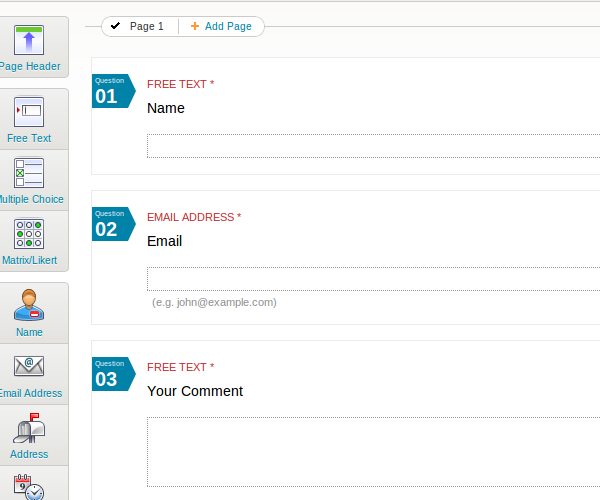
  3. Now on to the questions. I created a simple Name, Email and Comment form.
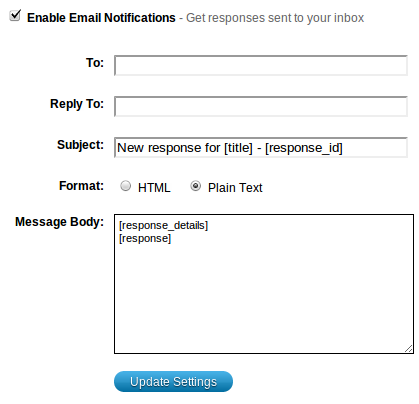
  4. You need to tell the survey where to send responses. After saving, go to Reports->Data and scroll down to the Email Notifications where you can fill in your details. You can also subscribe to an rss feed or send responses to a HTTP URL.

  5. To embed the form in your website use the embed popup and choose “Website Inline”. The iframe code should be copied into the new page that will hold your contact form.

  6. You’ll have a form that looks like this.

  7. You’re not finished yet though. Submit the form and you’ll see the message, “Survey Completed”. That’s not exactly appropriate for a contact form is it? Go to the languages page and create a new Survey Pack. You can change just about every bit of text displayed in the form here. After you’ve saved the language pack go back to the edit survey page and select the correct language pack:
  8. The one final job to do is to adjust the iframe size. I made each field of the form mandatory but that raises errors when you submit an empty form. Those errors make the form longer than the default and the iframe is too small to hold it. I bumped the height to 900 pixels and no more ugly scrollbars! There’s more empty whitespace below the form but my contact form is at the end of the page so I don’t mind.

You could also use the Javascript embed method, but that loads the survey form in a css popup window. I prefer the iframe method.

As you can see, Polldaddy surveys are incredibly flexible and offer a lot of customization options. I work on Polldaddy code every day so of course I’ll say this but I’d have no hesitation in recommending the service to anyone needing polls, surveys, quizzes or ratings. Create a free account and give it a spin!

WP Super Cache 0.9.9.8

WP Super Cache is a full page caching plugin for WordPress that makes your website run much faster!

Version 0.9.9.8 has been released and has a number of bug fixes and changes including:

  1. CDN updates: it can be switched off. Multiple CNAMEs can be used for serving static content to improve performance.
  2. Uninstall process improved. Files that the plugin creates are removed, and the wp-config.php and .htaccess files are fixed. If the plugin can’t do any of these steps it will display a message explaining what to do.
  3. Cached dynamic pages can now be stored in Supercache files and compressed. No need to use legacy caching any more.
  4. 1and1 Webhosting fix. They use “/kunden/” in some of their paths but not others.
  5. I removed the “log by email” functionality as it caused problems for users who were inundated by email.
  6. Many more minor fixes and changes.

The old uninstall process has been completely revamped. Now all you need to do is deactivate it on the plugins page. It will then remove wp-cache-config.php and advanced-cache.php. It will also remove the extra code it added to wp-config.php and the .htaccess file. On the off chance it can’t remove those files it will print a helpful message asking you to fix the problem. Unfortunately this class of plugin (full page caching plugins) are by design more complicated than regular plugins and are more invasive.

Got a problem with the plugin? Use the support forum please. Support queries posted here may be ignored or deleted.

cSprites for PHP 5.3.1/2

Joost posted a great article on reducing http requests on WordPress sites recently and one comment caught my attention. Nabil mentioned cSprites. It’s a WordPress plugin that merges the images in your posts into one file and uses CSS to position the single merged file in place of the original images. Here’s a good post explaining how this technique works.

Unfortunately it hasn’t been updated in over a year, and the current version doesn’t work if you have PHP 5.3.2 (and probably 5.3.1) as it trips over this PHP bug. The fix is simple, get rid of call_user_func_array() and call the functions directly.

I had it installed here and it worked well enough but not perfectly. Here’s the post I made on the plugin’s support forum if anyone’s interested.

I don’t think the author will update the plugin again and in fact he’s looking for someone else to take over. Anyone?

The plugin has been running on my photoblog for the last hour ago and I haven’t noticed any problems yet. As a bonus, it also stops people right clicking and stealing saving my photos for their own use. I’ve since removed it as visitors were only seeing blank images. Oh well.

So, want to give a “fixed version” a go? Grab csprites-for-wordpress.zip and install it in the usual way. Support queries should be directed towards the plugin support forum. 😉

Oh yeah, there’s also the SpriteMe bookmarklet if you don’t want to go fiddling with WordPress plugins!

Better uninstall for Supercache and other things

I need your help. Go grab the development version of WP Super Cache off the download page and give it a whirl. I’m working on making the uninstall process less painful than it is in the current release.

I added an action on the deactivate hook for the plugin so when you deactivate it on the Plugins page it deletes the files the plugin created and removes the WP_CACHE definition from wp-config.php. It doesn’t yet remove the mod_rewrite rules from the .htaccess file though. Sometimes people put the WordPress rules in the same block of that file so removing the rules would stop the site serving requests! I will of course gladly accept code patches to do that job.

No more messing with uninstall.php now, just deactivate on your plugins page.

Besides that, the CDN page has an on/off switch and can use multiple hostnames now. The cache can be cleared when caching is disabled and dynamic pages can be served by using PHP mode rather than the slower “legacy mode”.

There are also numerous bug fixes so if you have a development site and a few minutes to spare why not give this a go? Please?

WP Super Cache 0.9.9.7

WP Super Cache is a full page caching plugin for WordPress that makes your website run much faster!

I’ve just released a new version and the biggest change in this one is the addition of Content Delivery Network (CDN) support thanks to Mark Kubacki who allowed me to integrate his OSSDL CDN Off Linker plugin. (Please go visit his blog and say thank you if you use this feature!)

The CDN support simply rewrites images, CSS and Javascript files so they point at a different hostname. That hostname can be another virtual host on your own server (aka “Poor Man’s CDN”) pointing at your WordPress install or a fully fledged CDN. If your CDN supports “origin pull” then all the files on your server will be copied there as they are requested by visitors. Otherwise you’ll have to transfer the files over manually.

Apart from that, bugs have been fixed, a few features have been tweaked including the uninstall script which has been streamlined somewhat.

I also added links (on the “Easy” settngs page) to some plugins and tools you may find useful in making your site run faster.

Problems? Go to the forum and someone may already have had that problem and solved it. If not, post there and you’ll get a reply.

WP Super Cache and mod_pagespeed

So I finally got a chance to try mod_pagespeed on this server. I particularly wanted to know if it behaved well with WP Super Cache as I’d read reports that it causes problems.

Unfortunately those problems are real but I’ve been told that a new release will be out shortly to address a few bugs so perhaps this will help.

If you’d like to try mod_pagespeed make sure you disable compression in WP Super Cache and clear the cache first. Even though the docs state that the module always generates uncompressed HTML it appears to do the opposite. In fact, it tries to load mod_deflate:

# more pagespeed.load
LoadModule pagespeed_module /usr/lib/apache2/modules/mod_pagespeed.so

# Only attempt to load mod_deflate if it hasn’t been loaded already.
<IfModule !mod_deflate.c>
LoadModule deflate_module /usr/lib/apache2/modules/mod_deflate.so
</IfModule>

When things were working, supercached files were processed by mod_pagespeed correctly, I noticed inline Javascript was modified to remove whitespace and I presume other changes were made too but I already minify things and have static files off on another domain so perhaps the changes made on my pages are less minimal.

The changes made by mod_pagespeed, like minifying inline Javascript, are not cached by WP Super Cache so your server has to make these changes each time a page is served. I know that mod_deflate does not cache the gzipped page content, but zips up the page each time it’s served. Mod_pagespeed does however provide a caching mechanism so there’s a good chance those changes are cached there. I haven’t looked at the code so I don’t know.

I did have problems with dynamic pages. A simple phpinfo() refused to load quite often, and backend requests sometimes became stuck. Load on the server sky rocketed occasionally, usually when the module cache directory was emptied.

For now I’ve turned mod_pagespeed off but that might change as this is a young project and maturing fast! I’ll update this post whenever this happens.