Memories of my first computer

A few weeks ago I splashed out on a 60GB Xbox 360, going for a reasonable 200 Euro in HMV and luckily for me I was able to enjoy the HD graphics of this next gen (next gen? It’s 4 years old now but the hardware specs are impressive!) console. Actually, “enjoy” is putting it lightly. Blown away, gobsmacked and amazed are probably better ways of describing my reaction to some of the graphics I saw this machine throwing about! Sometimes it feels like I’m taking part in one big movie.
I miss the Wiimote, I hope Microsoft do bring out a magic wand sooner or later.

One of the great things about being a late adapter is that I can buy most of the games I want in the pre-owned section. Instead of spending 50 Euro they sometimes cost half that!

I’ve gone searching for Xbox 360 blogs but only found a couple that weren’t full of adverts or blatantly self serving. I must be using the wrong keywords. Xbox fans, what are your favourite Xbox blogs?

30 or so years ago the first computer that I remember was a games console. I don’t remember the brand although my brother says it was an Atari. It was a simple machine, with a slot for a game cartridge. It had two grey boxy analog paddles, each with slender sticks and a small red button. Each controller would slot into a space in the console for easy storage. We only had one cartridge, a compilation of “sports” games, but as the machine used stick graphics they were fairly simplistic.
I remember the tennis game with two bats and a single large white pixel of a ball provided hours upon hours of entertainment for us kids.

What followed after that were more serious computers, the Commodore Vic 20, Speccy 48k, Commodore 64, Amiga 500, various PCs running Win 3.1, win 95, 98, Linux, and finally a Macbook and a Dell laptop running Ubuntu Linux. I didn’t own a console until I bought a Nintendo Wii, and then 2 weeks ago the Xbox 360.

Of the Vic 20, I remember typing in a BASIC programme that displayed a simple animated bird that flew around the screen. As we didn’t have a Datasette I couldn’t save it. I left the Vic 20 on while I went to school!

My son Adam’s first memories of games will probably be the Xbox. A far cry from the black and white stick characters of my youth!

John, my personal spammer!

With apologies to anyone named John. Spammers are getting more clever at spreading their links. Now legitimate website owners are using software tools that allow them to enter keywords of their choice to a create a list of related blogs with comment forms. Many of these applications list blogs that pass Google Rank to the websites of visitors. That’s why I stopped doing the “dofollow” thing several months ago. Since then the number of spam comments has gone down slightly. Cookie for Comments stops the spam bots dead but the human spammer scum still get through.

Next time Akismet marks a legitimate looking comment as spam (or you get a comment from someone who was supposedly christened Austin Texas Photographer by his parents), check your logs. Look up the IP address of the visitor. You may find something like this. Note the lack of a referrer, an old Firefox user agent and then “bsalsa.com” is in the UA of the next request for a post. Bsalsa make a Windows toolkit that this software obviously uses. They’re fans of Borland Delphi apparently!

"GET /2006/11/04/cork-cinema-listings/ HTTP/1.0" 200 43366 "-" "Mozilla/5.0 (Windows; U; Windows NT 5.1; en; rv:1.8.1.11) Gecko/20071127 Firefox/2.0.0.12"

"GET /feed/ HTTP/1.0" 302 84 "-" "Mozilla/5.0 (Windows; U; Windows NT 5.1; en; rv:1.8.1.11) Gecko/20071127 Firefox/2.0.0.11"

"GET /2006/11/04/cork-cinema-listings/ HTTP/1.1" 200 12089 "-" "Mozilla/4.0 (compatible; MSIE 7.0; Windows NT 5.1; GTB6; User-agent: Mozilla/4.0 (compatible; MSIE 6.0; Windows NT 5.1; SV1; http://bsalsa.com) ; User-agent: Mozilla/4.0 (compatible; MSIE 6.0; Windows NT 5.1; SV1; http://bsalsa.com) (Mozilla/5.0 (Windows; U; Windows NT 5.1; en; rv:1.8.1.11) Gecko/20071127 Firefox/2.0.0.11); .NET CLR 2.0.50727)"

When my blogs were dofollowing, I’d get loads of spam comments every day. The tools used fire off a request to the blog to examine the links on that page. They highlight dofollow links so the user knows their spam comment will generate Google Juice for their site.

I was getting so sick and tired of them I contacted several spammers. Lindsay who commented on inphotos.org replied:

Hi Lindsay,

As a photographer, I’m always looking for other blogs to comment on but it’s hard to find interesting photoblogs that post anything other than photos. How did you find my blog? I didn’t see a Google search in my logs. Is it a special program?

Thanks,
Donncha

She was really helpful, even replying twice when I didn’t reply again:

I actually have a program called G-force fast blog finder. Basically, i put in some keywords and it searches ALL blogs with those keywords. THEN it tells me if those blogs do or do not have the “uComment iFollow” addon. Blogs that allow the “follow” tag are good for search engines if i post a comment with a link to my site.. SO basically, i get to look at photography blogs and comment on them while i help my website obtain some more links.

Basically, search engines rank your page based on a few things, one of them is link backs. Basically, a link from a site to my site is like a vote for my site saying it is good. So the more other websites link to my site, the better.. HOWEVER, some blogs and websites have the NOFOLLOW tag in them which does not let the search engines see it. Your site does allow the uComment iFollow.

We also created a link exchange program on our website. if you’re interested, it helps you too also have links for your site on other people’s site. If you go to my site here:
http://__________.com/catalog/links.php
You can submit your link and even a small picture to be displayed.
Let me know if you have any other questions

Lindsay

Yea. I Down loaded a program called fast blogger. They have a free trial and basically you add in search term and it searches all blogs for that term. It gives you lists of links to them and tells you if they are no follow or Ufollow IConment blogs. Basically, by findig blogs related to my webstie and blog and posting comments, it helps my website with the search engines when I post a link. It’s a win win situation. You get blog views and comments and the post gets a link back to third site.

If you are interested, I also have a blog. It’s at http://_____________.com/blog

Feel free to comment away and leave a link back to your blog.

We also have a link exchange. Basically you go to Http://____________.com/catalog/links.php

Click submit link and then we will add another link to our website. All we ask is you link back to us in return.

It’s basically everyone helping each other in order to get good page ranking for thief keywords

If you have any questions , Id be happy to answer.

Lindsay

Very helpful wasn’t she? Unfortunately it was the final straw. All links in comments are nofollowed again. Bloody spammers.

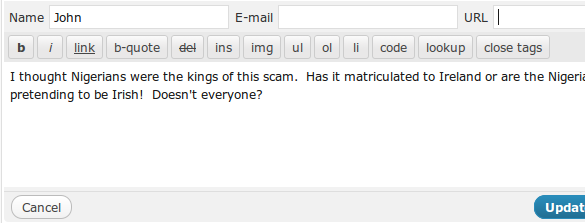
The spam comments continue but recently I’ve taken to changing the name of the person to “John”, removing their email and url and then allowing through the comment.

john the spammer

john the spammer

Thanks John!

Ubuntu Linux: Is your external usb drive slow?

I don’t know when this happened but my external USB drives were running really slow. Reading RAW images off them took ages, backups took forever, and moving files back and forth was plain slow.

I use two Seagate FreeAgent external drives. They’re both USB 2 devices so should sustain more than the maximum 1MB/s I was seeing. I decided to go looking. First stop was /var/log/syslog where I found the following:

usb 2-1.2.4.4: new full speed USB device using uhci_hcd and address 13
usb 2-1.2.4.4: not running at top speed; connect to a high speed hub

To cut a long story short, after a few searches I found bug 66115 where the same problem is described. Unfortunately the ticket has since been closed but the work around discovered by Jean Pierre Rupp works for me too. I haven’t modified any files in /etc/ but unloading ehci_hcd and uhci_hcd and reloading in the correct order worked for me:

rmmod ehci_hcd
rmmod uhci_hcd
modprobe ehci_hcd
modprobe uhci_hcd

Now I get a very respectable 15-20MB/s when using rsync to transfer files from my internal drive and reads are super fast:

hdparm -tT /dev/sdi1

/dev/sdi1:
Timing cached reads: 3964 MB in 2.00 seconds = 1985.16 MB/sec
Timing buffered disk reads: 82 MB in 3.03 seconds = 27.08 MB/sec

Next on the TODO list is making sure the modules are loaded in the correct order on reboot. Time to dive into /etc

My Public Representatives

While I was away last week John Handelaar announced his new project, kildarestreet.com. It’s a site dedicated to reporting all the goings on in the Irish Parliament, from the horses mouth so to speak. It makes available to the general public everything that TDs (our members of parliament) say in session. This information is available on the official Government websites but it’s not easy to find.

I live in Blarney, in Cork North Central. I checked the list of TDs and found those that represent me, my family, my neighbours:

Interesting stats on each of their pages, and I really like the “most recent appearances”. I wonder if TDs will watch more closely what they say come the general election to avoid giving ammunition to their competitors or to avoid “putting their foot in it” in front of a suddenly more well informed electorate.

WordPress MU 2.7.1

WordPress MU is a multi user or multi blog version of WordPress that can be used to run sites like WordPress.com.

This release of WordPress MU has been much delayed but I think it’s been worth the wait. Included in this release are a number of new features and many bugfixes. Get it from the MU download page.

Update! In the final rush to get this post written I neglected to add that this release fixes a vulnerability in the importer system that would allow an untrusted user to run PHP code. Thanks to Alexander Concha for discovering the vulnerability and to Barry Abrahamson who recognised that some servers treat unknown file types as PHP scripts.
One more reason to upgrade.

New features and changes include:

  • A revamped plugin system thanks to Andy Peatling. Plugins installed in the plugins directory rather than mu-plugins can be activated and deactivated on all blogs with one click.
  • The admin bar was removed. It’ll be stuffed into a plugin instead. Must talk to Viper007Bond about that.
  • A new “My Blogs” page where a user’s blogs are listed and personal “per blog” settings can be configured. It’s empty right now but it’s easy to add settings to it via plugins. Imagine having a different “Display Name” on each blog you write on! See SetupMenu and HandleFormPOST in the just removed admin bar for example code. That code uses actions rather than filters but it’ll get you started.
  • The site admin can now set a Global Dashboard blog for users who don’t have blogs. Those users will be added to this blog rather than the main blog. The default role of users on that blog can also be set but if they’re not “Subscribers” they won’t be moved if you change the Global Dashboard.

They’re the major changes. Smaller changes include notification of failed blog upgrades [1728], MU will now ignore free space checks when importing posts [1725] and lots more. Check out the timeline for further details.

If you’re running WordPress MU 2.7 you can upgrade from inside the Dashboard. The system will notice that a new version is out and will lead you through the upgrade process, just like in regular WordPress. Plugins can be updated as well through the familiar plugin upgrade process as long as your plugins are hosted on the WordPress.org Plugins Database.

As always this release would not have been possible without the help and encouragement of many people along the way. I know I’ll leave out someone if I try to list everyone but I appreciate all the help people give working through tickets, and helping on the forums.

PS. WP Super Cache was updated today too. New features include an option to stop caching for logged in users, it doesn’t cache previewed posts, and it displays cache size summary information on the admin page now.
PPS. Happy birthday Adam! 2 today and Dad’s finally getting away from the computer now! 🙂

WordPress MU 2.7.1 beta 2

WordPress MU is a multi user or multi blog version of WordPress that can be used to run sites like WordPress.com.

The 2.7.1 release is very close now. I have just uploaded wordpress-mu-2.7.1-beta2.zip for your enjoyment.

2.7.1 has taken longer than usual to come out, mainly because of the large number of bug fixes and new features in this release. Highlights include:

  • A revamped plugin system thanks to Andy Peatling. Plugins installed in the plugins directory rather than mu-plugins can be activated and deactivated on all blogs with one click.
  • The admin bar settings can be customized by any user for each blog via the “My Blogs” page. The code here is still rough, and may not make it into the final release. Please help clean it up!
  • The site admin can now set a Global Dashboard blog for users who don’t have blogs. Those users will be added to this blog rather than the first one.
  • And many more bugfixes you can read about on the MU Timeline

I think this release is just about good enough to put on a production server, but test it first on a development server and backup your old install if you’re really paranoid. All I’ll guarantee is that this software will take up space on your server. I need your help to test it.

If you’re a jQuery fiend or CSS styling guru, your help with the “My Blogs” page would be very much appreciated. My ugly code hides settings that aren’t relevant, but the page isn’t pretty. Use Trac or contact me through this site if you have ideas or code to contribute.

I’m glad to say that once MU 2.7.1 does come out. Upgrading from 2.7 should be as easy as clicking the Upgrade button in the dashboard. I tried upgrading from 2.7 yesterday and my test server upgraded itself after 1 or 2 false starts.
‘Course, if you’ve modified core files (naughty!), those changes will be overwritten and you’ll have to manually upgrade.

Thanks to everyone who helped me with patches, code snippets, ideas and with ticket updates on Trac.

Wireless Nunchuck Adapter Review

My latest gaming purchase last week was MadWorld for the Nintendo Wii Console. It’s a horribly violent and bloody beat-em-up and saw-em-up and gauge-em-up and .. you get the idea.
Everyone’s raving about it but after playing it for an hour or two I feared I’d snap my Nunchuck and Wiimote cable because one of the actions in the game calls for the player to err, snap the controls apart and something indescribable happens on screen. Someone loses their head, and they’re not angry! It certainly deserves the 18 cert,

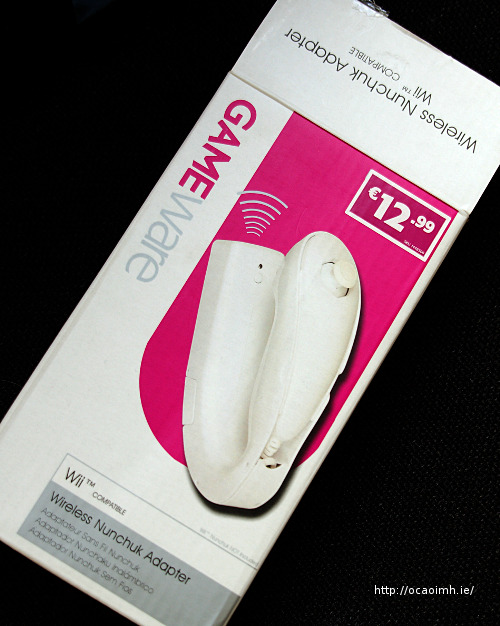
Gameware Wireless Nunchuck Adapter Last weekend I popped into Game for a look around and spotted the Gameware Wireless Nunchuck Adapter for a reasonable €12.99. Not bad. I also bought a Wiimote charger but I’ll blog about that at a later stage. Can’t have too much excitement in one post now can we?

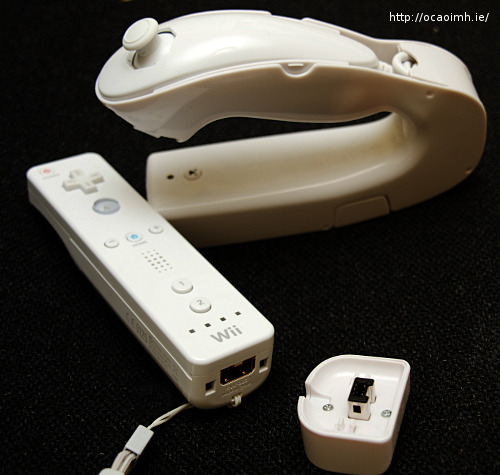
The box contained simple instructions, the adapter itself, and a small square transmitter/receiver you place on the end of the Wiimote (requiring a good tug to remove again!) It doesn’t include the Nunchuck. The adapter takes 2 AAA batteries. The Nunchuck fits snugly into the top, plugs in at the bottom, and the the cable is wound up at the back neatly. Press the little transmit button to connect it to the Wiimote and a little red light flashes on both.

Gameware Wireless Nunchucck Adapter

The first game I tried with it was Call of Duty, World at War (Get it! It’s a great game!) For the most part it’s fine and it’s neat not having the cable knocking against you as you play. If I can fault the adapter, I found that sometimes when pulling back on the Nunchuck joystick, the Nunchuck slid back slightly. It’s a snug fit, but could have done with some restraining plastic to hold things in place better.
Also, it you have overly large or small hands it might cause problems too but that’s a minor niggle.

MadWorld was more fun with the Wireless Adapter fitted to the Nunchuck. No worries about breaking cables any more! I still can’t recommend buying the game though. It got repetitive quickly, I spent my time bashing buttons desperately and wondering how I killed the end-of-level bosses.

MadWorld gets a thumbs down from me, but the Wireless Nunchuck Adapter from Game gets a thumbs up! 🙂

The new Commodore 64 laptop

sx-64_build This isn’t the first time a Commodore 64 laptop has been made but it’s probably the coolest one. Commodore’s original SX 64 was built in 1984 and featured a tiny 5 inch CRT screen with a hardly portable body weighing in at 10kg!
I actually saw an SX 64 years ago in Cork Micro, the small computer shop run by the late Sean Bossang in Cork.
A couple of years ago there was the Picodore, a tiny little laptop built from the innards of a C64 DTV joystick. The keyboard’s a little small for my tastes though!
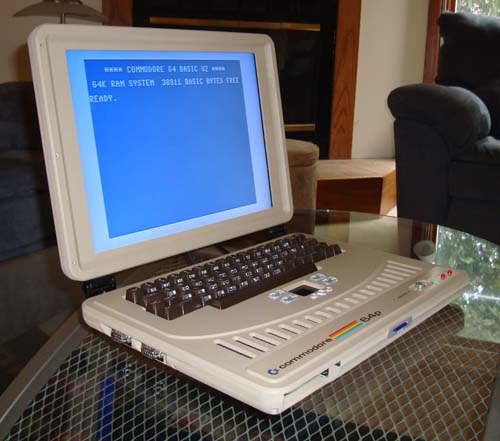
c64_hero And finally, Benjamin has created a real, “normal sized” laptop from the motherboard of a C64C, the final version of the C64 built by Commodore.
It uses the original keyboard too, and “1541-III DTV” to emulate the original 1541 disk drive. This device takes FAT32 formatted SD cards so you can copy D64 images from your PC on to it, insert the card in the laptop and load them immediately. Judging by the movie below, he needs an Action Replay cartridge or something to speed up loading. The emulated drive emulates the slow loading of the original drive too well methinks.

Nice to see Thunderblade make an appearance. I’m sure I have the original C64 tape of that game around here somewhere..

More info on Ben’s post.