This WordPress Map on ohloh.net is nicely populated, but I’m feeling rather lonely on the WordPress MU one!

Looks like I’m the only WordPress banner waving fanatic in Ireland. Come on everybody, add yourselves! π
(via Barry)
This WordPress Map on ohloh.net is nicely populated, but I’m feeling rather lonely on the WordPress MU one!

Looks like I’m the only WordPress banner waving fanatic in Ireland. Come on everybody, add yourselves! π
(via Barry)
Version 0.5.1 of WP Super Cache is now available! This release of the plugin will be especially useful for Digg and Slashdot users who experience really huge traffic spikes.
This post has been dugg! Add your Digg here! I doubt it’ll get anywhere near the front page at this stage as it’s only collected 3 diggs in 7 hours. Once it hits 24 hours it disappears forever.

After submitting a site to Digg, some people do the following to get every last ounce of performance out of their WordPress blog, especially on an underpowered server:
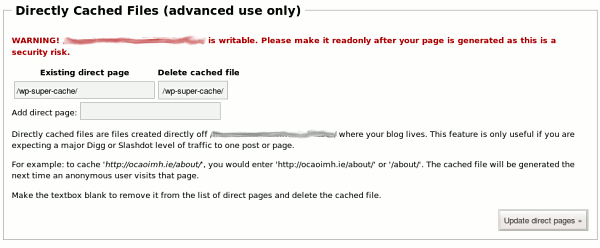
The new version of WP Super Cache automates all the above. You do have to make your blog’s root directory writable by the webserver, but you’re warned continually that this is a major security risk and reminded to make it read-only again.
Download it here: wp-super-cache.0.5.1.zip
How does it perform versus the regular static files the plugin creates? In most situations you won’t notice any difference, but when there are tens of thousands of requests hitting your server for one particular page, I find that Apache has trouble keeping up.
In other developments, I added checks for PHP safe_mode. Unfortunately safe_mode stops WP Super Cache working properly. I’m glad to see Mark applied my patch for Subscribe to Comments! No more stray emails if you use the moderation queue to approve comments from many posts!
I’m not sure why I noticed this protest sticker. It’s stuck to a lamp post on Patrick Street, Cork but maybe it was the typo in the URL that triggered my subconscious. One thing I can be certain of is that WordPress.org is not taking sides in any conflict of any sort! GPL software can be used by anyone just so long as they stick to the agreement with which they accepted the software.

As expected, palestinesolidarityproject.wordpress.com points at an old blog of theirs as they have now moved to their own server at palestinesolidarityproject.org.
Glossing over the .org mistake for a minute, why do people still put the “www.” in front of long-winded urls? It gets stripped by WordPress.com anyway. Why not put “http://” there instead? Makes more sense to me. Three cheers for the no-www movement!
So, have you seen any glaring typos on posters, fliers, stickers or blogs that made you look twice? Today’s link post doesn’t count. I did that on purpose to make a point. Sure. π
Now, that’s why you can’t believe benchmarks. Sure, this server was able to serve 100,000 page views in 282 seconds but:
So, Litespeed’s webserver is the one to go for? Maybe not. I can’t for the life of me get compression of the static cache working. When I do, the browser tries to display the gzipped data directly. I can enable the webserver’s gzip function but from tests I don’t think it caches the resulting gzipped file. (btw – mod_deflate, the Apache2 module that does the same thing suffers from this problem too!) Later – testing this again. Litespeed allows you to set a a gzip cache directory. For normal traffic it’s worth doing so pages load faster.
The mod_gzip site is a great resource if you want to find out more about compressing HTTP content.
How did Apache cope? I was serving 100 concurrent requests and Apache didn’t cope too well. It did serve all the file requests eventually but the load average jumped to just over 50 and the site was unavailable to anyone else. It’ll serve 1000 requests for a static file fine, even 10,000 too, but under constant load the server starts to wilt. Unless you have the RAM to keep enough Apache child processes going all the time you’re going to start swapping.
Meanwhile, Litespeed hardly caused a blip in the server’s load average. I’m quite impressed and I’m running it now. It’s also what powers WordPress.com. Even if you’re not using WordPress, you should look at alternatives to Apache.
This leads me nicely on to announce WP Super Cache 0.4! Download it here!
Major new features include:
Support queries should go to the forum. Make sure your posts are tagged “wp-super-cache”, but if you post from that link they will.

I must admit making the front page of Digg.com wasn’t the nail biting experience I expected.
$ grep "GET /2007/11/05/wordpress-super-cache-01/" access.log.1|grep digg -c
4686

My Super Cache announcement only drew 4686 visitors which is an ultra-light Digg. The Digg page for the post received 808 diggs as of a few minutes ago which is great. Thank you for voting! Judging by the sheer number of comments on that post, there’s a lot of interest out there in the plugin.
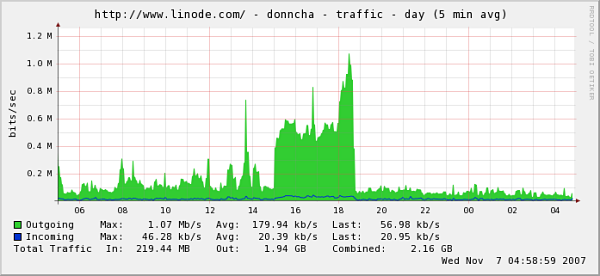
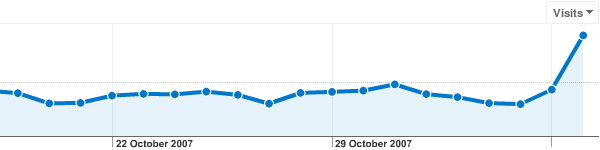
What about traffic graphs? The spike at the end of the first graph is my nightly Backuppc service kicking in. The second is from Google Analytics. My server could certainly handle a lot more traffic!


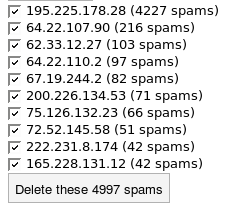
A quick look at my uptime shows the server hardly broke a sweat dealing with the extra traffic except where some idiot spammer bots tried to download my archives a few times. Unfortunately the first time that happened the archives weren’t cached and the load climbed.
For maximum performance, download Xcache and install it. The Xcache WordPress plugin uses Xcache to cache data structures and makes WordPress much faster, even if you don’t use any other caching tool.
It’s time to lift the veil of secrecy on my latest project. With help from friends who diligently tested and reported bugs on this I can now present version 0.1 of WP Super Cache!
It is an extensive modification of the famous WP-Cache 2 plugin by Ricardo Galli Granada. This plugin creates static html files that are served directly by the webserver as well as the usual WP-Cache data files. It also goes one step further fixing a couple of bugs, adding some hooks and new features and making WP-Cache more flexible.
From the plugin page, here are some of the major changes and updates:
do_cacheaction() and add_cacheaction() like you would with WordPress hooks. Plugins can add their own options to the admin page too.If your server is struggling to cope with the traffic your site gets this plugin could be just right for you. If your site regularly gets hit by spikes of traffic like a digging or slashdotting it’s definitely the right choice, and even for everyday use, you may very well notice your webserver is a little bit more responsive.
I contacted Ricardo last week and sent him on an earlier copy of the plugin but I haven’t heard from him yet however. I’d love to know what he thinks of my modifications!
Update! this post has been dugg, please digg it and we can really test the cache out!
Nov 6th: WP Super Cache 0.2 is out! I think all the bugs mentioned below are now fixed. I applied Tummbler’s patch (from Elliott and Reiner) that enables gzip compression of the WP-Cache data files and fixes feed content types.
Please note: PHP’s internal zlib compression must be disabled for this to work. Look in your php.ini for the zlib.output_compression and zlib.output_compression_level directives and comment them out by placing a “;” at the start of each line.
Check the plugin page above for the download link.
Finally, after what seems like an age, the download page has been updated with the new WordPress MU 1.3 release.
WordPress MU is a multi-blog version of WordPress which runs on millions of blogs all over the world. The major blogging site, WordPress.com uses it as do many others.
This is a sync of WordPress 2.3.1 which includes native tagging support as well as many bug and security fixes.
WordPress MU specific features include:
Developers – get_blog_option() will never return the string “falsevalue” again. That bug has been squished and it now returns the boolean value false.
This forum thread on the new release is worth watching. Any problems will surface their first.
Thanks to:
Everyone on the MU forums for your help in tracking down bugs.
ktlee and momo360modena for all your patches. They’re very welcome and a huge help.
Extensive documentation is being built up on the WordPress MU Codex by many people, including Martin Cleaver who bugged me about moving the docs from Trac and about telling everyone that documentation help is always needed.
Daylight Saving Time (DST) kicked in this morning in Ireland, the UK and many other parts of the world when the clocks went back 1 hour. The US is next week from what I remember. If your server is using UTC time, check Options->General, the “Times in the weblog should differ by” textbox in your blog and adjust accordingly!

Here’s a discussion on the WordPress.com forums about the issue from last year and I found this extend idea that has already been implemented in the Time Zone plugin, but it only works on UNIX-like systems and if you’re not using PHP’s safe mode.
PHP5 has the date_default_timezone_set function, but not enough hosts are using PHP5 to make that a universal choice. It would be nice if all this was done automatically, but hopefully with the further adoption of PHP5 that will happen eventually.
And don’t forget to check your other gadgets, especially digital cameras. I doubt many of them know anything about timezones!
If you use protected posts on your WordPress blog you may have noticed that WP-Cache doesn’t cache those password protected posts properly. I didn’t know this, but James Farmer did so I went looking and found a fix.
In the plugins/wp-cache/ directory, open wp-cache-phase1.php in your favourite text editor and look for the following line:
if (preg_match(“/^wordpress|^comment_author_email_/”, $key)) {
Replace that line with this one:
if (preg_match(“/^wp-postpass|^wordpress|^comment_author_email_/”, $key)) {
Save and upload the file if necessary and clear your cache. Password protect posts should be cached properly now!
Ironically, this post wasn’t being cached by WP-Cache because the url contains the string “wp-“. Here’s how to fix that bug. Open wp-cache-phase2.php and look for the following line:
if (strlen($expr) > 0 && strstr($uri, $expr))
Change it to read:
if (strlen($expr) > 0 && substr( $uri, 1, strlen($expr) ) == $expr )
Phew. This post is now cached.