Luciano Pavarotti has sung his last

Luciano Pavarotti died in the early morning of September 6, 2007 at home surrounded by his wife and four daughters.

I got a bit of a shock this morning looking through my feeds when I saw Pat’s post that Pavarotti died. The Wikipedia page on him has already been updated with more details. A sad day for his family, friends, fans and the music world.

luciano-pavarotti.png

Charity photography exhibit starts today

If you’re not subscribed to my photoblog, In Photos dot org, you might have missed the announcement about the exhibit. Mallow Camera Club (no, we don’t take photos of candy, cookies or biscuits, Mallow is a town a few miles from here!) will be exhibiting a number of photos in Mallow Town Library for three weeks starting today.

One of the Club’s members, Sean Riordan, is heading out to South Africa shortly as part of a group from the Niall Mellon Township Trust helping to build homes for the poor in that country. All the photos on exhibit will be for sale with all profits going to help fund Sean’s trip and the good work he’ll do in November.

Your one week’s hard work will change the lives of generations of some of the poorest families in the world. Over 200 families will move from a one roomed shack measuring 3m x 3m to a house with 2 bedrooms, a kitchen and a bathroom. Most importantly, these houses will have running water, electricity, and sanitation – facilities we take for granted in our everyday lives.

171643566_d75305c354_m.jpg

One of my photos, this one of Brendan O’Carroll outside the Opera House in Cork will be on show and for purchase too. It’s not exactly like the one shown here. It’s a portrait with a tighter crop and better. I’ll be there tonight at 6pm to see how things go. If it’s bought while I’m still around, I’ll sign my photo for you. You never know, it might be valuable in years to come!

So, here’s me asking for everyone to give this a plug, especially if you live in Cork or some of your readers live in the locality. Come on Donal, Ryan, Tom, Damien, Adam, Gamma Goblin, Conor, Will, Mel, Haydn, Mark and everyone on Cork Blogs .. Giz a link and a plug, please! 🙂

Is your eAccelerator cache dir still there?

While looking through this WordPress performance post I realised that eAccelerator might not be running properly on this blog. For some time I’ve noticed this site hasn’t been as quick off the mark as it used to be. Dare I say it, but it was even a little sluggish!

If you’re not familiar with it, eAccelerator is a PHP accelerator. It caches PHP bytecode and performs optimizations to make your PHP site run a lot faster.

I verified that eAccelerator was loaded and then checked my php.ini configuration. Sure enough, the eaccelerator.cache_dir directive was set to “/tmp/eacc/” and that directory was deleted the last time my server rebooted.

A permanent fix is to change the location of the cache dir. Put it anywhere the webserver can read, but don’t put it in /tmp/.

While you’re looking at eAccelerator, upgrade to the latest version, especially if you’re running PHP5.

gmail: no third-party DSNs

Be careful if you forward email to a gmail account. Gmail doesn’t like receiving mail delivery status notices or reports. This server filled up overnight with tens of thousands of email reports bouncing back and forth between it and gmail. If you emailed me in the last 24 hours and I haven’t replied, I may not have received it (yet).

postfix/cleanup[12107]: 9FE58326C1: reject: header Content-Type: multipart/report; report-type=delivery-status;??boundary=”A507733AD3.1188834275/mail.ocaoimh.ie” from local; from=<donncha_@_ocaoimh.ie> to=<xxxx@gmail.com>: no third-party DSNs

I really haven’t had any luck with email recently …

How I fixed everything

  • First of all I disabled the forward to my gmail accounts by moving .procmailrc out of the way.
  • Then I deleted a lot of log files to make more breathing space for everything and watched the mail spool into my mail file.
  • That was taking too long so I shutdown Postfix and went into /var/spool/postfix/ and into the active, incoming and maildrop folders where I moved every file with the string “Undelivered Mail Returned to Sender” out of the way:

    for i in `grep "Undelivered Mail Returned to Sender" * -rl`; do mv $i /tmp/xxx/ -vi; done

  • After restoring the .procmailrc, I restarted Postfix and lots of legitimate email started flowing again!
  • I added the following recipe to my .procmailrc which I hope will stop bounced messages getting to Google:

    :0:
    * ^Subject: Undelivered Mail Returned to Sender
    POSTMASTER.txt

What caused the problem in the first place? A bounced email from Yahoo. Someone left a comment with a fake email address, subscribed to the post and when another comment was left on that post the subscription email bounced. It’s worked before fine so I’m not sure why Google are complaining now! Over 2GB of bounced mail. My poor server.

Update! It happened again but I stopped Postfix at 9.5MB free on the filesystem and this time I found out what went wrong. I implemented these Postfix rules Justin blogged about without running Spamassassin. Well, I used to run SA but then when I started using Gmail I stopped, which is probably why I didn’t see this earlier. Not Justin’s fault, my own for playing with fire!

Idiot spammers

This comment was posted automatically using Blog Comment Poster. Check out its site to learn more and start building backlinks to your websites today.

This post was written manually using Donncha’s fingers. Check out the Akismet anti comment-spam plugin to stop the idiot spammer at 75.126.132.23 using “Blog Comment Poster”.

Ubuntu Linux on Dell D630: the DVD

Getting the DVD drive working in Ubuntu Feisty on my Dell D630 laptop was one of the tasks that eluded me until a few minutes ago when I went searching again and found the solution.

At first I tried this and used the ide-generic driver. Linux recognised the drive, but as the page above says, it doesn’t give you any DMA modes. I tried the Bourne Supremacy, just to see if anything would happen, but Totem just sat there and the system became sluggish while the CD made some whirring noises. That’s a sure sign that DMA isn’t working!

That wasn’t going to be satisfactory, so I kept searching. This page and some of the Ubuntu forums suggest loading the “piix” and “ata_piix” modules. I tried to modprobe them without luck, but when I added “piix” to my /etc/modules and rebooted my DVD drive was found!

DMA is now enabled and everything works ok. Even got the film to play in Mplayer and it was very smooth.

# hdparm -i /dev/hda

/dev/hda:

Model=TSSTcorp DVD+/-RW TS-L632D, FwRev=DE04, SerialNo=
Config={ Fixed Removeable DTR10Mbs nonMagnetic }
RawCHS=0/0/0, TrkSize=0, SectSize=0, ECCbytes=0
BuffType=unknown, BuffSize=0kB, MaxMultSect=0
(maybe): CurCHS=0/0/0, CurSects=0, LBA=yes, LBAsects=0
IORDY=on/off, tPIO={min:227,w/IORDY:120}, tDMA={min:120,rec:120}
PIO modes: pio0 pio1 pio2 pio3 pio4
DMA modes: mdma0 mdma1 mdma2
UDMA modes: udma0 udma1 *udma2
AdvancedPM=no

# hdparm /dev/hda

/dev/hda:
IO_support = 1 (32-bit)
unmaskirq = 1 (on)
using_dma = 1 (on)
keepsettings = 1 (on)
readonly = 0 (off)
readahead = 256 (on)

Blogline's new interface is beta

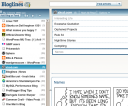
Bloglines beta screenshot

Bloglines have announced a beta of their new interface, just after I jumped ship to Google Reader. The new interface looks snazzier than the old one and they’ve adopted some of the conventions of Google Reader. Clicking on a subscription doesn’t mark all items as read for example.

The same accelerator keys still work, and “s” still jumps to the next feed, but they don’t have the star and sharing features of Reader. If you’re reading this through a feed reader jump to the front page of ocaoimh.ie and you’ll see an “I like these” list on the sidebar. Those are my shared items. Damn, I found something sticky in Reader that I can’t live without.

bloglinesbeta-views.png

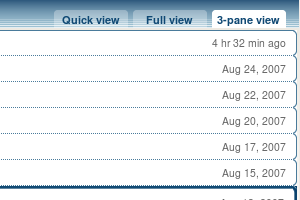
Bloglines now has 3 views of your feed. Like Google Reader you have the Quick and Full views, but a third view, the “3 pane view” looks more like an email client or news reader. Nice, but I’m too used to the full view to switch now.

If i hadn’t already moved to Google Reader I’d be disappointed. The new 3-pane-view is nice but not enough to make me jump back to Bloglines. It’s beta, so hopefully it’s not too late to add a few new features.

Waterloo Renewal Fundraiser

2007-08-25_img_4345-hs.jpg

Originally I thought we might head to Youghal tomorrow but someone called to the door a few days ago selling raffle tickets to support renewal of the local area. It’s organised by “Waterloo Renewal Group” who have great plans for the local river area and walk. There will be a BBQ at the Waterloo Inn so it looks like we won’t be going far from home on Sunday!

How labels saved my life

Well, they made it easier. Saved might be a little strong. When using a Unix based system you use a file called /etc/fstab to designate all the hard drives and external storage like flash cards and where they will mount or live on your filesystem. It’s not quite like the Windows world where everything has a drive letter, although you can use SUBST to get a similar effect on that operating system.

/etc/fstab is easy to maintain when all your drives stay in one place, but since I’m using 3 external drives and a card reader, sometimes the device name /dev/sdX changes for each. It’s horribly frustrating changing entries in fstab just because the card reader wasn’t plugged in when the computer booted into Ubuntu Linux

That all changed when I assigned labels to each drive. Now fstab entries reference those labels instead of devices! The following line,

/dev/sdc1 /media/disk auto rw,user,noauto 0 0

becomes

LABEL=DATA /media/disk auto rw,user,noauto 0 0

So, even if the device changes from sdc1 to sdd1 /media/disk will always mount!

Here’s a great tutorial on how to assign labels to disks, and how to modify your /etc/fstab to support them. It might seem like a pain at first but it’s well worth it!