
WP Super Cache 0.9.6.1

WP Super Cache 0.9.6.1 is now available.

This release adds the following menu item to the admin page.
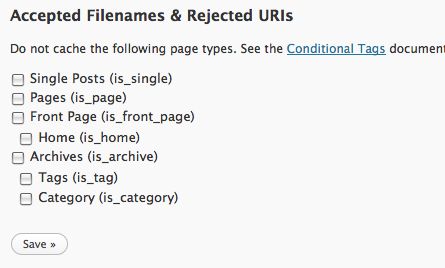
page_types

You can now choose to not cache different types of pages on your blog. Don’t want to cache your front page? That’s easy now. The indented page types are types covered by the top type. “Archives” covers “Tag” and “Category” pages for example.
See the Conditional Tags codex page for a description of the page types, especially “front page” and “home”.

I also fixed a few bugs, including the AYS problem saving posts which was a problem if you had “Don’t cache for logged in users” enabled.

I never got around to blogging about 0.9.6 but that included an uninstall script that deletes the folders and files created by wp-super-cache. Make sure you read the readme.txt before running it. For security reasons you have to edit the script before using it.

I also updated the mod_rewrite rules in cache/.htaccess (Thanks Andrew!) For some reason the web server forgets the mime type it’s supposed to serve gzipped supercache files as. It should be “text/html” in the cache dir but randomly and on the odd occasion it reverts to the gzip mime type. I examined the cache files when this happens and they look correct. Clearing the cache dir fixes the problem temporarily (and file sizes match before and after). I can’t explain it.
Remove cache/.htaccess if you see this happen (you might need to use the uninstall script) and reload the admin page to regenerate the file. The new rules force the mime type in a different way. Hopefully Apache won’t forget it this time.
Win a trip to Disneyland

I’ve got good news, and I’ve got great news! The good news is for spammers. The great news is for you.

The good news is that in 3 simple steps you too could win a trip to Disneyland:

  • Visit one of those sites that lists this blog as a dofollow blog (BTW – it doesn’t dofollow anymore)
  • Click on a link to my blog.
  • Have a great time in Disneyland!

The great news is that you can send those spammers to Disneyland too! Just take a look at the code in disney.txt and copy it into your wp-config.php (Put it right at the top of the file!) or into an auto_prepend file.

The $bad_referrers array is a simple list of offending sites that send you the most spammers. Add them in and when the spammer comes visiting they’ll be whisked off to Disneyland for a magical tour of the castle. (Hopefully they’ll meet an ogre who’ll take a fancy to them and lock them in the tower or something!)

I use my Comment Referrers WordPress plugin to tell me where comment authors come from but sometimes if they’ve browsed around my site (and the referrer is gone then), I search my logs for their IP address.

Yes, the above could be done with .htaccess mod_rewrite rules but this is more portable and I redirect to a Pretty Link shortcut so I can easily count the hits. No matter what I did I couldn’t get it to exclude the hit to the shortcut and it would redirect continuously.

Update! I added rewrite rules to send the spammers off. I’m sure these rules can be improved so leave a comment if you have any tips.

RewriteCond %{HTTP_REFERER} .*theseomizer.com.* [NC,OR]
RewriteCond %{HTTP_REFERER} .*seomizeme.com.* [NC,OR]
RewriteCond %{HTTP_REFERER} .*revolutioners.com.* [NC,OR]
RewriteCond %{HTTP_REFERER} .*rishabhsood.net.* [NC,OR]
RewriteCond %{HTTP_REFERER} .*011831068587400451950.* [NC,OR]
RewriteCond %{HTTP_REFERER} .*backlinkmagic.com.* [NC,OR]
RewriteCond %{HTTP_REFERER} .*www.online-utility.org/webmaster/backlink_domain_analyzer.jsp.* [NC,OR]
RewriteCond %{HTTP_REFERER} .*forums.digitalpoint.com/showthread.php?t=1011238.* [NC,OR]
RewriteCond %{HTTP_REFERER} .*courtneytuttle.com/blogs-that-follow/.* [NC,OR]
RewriteCond %{HTTP_REFERER} .*forums.digitalpoint.com/showthread.php?t=1006727.* [NC,OR]
RewriteCond %{HTTP_REFERER} .*forums.digitalpoint.com/showthread.php?t=1003675.* [NC,OR]
RewriteCond %{HTTP_REFERER} .*rasimcoskun.com.* [NC,OR]
RewriteCond %{HTTP_REFERER} .*smartpagerank.com.* [NC]
RewriteRule ^(.*) http://disney.com/ [R,L]

And in other news, Stephen Cronin created the comment warning plugin to warn visitors who come from predefined urls like the dofollow lists above. Nice!

WordPress MU 2.8.2

WordPress MU 2.8.2 has just been released. This is a security release with the same fix as the standalone WordPress.

WordPress 2.8.2 fixes an XSS vulnerability. Comment author URLs were not fully sanitized when displayed in the admin. This could be exploited to redirect you away from the admin to another site.

This release also fixes a number of other bugs, most notably the upgrade notice, but also fixes a number of other problems. See the timeline for a record of the latest activity.

Grab the new release from the download page or upgrade automatically from within WordPress MU.

Worldwide Photowalk on MU

For all you photographers out there, did you know the Worldwide Photowalk takes place next Saturday? It’s a good chance to meet other photographers in your area. It was a pleasant surprise when I realised their website runs on WordPress MU! I’m leading the Cork City Walk (still a few places left!) on Saturday and it was nice when I recognised what it was running on.

So, if you’re free on Saturday, check out the listings page. There might be a photowalk near you!

PS. If you’re running WordPress MU, check out the alpha release of the new version. It fixes a number of bugs in the original 2.8.1 release. It’s very stable but try it out on a test server first.

Why you should limit login attempts

limit-logins

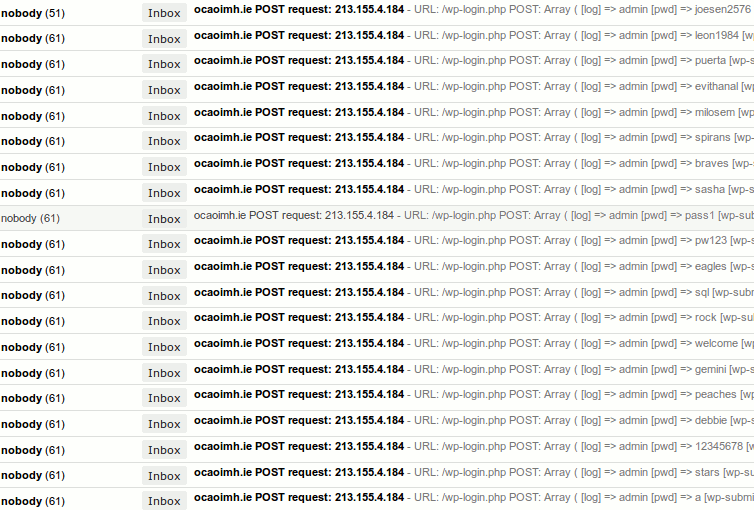
Some idiot at 213.155.4.184 hit all my websites over the last few days trying to login to my blogs. He fired off hundreds of automated requests probing and searching and testing my admin login. Each request had a different password. I use difficult to guess passwords but seeing the attempts was disconcerting.

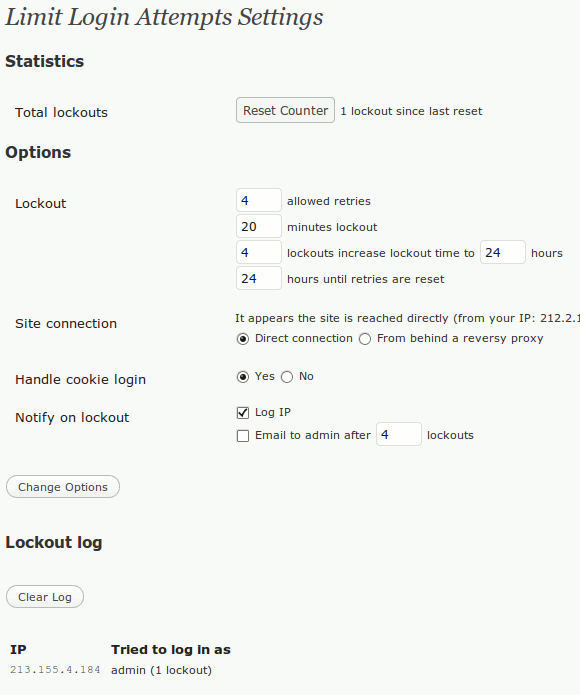
I went searching and found the Limit Login Attempts plugin. After installing, a new page appears under Settings with a wealth of options:

lockout

I’m glad I did install it, it caught the same guy when he hit this blog a few hours later! You should probably install it too.

PS. Matt asked me to explain how I recorded those requests. There is a WordPress plugin that sends an email when a POST request is made but I threw this code into a file and load it with the “auto_prepend_file” directive in my php.ini (saves adding it to every installation of WordPress on my server)

if ( ( isset( $HTTP_RAW_POST_DATA ) || !empty( $_POST ) ) && $_SERVER[ 'REQUEST_URI' ] != '/wp-cron.php?doing_wp_cron' && $_SERVER[ 'SCRIPT_NAME' ] != '/wp-comments-post.php' && substr( $_SERVER[ 'REQUEST_URI' ], -10 ) != '/trackback' && substr( $_SERVER[ 'REQUEST_URI' ], -11 ) != '/trackback/' ) {
    mail( "MYEMAIL@gmail.com", $_SERVER[ 'HTTP_HOST' ] . " POST request: " . $_SERVER[ 'REMOTE_ADDR' ], "URL: {$_SERVER[ 'REQUEST_URI' ]}\nPOST: " . print_r( $_POST, 1 ) . "\nCOOKIES: " . print_r( $_COOKIE, 1 ) . "\nHTTP_RAW_POST_DATA: $HTTP_RAW_POST_DATA" );
}

WordPress MU 2.8.1

WordPress MU is a multi user or multi blog version of WordPress that is used to run sites like WordPress.com.

Just a day after WordPress 2.8.1 came out and here’s WordPress MU 2.8.1. The original WordPress announcement has plenty to say about this release, but what you need to know is this is a security update and a required upgrade.

This is the first MU 2.8.x release because of course there wasn’t a 2.8 one. Make sure you upgrade to stay up to date. The handy auto upgrade facility built in to the software should kick in but if not, go to the download page and grab the new zip file. Unzip over your current install and any database upgrades will take care of themselves when people login.

The WPMU Timeline is a good place to look to keep track of what has changed. Many bugs were squashed and features added.

WordPress MU 2.8.1 beta

Autumn Trees WordPress MU is a multi user or multi blog version of WordPress that can be used to run sites like WordPress.com.

MU Admins! Please download and test wpmu-2.8.1-beta.zip on a test server! This is a beta release that is this <—> close to being final but it needs testing by the community.

It works fine on my test server but I haven’t been able to test every last thing to death. That’s where you come in. Download it, install it, login, look around. Notice anything broken? That’s what Trac is for. Verify you can repeat the problem, open a ticket and describe how the problem can be reproduced. Well done. You’ve just contributed to a Free Software project. πŸ™‚

PS. I know there are two “My Blogs” links in the beta. That was fixed 2 days ago. Grab the zip file from the end of this page to get the most up to date code.

Go Mobile with Supercache

I’ll be honest, I don’t have much experience with mobile content. I’ve rarely browsed the net on a mobile device. I don’t have an iPhone and don’t intend buying one but lots of people do use mobile devices to browse online.

With that in mind, and after some pestering by Vladimir I modified WP Super Cache so it will support mobile devices and operate in full super caching mode!

The plugin now filters out requests from the most common mobile user agents and serves those requests in “half on” WP-Cache mode while serving the rest of your visitors static html files. As I’ve said many times before, the speed differences between both modes is negligible for normal traffic but it’s a nice safety net in case your site is inundated.

Only thing is, I want people to test it first before making a final release. Grab the development version from the download page and give it a whirl.
Your mod_rewrite rules in the .htaccess file have to be updated but if you delete the “WPSuperCache” rules they can be regenerated by the plugin next time you load the admin page.
There are also a number of other bugfixes and enhancements too so check out the Changelog.txt for more details.

I use WordPress Mobile Edition here and last Sunday I noticed an extra 10,000 requests from Google using odd looking “mobile useragents” like this one:

SAMSUNG-SGH-E250/1.0 Profile/MIDP-2.0 Configuration/CLDC-1.1 UP.Browser/6.2.3.3.c.1.101 (GUI) MMP/2.0 (compatible; Googlebot-Mobile/2.1; +http://www.google.com/bot.html)

The actual mobile device changed but the Google bit stayed the same and all requests came from 66.249.71.2
Eventually I figured out that Google was adding my site to the “mobile” section of their index. Presumably to be served from here. Cool, another way of getting to my site.

PS. the development version also has a small modification to make it go faster by not checking file modification time on each request. This could help on really busy servers.

WordPress MU Catchup: big merge, wpmudev goes gpl and MU support

Exciting times in the world of WordPress and WordPress MU. Last weekend’s announcement by Matt that WordPress MU would merge into WordPress caused a flurry of activity and questions on twitter and on blogs, most notably with speculation that WordPress.org would run on MU and by jeffr0 who asked me on IRC what was happening.

Basically, the thin layer of code that allows WordPress MU to host multiple WordPress blogs will be merged into WordPress. I expect the WordPress MU project itself will come to an end because it won’t be needed any more (which saddens me), but on the other hand many more people will be working on that very same MU code which means more features and more bugfixes and faster too. It also means no more marathon code merging sessions. I certainly won’t miss that.

Meanwhile in the real world, there’s more merging to be done. WordPress 2.8 is expected next Wednesday and it has introduced fancy new stuff I haven’t finished fixing yet in WordPress MU. Expect an MU 2.8 beta sometime next week I hope.

In what I first thought was fabulous news, James Farmer has announced that WPMU DEV Premium has been relaunched. The site offered premium support for WordPress MU for a very long time. It also sold proprietary plugins which I’ve never agreed with (because of the conflict with WordPress) but now all plugins are GPL licensed.
Then I found out that you need to signup and pay a subscription fee to download them. I’m conflicted about it, because if I’m honest, while they’re sticking to the letter of the GPL, the spirit may be lacking.
So, should you signup there for a month, download all their plugins and upload them to WordPress.org? It’s tempting isn’t it? But no, you shouldn’t. This is real income for James, Andrew and company. If their plugins are uploaded elsewhere will they be updated? Will you signup for another month and grab them all again and upload each and every one to separate Subversion repositories? Will you provide support when things go wrong? I didn’t think so.
If it really bothers you that GPLed plugins are not available “free as in beer” then write your own and support it. It’s not something to be done lightly.

When we speak of free software, we are referring to freedom, not price. Our General Public Licenses are designed to make sure that you have the freedom to distribute copies of free software (and charge for this service if you wish), that you receive source code or can get it if you want it, that you can change the software or use pieces of it in new free programs; and that you know you can do these things.

(GNU GPL v2.0)

Of course, WPMU DEV aren’t the only MU support people in town. Check out Ron & Andrea’s musupport.net and of course I recommend the Automattic Support Network where you’ll find me and the rest of Automattic.