Howto: Geotag photos in Lightroom with Google Timeline data

One feature in Adobe Lightroom that many don’t use often is the Map module. It’s really useful if your camera has GPS, if it can connect to your phone GPS, or if you manually drag images onto a map. I use the Sony “Imaging Edge Mobile” app to connect my camera to my phone via Bluetooth, but this drains the battery quickly when I’m out for a long time. It’s not ideal. If I want to use the Bluetooth remote control (not the app, the physical remote) I can’t use the location feature.

The changing of the guard. A guard approaches the camera. His dress uniform is a red cap with a long black silk tuft. His uniform is brown, and his shoes have a black tuft at the top. He has a grave expression on his face. Another guard stands in the background, facing away.
The changing of the guard at the Tomb of the Unknown Soldier, Athens, Greece.

The battery life of my camera when “Airplane mode” is enabled is stellar. Not so much when using a Bluetooth connection. If I know I’ll be out for an entire day, I’ll toggle it on and off and usually remember to do it on both devices, and sometimes I even make sure to check the next image has embedded GPS data!

Google Timeline is a feature that records your location data over time, using your phone’s GPS. This data can be very useful for geotagging photos because it provides a detailed record of where you’ve been. I’ve long wondered if I could use that GPS data to geotag my photos. You can export the entirety of your location data from Google using their Google Takeout tool. If you’ve had a Google account for a long time, that file will probably be well over 1GB is size if you had location sharing enabled. Unfortunately, it’s not in a format that Lightroom understands, and may contain many years worth of location data.

A few months ago, I decided to try writing a script that convert the Google Timeline JSON data into the GPX format that Lightroom wants, but I didn’t get very far, as “real life” intruded, and it was yet another project left on the long finger. I was looking forward to a day when I had sufficient time and energy to look at it.

The ruins of the Temple of Poseidon. A tree stands in the foreground, as well as some blocks with the prominent structure of columns and some horizontal pieces visible in the background.
The Temple of Poseidon in Sounion, Greece.

I’m glad I dropped it because I found someone had already created such a script, and it can consume a gigantic Records.json file. It will spit out the GPS data for any date range I want in GPX format. I discovered a Lightroom extension that makes importing that file easy, and it massages the data if a photo is taken in between points too.

The conversion script is a Python one called location-history-json-converter that can be found here. It’s relatively easy to install on Linux or macOS. If you use Windows you hopefully know how to get Python installed.

Once installed, I ran the following command to extract the GPS data I wanted for the first 17 days of May this year, and output it in the GPX format.

./location_history_json_converter.py Records.json records.gpx -f gpx -s 2024-05-01 -e 2024-05-17

That produced a nice 1.3MB file from the huge Records.json file.

The Maps module in Lightroom does allow you to import tracklogs, but I’ve used it in the past, and sometimes it missed photos, maybe because my tracklog wasn’t recording points often enough. This time I used Jeffrey Friedl’s geoencoding extension for Lightroom. The ability to adjust the timezone was critical to me, as I wanted to geoencode or geotag the photos I took on a recent trip to Greece.

A train covered in graffiti with people visible through the windows.
On the metro in Athens, Greece.

I messed up the first time and told it to adjust the timezone by 2 hours, the difference between Ireland and Greece but that was an hour out, possibly because of daylight savings time settings somewhere in the mix of camera, phone and exported data. I was really annoyed with myself over that because the plugin allows you to choose only “unmapped photos”, but now every photo was mapped. 75% of them were mapped to the wrong location!

I realised it didn’t matter because the originally geotagged images were tagged off my phone, so they had the same location data as Google Timeline. I went slower a second time, picking a couple of test images of places I knew, and by adjusting the timezone by 3 hours, I saw that it worked perfectly. I ran the job again against more than 1800 images and those images were geotagged correctly.

In the past, I used a GPS logger app to log my location to my phone. That created a GPX file, but I completely forgot I had that installed and simply used the Sony app connected to my camera for a long time. The Google Timeline data is already there because I allow Google to log that data, so it’s a handy source of this information. I can attempt to geotag years worth of photos now, but I’ll have to go slow, as I know the time on my camera drifts, so that will have to be accounted for.

We’re out of water

That’s not really an announcement you want to hear from the pilot of your flight, but that’s what happened on my flight from Athens to Amsterdam recently.

A photo from the window of a KLM flight. The wing is clearly visible and the KLM logo is etched on the end. The plane is flying above the clouds with a clear blue sky above and a hazy horizon.

The pilot came on the intercom and informed his passengers there was no water to flush the toilets or wash hands. He said that’s the first time he’s had to make such an announcement. The flight had been delayed an hour at Athens, and then we spent 25 minutes on the ground while the congested air over Europe cleared. So I’m surprised someone forgot to fill the water tank.

Water bottles were provided, but I think everyone was glad to get to Amsterdam, even if several people missed their connection due to delays. Thankfully, the flight to Cork was late in the evening, and I had time to make it to gate D6. The airport was mostly closed down with only a few shops open, and passport control was backwards which was odd but worked well enough to get us to our destination. The police there were friendly and efficient.

I have to say, one thing I love about KLM is their free WiFi that allows messaging on WhatsApp, Messenger and other apps. It was great to message my family and friends while flying. It’s something that will make me choose KLM for a connection if all other things are equal. The flight to Cork didn’t have it, but the outgoing flight a week earlier did.

I was watching Top Gun: Maverick on my phone, downloaded on the Netflix client, and it looked like my flight would land before the film ended.

Screenshot from Top Gun Maverick showing the text "Hang on. We gotta get low."
Tom Cruise is flying a fighter jet while the world turns around him.

It was a late flight, the lights switched off in the cabin. I was staring at the action on my phone, with headphones hiding the drone of the aircraft. I was glued to the action on my phone, totally absorbed in it. Maverick shouts at his passenger, “Hang on. We gotta get low.” during a dogfight. A moment later, I feel my flight touching down on the runway at Cork Airport, and I look up in mild panic. Talk about immersion. Thanks, KLM! Perfect timing!

Watch out for Aurora Tonight

Map of Europe showing the strength of the Aurora likely visible.

If you live north of me in Europe, there’s a pretty good chance you’ll see an aurora tonight. I’m looking forward to seeing all the photos!

The US Space Weather Prediction Center has issued its first “severe geomagnetic storm watch” today for the first time in nearly 20 years.

The activity is expected to make the aurora borealis phenomenon visible across Northern Europe in the early hours of Saturday, May 11th (after midnight tonight).

Donegal Daily

Someone already posted fabulous photos from Latvia!

Aurora in the skies over a house in Latvia
Aurora photo by Simron.

Writing C64 ASM in VS Code

Thanks to this Hackaday article, I found a video describing how to use Visual Studio Code to write 6502 assembler for the Commodore 64!

It’s been a long time since I’ve done any ASM on the C64, and compared to the programming environments available these days, I was working in the dark ages with my Action Replay monitor, typing code directly into memory.

Kick Assembler is used to assemble the code into a .prg file, using the KickAss (C64) extension for VS Code to launch the emulator with the code loaded into memory. I see Kick Assembler 8-Bit Retro Studio is mentioned in the comments, and it is indeed still being developed, so it might be the better choice, but either will make developing on the C64 much simpler.

It gives a nice overview of using Git to track changes too, something I would have also loved on the C64. So many files prefixed with numbers as I experimented with effects …

Faulty Towers – The Dining Experience

Sybil and Basil Fawlty
BASIL!
Yes, dear!

If you’re a fan of Fawlty Towers, the hit British comedy from the 70s, then you’ll love The Dining Experience. Apart from the entertaining “shows” the three actors put on, you’ll, of course, be eating a three-course meal.

Manuel, the hapless Spanish waiter, doing his best to do his job.
I know nothing!

In Cork, they performed in the Metropole Hotel, so the food was great. Portions were small but it’s the experience you’re paying for and I have no hestitation in recommending it if you’re at all familiar with the show!

Speculating on what to load next

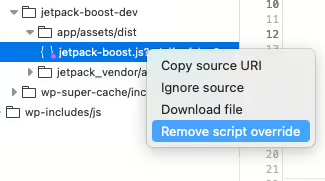
The Speculative Loading plugin for WordPress is a plugin you should probably try out on your site, especially if you use WP Super Cache or Jetpack Boost to cache things. It uses the new speculation API that Chrome/Edge supports to load pages in the background if you even hover over a link.

It will dynamically prefetch or prerender pages before they’re requested by the visitor on your site, which means that the page will show instantly when the visitor actually clicks the link.

It doesn’t work in Firefox yet, but it won’t hurt either, as the browser will just ignore the extra bits and pieces added to the page.

The default “moderate” eagerness works fine for me. The “eager” setting appeared to load links if the cursor got anywhere near them, which was a little too aggressive.

You won’t notice your browser loading the page in the Network tab of the webdev tools, but if you tail your access_log, you’ll see the requests go through when you hover over the links.

Browse around this site, or take a look at my photoblog for a feel of what it does.

There’s more info in the make blog post about it, and this insightful comment about the wastefulness of loading pages that might not be used, especially for visitors on limited data plans, or low powered devices. That’s definitely something to think about before using this plugin. I may yet remove it later, and I’ll update this post if I do.

Enough of the Moon already?

The Moon, seen from Ireland in 2021.

With the solar eclipse in the United States, and Ireland and the UK getting a partial eclipse, you’re probably sick of Moon coverage, but I would just like to point you to a couple of podcasts you’ll enjoy if you want more.

  1. Tom Hanks talking about the Moon walkers on The Rest is History podcast. Who doesn’t love listening to Tom Hanks?
  2. The Moon itself from Radiolab is a fairly basic look at the Moon, but gets a lot more interesting later on.

Both shows are great, but if you’re only going to listen to one, listen to The Rest is History, sorry Radiolab. But you should listen to both!

If you have even more time to spare, you should listen to the Omega Tau podcast episodes on the Apollo missions I listed in this blog post about Apollo. Fascinating listening. So many technical details.

As expected, the sky outside was a grey blanket on the island of Ireland. I hope someone saw something.

I’m a little tired after walking home

A screenshot of Google Fit showing the path from Amsterdam to Cork as the app recorded it.
The text "Morning walk" is below, showing a I did 14 heart points and 5,571 steps during the flight.

It’s good to be back in Cork today, even with Storm Kathleen on the way. I forgot to end my tracked walk when I got to Gate 26 in Schiphol Airport, and Google Fit somehow managed to pick up GPS signals every now and again as we flew home. So, it looks like I walked from Amsterdam to Cork. 🙂

I’ve no idea how I walked 2km off the coast of Ireland, somewhere south of Waterford. There was some bad turbulence on the flight, but we weren’t quite bouncing up and down in our seats!

The Netnewswire Reader View rocks

Netnewswire is an RSS reader for macOS and iOS devices. You know podcasts? Like that, but for reading.

RSS readers have been around for a long time, long before social media sites like Twitter and Facebook. They allow you to follow updates on your favourites sites, which could also include the personal sites of people you know. Twitter used to have RSS feeds, Facebook never did (AFAIR), but Mastodon sites (and other Fediverse services) do.

This blog has an RSS feed. You can follow my interesting posts there. Chances are, if you’re reading this, you already know all this.

Anyway, Netnewswire has a “Reader View” that will load entire posts in the reader, which is very useful if a site only shares extracts of their articles. Sometimes it doesn’t load the entire article, so you’ll need to visit the site anyway. It’s a convenient way to read without leaving the app when it works.

Oher RSS readers include the WordPress.com Reader, Feedly and many more. Wired has an overview of some, as does Zapier.

RSS won’t replace social media, it’s just another way to read the news.