WordPress at No. 10

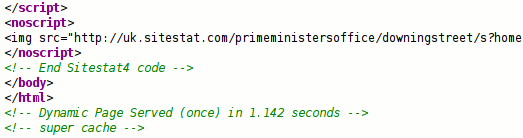
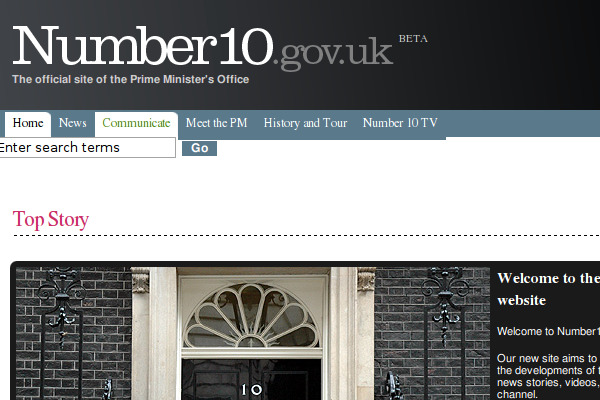
You may have heard that the official site of the British Prime Minister’s Office at number10.gov.uk launched earlier today. The great news is that it’s running WordPress, but what really excited me is the fact that the site is also using WP Super Cache.

The site was initially very slow, but once the cached static files were in place, it just zipped along! Three cheers for caching and everyone who has contributed to WP Cache and WP Super Cache! 🙂

I wonder if Gordon Brown will be looking at his Dashboard? *Wave*

WordPress MU Domain Mapping 0.1

A long sought after feature in WordPress MU is domain mapping. That’s where a blog on a WordPress MU site can be “mapped” to a new domain. WordPress.com has an advanced domain mapping feature that has proved to be very popular with users even though it’s a paid-for upgrade.

This domain mapping plugin isn’t quite as powerful and still requires plenty of testing. So, while domains and “sub domains” or hostnames can be mapped to individual blogs, there are a number of caveats:

  1. Remote login does not work. It’s possible to be logged in on the main site, logged in on the domain mapped blog as a different user or not logged in at all there!
  2. It only works if your WordPress MU site is using sub domains.
  3. It’s the 0.1 0.2 release. It’s basic.

Here’s the plugin page, and the download page. I’d like to hear how well it works for you.

I’m submitting this plugin to the WordPress MU plugin competition. There are only 2 other entries so the odds on my winning are pretty good!

I should have a Sitewide Tags update later this week, with thanks to Thomas Schneider who came on board last week to help and has done some super work!

Ron and Andrea found a bug in pre release testing that I forgot to fix in 0.1, so grab 0.2 if you were (un)lucky enough to grab the first release! Thanks Trent for testing too. Follow me on Twitter to get the inside scoop on my WordPress plugins, including a sort of super secret Twitter plugin..

WordPress MU is the multi blog version of WordPress that runs on WordPress.com and many other sites.

Gravatar enabled WordCamp Badges

Andy has the very exciting news that Gravatar icons will be printed on attendee’s WordCamp San Francisco badges this year!

gravatar badge

On supporting websites, Gravatars have become a de-facto identity for comment threads and discussions so to carry through the identity to the conference floor is just a logical conclusion.

There is one caveat. Gravatars can now be up to 512×512 pixels. The bigger they are, the better they’ll print. If your Gravatar is a measly 32×32 pixels it’s going to look like a dirty smudge next to the shiny badges of the big boys. Andy has created a handy form for checking if your image is the right size. If not, please upload a new Gravatar before August 14th!

I won’t be at WordCamp this year but after seeing the line up of speakers I’m looking forward to seeing the blog coverage afterwards.

PS. Andy has a new post showing how to create those badges with the help of a PDF library.

WordPress MU 2.6

Version 2.6 of WordPress MU is now out! WordPress MU is the multi blog version of the popular blogging software WordPress. It’s the engine behind WordPress.com and many other blogging sites.

This version of WordPress MU is based on WordPress 2.6. There’s a long and interesting WordPress.org post on the new features in 2.6 so get over there to read up on post revisions, “Press This!”, Gears, Theme Previews, and the long list of developers who helped make this release a reality.

Some of the new features in this release of MU:

  1. Version number is 2.6 rather than 1.6 because it just makes sense to synchronise the major version numbers.
  2. Signup page now has a nonce which should help in the fight against spammers, for a short while anyway.
  3. Redirecting to the signup page for 404s and for unknown blogs is not enabled by default. Check out wp-config-sample.php for instructions.
  4. “allowed_themes” filter, much like the plugins filtered added previously.
  5. New functions: get_id_from_blogname(), is_main_blog().
  6. get_blog_details() can now take a blogname as well as a blog_id.
  7. Custom first posts didn’t always work. Now they do.
  8. Blognames in the “Add blog” form in wpmu-blogs.php are now sanitized.
  9. Added “pre_site_option_*” and “site_option_*” filters like the similar option filters.
  10. Meta fields will be passed on signup again.
  11. Added an “admin_header_navigation” filter so the top right navigation in the backend can be customised.
  12. The signup page uses “blogname” instead of “blog_id” to avoid confusion with the global variable of the same name. Plugins will break if not updated!

That last change is quite a major one. If you have any plugins that interact with the signup form they will need to be updated!

This release also addresses some security issues spotted by Alexander Concha and Juan Galiana. Thank you both for alerting us and for your patience while this release was prepared!

Sitewide tags pages for WordPress MU

For WordPress MU only. My latest plugin is the sitewide tags pages plugin.

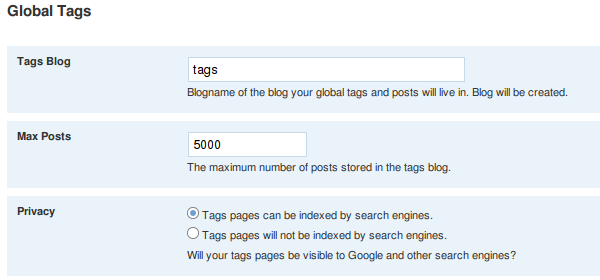
This is the initial release of a plugin that creates a set of pages like the WordPress.com Hot Topics pages. It’s a lot more simplistic, but by feeding posts into one blog it also creates a sitewide feed of all posts plus feeds of any tags and categories too.


Sitewide Tags Options

WordPress MU is a multi blog version of WordPress that runs on WordPress.com. If you use the regular version of WordPress this plugin is not for you and you can ignore this post.

PS. In other MU news. Raanan has a new post on the Publisher Blog about Nationen! blog, a new Danish blog site based on WordPress MU that looks rather nice!
The site was developed by Incsub who are also the guys behind wpmu.org where you’ll probably find all sorts of useful nuggets of MU goodness on a regular basis!

Anti spam-blog plugin for WordPress MU

The very popular WP Hashcash plugin for WordPress has been modified to work on the WordPress MU signup page.

WP Hashcash is an anti spam plugin that protects blogs from comment spam. It does this with Javascript and is quite successful. I worked on it over the last few days and the plugin now offers the same protection on the WordPress MU signup form!

This is the first release of the code so handle with care. Grab the latest version (version 4.2 as of this moment) from the download page. Unzip it and copy wp-hashcash.php into wp-content/mu-plugins/ and visit “Site Admin” -> “WordPress Hashcash” to confirm it’s working.

Now logout and create a new blog, just to make sure everything is working ok. Occasionally some users will have problems registering, and those that have Javascript turned off won’t be able to create a new blog at all. That’s the downside of using this plugin unfortunately.

Keep an eye on the stats counter on the admin page. I want to hear how well this works on your site!

WordPress MU 2.6 beta 1

Edit: The release candidate is now online. Here’s the forum thread on it. Grab the zip file to test!

WordPress MU 2.6 beta 1 is now available. WordPress 2.6 is due for release shortly and it’s already on it’s third beta so it’s times for WordPress MU to be updated.

This release has many new features as well as a few security fixes. In his beta 1, beta 2 and beta 3 posts Ryan listed some of the main features, including post revisioning, gears support for faster loading, theme previews, better SSL support and much much more.

WordPress MU specific changes include:

  • The version number is being bumped to 2.6 rather than 1.6 because of version confusion. Minor MU versions will probably append a letter to the version.
  • Signup page now has a nonce to help defeat spammers.
  • Plugins in wp-content/plugins/ are version checked like in WordPress. mu-plugins isn’t covered just yet.
  • Major object cache changes.
  • And many more bug fixes. Check the timeline for a list of changes.

Download wordpress-mu-2.6-beta1.zip

More ways to stop spammers and unwanted traffic

Comment spammers, trackback spam, stupid bots and AVG linkscanner eating into your bandwidth and server resources? Here’s how to put a dent in their activities with a few mod_rewrite rules.

I hate those blogs that send me fake trackbacks and pingbacks. Unfortunately it’s impossible to stop but this morning I figured out a way of stopping some of them.

Look through the log files of your web server for the string ‘ “-” “-“‘. Lots of requests there aren’t there? I found 914 requests yesterday. Those are requests without a USER_AGENT or HTTP_REFERER and almost all of them are suspicious because they weren’t followed by requests for images, stylesheets. or Javascript files. Unfortunately the WordPress cron server also falls into this category so you need to filter out requests from your own server’s IP address.

This morning I checked up on a spam trackback that came in. This one came from 85.177.33.196:

URL: /xmlrpc.php
HTTP_RAW_POST_DATA: <?xml version=”1.0″?>
<methodCall>
<methodName>pingback.ping</methodName>
<params>
<param>
<value><string>http://7wins. eu/cbprod/detail_10347/cure+your+tight+foreskin.html</string></value>
</param>
<param>
<value><string>http://ocaoimh.ie/2005/03/01/i-am-bored-sites-for-when-youre-bored/all-comments/</string></value>
</param>
</params>
</methodCall>

I looked through my log files for that IP address and discovered the following:

85.177.33.196 – – [03/Jul/2008:06:40:01 +0000] “GET /2005/02/18/10-more-ways-to-make-money-with-your-digital-cameras/ HTTP/1.0” 200 36151 “-” “-”
85.177.33.196 – – [03/Jul/2008:07:04:18 +0000] “GET /2007/06/07/im-not-the-only-one-to-love-the-alfa-147/ HTTP/1.0” 200 44967 “-” “-”
85.177.33.196 – – [03/Jul/2008:08:09:40 +0000] “GET /2005/03/01/i-am-bored-sites-for-when-youre-bored/all-comments/ HTTP/1.0” 200 410423 “-” “-”
85.177.33.196 – – [03/Jul/2008:08:09:44 +0000] “POST /xmlrpc.php HTTP/1.0” 200 249 “-” “XML-RPC for PHP 2.2.1”
85.177.33.196 – – [03/Jul/2008:09:00:09 +0000] “GET /2007/10/28/what-time-is-it-wordpress/ HTTP/1.0” 200 63332 “-” “-“

So, the spammer grabs “/2005/03/01/i-am-bored-sites-for-when-youre-bored/all-comments/” at 8:09am and 4 seconds later sends a trackback spam to the same blog post. Annoying isn’t it?

The following mod_rewrite rules will kill those fake GET requests dead.

# stop requests with no UA or referrer
RewriteCond %{HTTP_REFERER} ^$
Rewritecond %{HTTP_USER_AGENT} ^$
RewriteCond %{REMOTE_ADDR} !^64\.22\.71\.36$
RewriteRule ^(.*) – [F]

Replace “64\.22\.71\.36” with the IP address of your own server. If you don’t know what it is, look through your logs for requests for wp-cron.php, run ifconfig from the command line, or check with your hosting company.
Here are a few of the requests already stopped this morning:

72.21.40.122 – – [03/Jul/2008:09:59:59 +0000] “GET /2005/04/02/photo-matt-a-response-to-the-noise/ HTTP/1.1” 403 248 “-” “-”
216.32.81.66 – – [03/Jul/2008:10:00:11 +0000] “GET /2006/12/14/bupa-to-leave-irish-market/ HTTP/1.1” 403 240 “-” “-”
66.228.208.166 – – [03/Jul/2008:10:03:18 +0000] “GET /2008/05/23/youre-looking-so-silly-wii-fit HTTP/1.1” 403 212 “-” “-”
216.32.81.74 – – [03/Jul/2008:10:04:52 +0000] “GET /1998/03/22/for-the-next-month-o/ HTTP/1.1” 403 234 “-” “-”
69.46.20.87 – – [03/Jul/2008:10:06:06 +0000] “GET /2006/10/01/killing-off-php/ HTTP/1.1” 403 229 “-” “-”
72.21.58.74 – – [03/Jul/2008:10:07:54 +0000] “GET /2005/08/12/thunderbird-feeds-and-messages-duplicates/ HTTP/1.1” 403 255 “-” “-“

Some spam bots are stupid. They don’t know where your wp-comments-post.php is. That’s the file your comment form feeds when a comment is made. If your blog is installed in the root, “/”, of your domain you can add this one line to stop the 404 requests generated:

RewriteRule ^(.*)/wp-comments-post.php – [F,L]

Trackbacks and pingbacks almost always come from sane looking user agents. They usually have the blog or forum software name to identify them. Look for “/trackback/” POSTs in your logs. Notice how 99% of them have browser names in them? Here’s how to stop them, and this has been documented for a long time:

RewriteCond %{HTTP_USER_AGENT} ^.*(Opera|Mozilla|MSIE).*$ [OR]
RewriteCond %{HTTP_USER_AGENT} ^$
RewriteCond %{REQUEST_METHOD} ^POST$
RewriteRule ^(.*)/trackback/ – [F,L]

I’ve been using that chunk of code for ages. It works exceptionally well. This was prompted by a deluge of 40,000 spam trackbacks this site received in one day a few months ago.

If you use my Cookies for Comments plugin. Check your browser for the cookie it leaves and use the following code to block almost all of your comment spam:

RewriteCond %{HTTP_COOKIE} !^.*put_cookie_value_here.*$
RewriteRule ^wp-comments-post.php – [F,L]

That will block the spammers even before they hit any PHP script. Your server will breeze through the worst spam attempts. It blocked 2308 comment spam attempts yesterday. Unfortunately it also stops the occasional human visitor leaving a comment but I think it’s worth it.

Do something different. That’s what you have to do. Place a hurdle before the spammers and they’ll fall. On that note, I shouldn’t really be blogging all this, but almost all these ideas can be found elsewhere already and the spammers still haven’t adapted.

Unwanted traffic? What’s that? Surely all visitors are good? Nope, unfortunately not. Robert alerted me to the fact that AVG anti-virus now includes an AJAX powered browser plugin called “Linkscanner” that scans all the links on search engine result pages for viruses and malicious code. Unfortunately that generates a huge number of requests for pages that are never even seen by the visitor. I counted over 7,000 hits yesterday.

Thankfully Padraig Brady has a solution. I hope he doesn’t mind if I reprint his mod_rewrite rules here (unfortunately WordPress changes the ” character so you’ll have to change them back, or grab the code from Padraig’s page.)

#Here we assume certain MSIE 6.0 agents are from linkscanner
#redirect these requests back to avg in the hope they’ll see their silliness
Rewritecond %{HTTP_USER_AGENT} “.*MSIE 6.0; Windows NT 5.1; SV1.$” [OR]
Rewritecond %{HTTP_USER_AGENT} “.*MSIE 6.0; Windows NT 5.1;1813.$”
RewriteCond %{HTTP_REFERER} ^$
RewriteCond %{HTTP:Accept-Encoding} ^$
RewriteRule ^.* http://www.avg.com/?LinkScannerSucks [R=307,L]

WordPress Exploit Scanner 0.1

My previous post about hacked WordPress sites caused Donnacha to ask,

After your last post on this subject, I was thinking that it would be a good idea for Automattic to create a plugin that carries out all the checks you suggested people do to find out if they’ve been hacked…

At the time I wasn’t too optimistic about it but after thinking about the idea for a few days I came up with the WordPress Exploit Scanner which does most of what Donnacha wanted.

This WordPress plugin searches the files on your site for a few known strings sometimes used by hackers, and lists them with code fragments taken from the files. It also makes a few checks of the database, looking at the active_plugins blog option, the comments table, and the posts table.
It also allows the blog owner to search for whatever string they like which could come in handy when new exploit code is used in a hack.

You must be running WordPress 2.5.1 or higher to use this plugin. There’s not much point in finding exploited files if you’re running an old version of the software that can be broken into again.

Download the plugin from here: WordPress Exploit Scanner

Thanks to those who tested the plugin, especially Cathal Garvey who provided some great feedback!

Catch website file changes with AIDE

A week ago I suggested installing AIDE to track changes on your server in case it had been hacked. I think AIDE Is so useful that it deserves a post of it’s own. Here’s a short guide to get it working properly.

The AIDE .deb package includes configuration files for over 80 different software packages or log files. That’s great if you have all that software installed or want to keep a paranoid eye on /var but what if you only care about the directory where your website lives?

When I first installed AIDE (using apt-get install aide), it said I needed to run /usr/sbin/aideinit after installation. Every morning I’d get an email from AIDE with a list of changed files from all over my server, including mail logs, Apache logs, and more. I didn’t need all that so I removed the files from /etc/aide.conf.d/ except my WordPress config file:

/home/web/ Checksums
!/home/web/logs/.*
!/home/web/public_html/wp-content/cache/.*
!/home/web/.*/htdocs/wp-content/cache/.*

Unfortunately after I removed the configuration files the daily AIDE email was flooded with open_dir() errors:

Output is 40577 lines, truncated to 1000.
open_dir():Not a directory: /home/donncha/.bashrc
open_dir():Not a directory: /home/donncha/.bash_profile
open_dir():Not a directory: /home/donncha/.viminfo
open_dir():Not a directory: /home/donncha/.bash_history

AIDE was rendered useless by all the errors. Thankfully it was easy to fix. Run aideinit again and it regenerates the AIDE database.

# /usr/sbin/aideinit
Overwrite existing /var/lib/aide/aide.db.new [Yn]? y
Running aide –init…

AIDE, version 0.13.1

### AIDE database at /var/lib/aide/aide.db.new initialized.

Overwrite /var/lib/aide/aide.db [yN]? y

For good measure, I ran /etc/cron.daily/aide again which sent me the “Daily AIDE report”, and yes, it reported that my .htaccess file had been changed. Nice.

If your site is on a shared hosting account then you’re out of luck, but if you have a dedicated host, or virtual private server (VPS) then please consider using AIDE to keep track of changed files. It will send you a short email every day listing changed, added or deleted files. It may save you a lot of hassle and embarrassment if your site is hacked.

Edit: By default, the nightly cron script doesn’t update the AIDE database leading to the same files changes reported every day. Edit /etc/default/aide and make sure COPYNEWDB is set to “yes”. That will update the database.