My Favourite Android Apps

I’ve used a Samsung Galaxy S since August last year and in that time I’ve downloaded and played with lots of apps and games. Here are a few of my favourites.

  1. Tweetdeck
  2. Dolphin Browser HD
  3. Kindle and FBReader
  4. Amazon Appstore and Android Market
  5. Reddit is Fun
  6. GO Contacts/Dialer/Launcher EX/SMS Pro
  7. CardioTrainer
  8. WordPress
  9. aCar
  10. Juice Defender
And some games
  1. Galaxy Domination (not on the market any more, now here!)
  2. Cut the Rope
  3. Guns ‘n’ Glory

Besides those, there are so many apps on my phone now that it’s ridiculous. I recently started using the Google+ app, and the Amazon Appstore gives away a free paid app every day so that’s my first port of call shortly after 8am every morning. There’s also getjar.com who have a free ad-supported version of Cut the Rope, as well as many other apps and games.

I used to play a lot more games, I’d dive into Galaxy Domination any chance I’d get but now I’d rather read a book in the Kindle app or FBReader, or check out the latest Reddit posts on “Reddit is Fun”.

If you have a phone with a fairly big screen (the Galaxy S has a 4 inch screen) then reading on them is a rare pleasure. No more fiddling with bookmarks or holding the spine of a thick volume open. Go on, head over to Amazon now and pick up a cheap ebook. You might just like it!

You might wonder how much has this all cost me? I’ve bought quite a few books on the Kindle store (I still think it’s wonderful that I can visit Amazon from my phone and buy a book), but I’ve only bought 2 apps. Those would be aCar (purchased through the author’s website) and just last night I bought Juice Defender Plus. As I mentioned in a previous post on battery saving tips that app shuts off the various radios in your phone when not in use, switching them on momentarily for syncing on a regular basis. The free version turns off the 3G connection when the screen is locked, but not wifi. The paid for version  does that and it’s well worth it. Battery life sky rockets after using this app!

Cut the Rope and Burn the Rope for…

Cut the Rope and Burn the Rope for Android can be downloaded for free from getjar.com, but get them soon. Cut the Rope at least will be free for only a week according to this post. Both games are ad-supported. The ads don’t show up on the game screen in Cut the Rope but do on Burn the Rope.

No direct link to the getjar.com game pages unfortunately as it asks for your mobile phone.

Cut the Rope plays just as well as it’s iOS version though I do wonder how well multi touch actions will work on the smaller screen. (Spoiled by the iPad screen and I have big hands!)

Galaxy Domination for Android still lives!

One of the games I first downloaded when I bought my Samsung Galaxy S was Galaxy Domination. I played the game non-stop for weeks (well, non-stop in relative terms).

When I updated my phone I lost the game because I screwed up by having a speed-up mod on it. When Froyo was installed the phone wouldn’t boot so I had to do a factory reset. For some reason Galaxy Domination was not to be found on the Android Market!

Luckily I found it this evening here where it has been released as an open source project. The .apk file is there so all you have to do is copy it on to the memory card and install it manually. Works a treat again! 🙂

Portable Minecraft (Video)

Minecraft running on Sony Ericsson’s Xperia Play. It’ll come to other Android phones and iPhones later and I have to admit this does tempt me to buy the phone.

Two things put me off, the cost which is just over 200 Euro on my current, and there’s no indication that Minecraft will be network aware. I shudder to think how fast Minecraft would run through my measly 250MB/month data limit…

Oh, while you’re here go look here for the first part of the Portal 2 soundtrack! It has ringtones too, I used the “Science is fun” one for my phone. Someone ring me, eh? 🙂

(Both links via Kotoku!

Android Playstation Emulator goes Free!

Fly! Fly away! Be free!

In other news, the Playstation emulator for Android (PSX4Droid) that Google booted off the Android Market is now open source and you can grab source and binaries from here. If you’re impatient get the apk here and install in the usual way on your phone. (via)

Now, how do I load a PS1 CD into my phone?

Amazon Appstore opens in North America

The Amazon Appstore for Android opened today and apparently Apple are already suing them for confusing consumers with a name similar to their App Store.

I wouldn’t really know because after downloading the Appstore app (beautifully simple procedure: click a link in an email/text to a .apk file) and logging into Amazon it refused to let me download the exclusive Angry Birds Rio game.

The Amazon Appstore for Android is not yet available in your region

Good thing I’m sick of Angry Birds, but it’d be nice if it worked over here too!

Make Android screenshots without root

Sometimes you can learn useful things from a bad thing happening. Yesterday came the news that 21 popular apps on the Android market had been copied. They were uploaded again to the market with similar sounding names but loaded with a trojan.

That installed a rootkit on your phone to get root access and then sent private data to a remote server in the US. All the apps have been removed, and the developer accounts banned but of course it’s a bad day for Android. 🙁

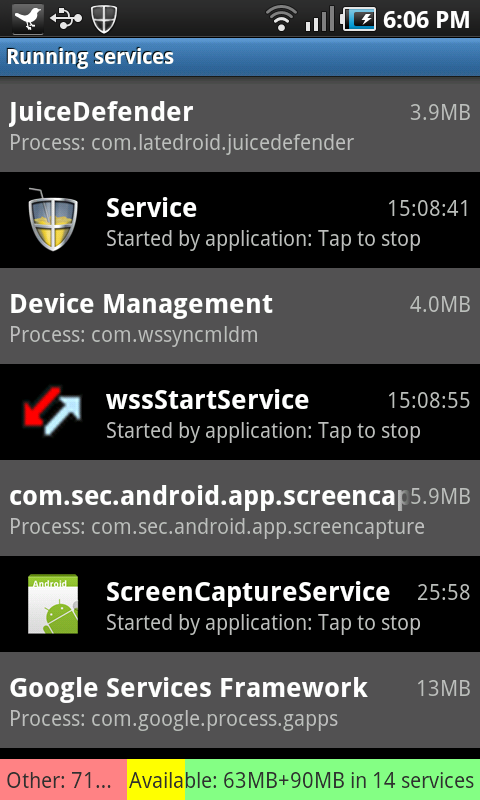
Anyway, this Symantic post explains how to know if you’ve been unlucky enough to download one of these apps. Open up Settings->Applications->Running Services and look for “DownloadManageService”.

I did that and found a service I didn’t recognise, ScreenCaptureService. What? In the past I had to root my phone to take screenshots. How do I do it now? A quick search and I found this thread. Apparently pressing the back key and power key starts the service and this post explains that pressing Back and Home takes a screenshot! This is a Froyo, (Android 2.2), feature and a welcome one but I wonder why it’s not documented?

Screenshots are stored on your SD card, in a ScreenCapture directory. The screenshot above was created with it. No root required!

I'm an ebook convert now

Matt has made it well known that he loves his Kindle and for a while I thought about buying one too. Unfortunately I’ll have to order it from Amazon.com in the US because I live in Ireland. Attempts to buy it from Amazon.co.uk result in an error and asks me to go visit the US site. When you add shipping costs and import fees it drives the price on Amazon.com up to $193.58!

So, if not the Kindle, how do I read ebooks? On my phone of course! I downloaded the Android Kindle app for my Samsung Galaxy S. The 4 inch screen of this phone is plenty big enough for reading, though you won’t be doing it at arm’s length. It’s also backlit so there’s no need for a light to shine on the device to read it. That suits me as the majority of my reading is done when I’m in bed at night. I don’t think I’ll ever read a magazine on the phone as the screen is too small. I tried reading bits and pieces of a Retro Gamer pdf on it but it was a horrible experience. I presume Kindle formatted magazines are better suited to the small screen?

I tried reading books on previous phones but each time it was one of the free “out of copyright” books I picked up rather than a book I had to spend money on. Last September at Seaside all that changed when I bought the Kindle version of Terry Pratchett’s “Unseen Academicals” and put the paperback version of that book back into my bag. It was wonderful!

I don’t think I’ve bought a paperback since. I wandered into Waterstones once (killing time, I didn’t even head over to the sci-fi section), and any time I pop into Eason’s it’s to buy a magazine. I’ve since made several purchases on amazon.com including a few books by authors unknown to me. Check out Containment and Brainbox by Christian Cantrell for example.

I’m not happy about everything Kindle however. Even though Ireland is in the European Union along with the UK, Amazon customers here cannot buy the Kindle or ebooks through amazon.co.uk. Instead we have to use amazon.com. Thankfully there’s no VAT on books so the US price is the price Irish customers pay. Good thing the Euro is stronger than the US Dollar. It does however mean that we have to buy books with American English spelling and that won’t improve the humour of those people who will criticise the service.

Also, some books cannot be bought because I’m not in the United States or United Kingdom. Ender’s Game is one such novel. If I search Amazon.com for that title I won’t be shown the Kindle version at all but I found it by using Google. I can’t even look for it on amazon.co.uk because I’m in Ireland, not the UK. I understand this is probably because publishers have regional contracts but this is digital data and Amazon has a worldwide audience.

I’d still like to try out a Kindle as a reading device as I’ve heard so many good things about it, but the important part of the Kindle are the books, and I can read them just fine on my phone.

Besides the Kindle app there are many other Android ebook readers. I particularly like FBReader myself but check the market for others.

For historical purposes for those reading this in 10 years time when it will probably be hard to buy paperback books, Amazon sold more ebooks during the last 3 months of 2010 than paperbacks.

Amazon has revealed that it has sold more Kindle ebooks than paperbacks in the US during the final three months of 2010.

A similar pattern has continued during January 2011 with 115 ebooks being sold for every 100 paperbacks.

Get Angry Birds for free on Android!

The good people at GetJar.com are now offering Angry Birds as a free download for mobile phones running Android.

The game is ad supported but as far as I can see, adverts appear at the start of the level and don’t appear on each one so they’re not intrusive. Works flawlessly on my Samsung Galaxy S too. Great job!

Oh, you might have to wait a while before downloading. The GetJar website is currently down, but persevere and you’ll get it!

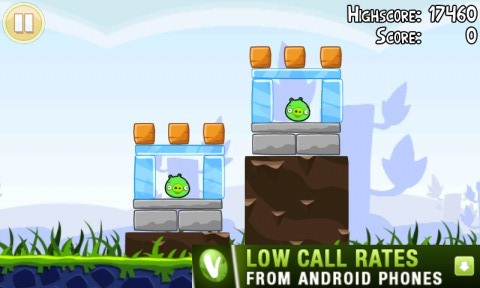
This advert disappeared after a few seconds.