WordPress, Nginx and WP Super Cache

If you host your own WordPress blog, it’s probably on Apache. That all fine and good. For most sites Apache works wonderfully, especially as it’s so easy to find information on it, on mod_rewrite and everything else that everyone else uses.

One of the alternatives is Nginx, a really fast webserver that streaks ahead of Apache in terms of performance, but isn’t quite as easy to use. That’s partly because Apache is the default webserver on most Linux distributions and hosts. Want to try Nginx? Here’s how.

Install Nginx. On Debian based systems that’s as easy as

aptitude install nginx

Nginx doesn’t talk PHP out of the box but one way to do it is via spawn-fcgi. Here’s where it gets complicated. (Docs summarised from here)

  1. Install php5-cgi. Again, on Debian systems, that’s
    aptitude install php5-cgi
  2. Edit /etc/nginx/sites-available/default and add the following chunk of code to the “server” section:
    location ~ \.php$ {
            include /etc/nginx/fastcgi_params;
            fastcgi_pass  127.0.0.1:9000;
            fastcgi_index index.php;
            fastcgi_param  SCRIPT_FILENAME  /var/www/nginx-default$fastcgi_script_name;
    }
  3. Install lighttpd for the spawning command.
    apt-get install lighttpd

    You’ll probably get an error at the end of the install if Apache is already running on port 80. Edit /etc/lighttpd/lighttpd.conf and uncomment the line

    server.port = 80

    and change 80 to 81. Now run the apt-get command again and it will install.

    /etc/init.d/lighttpd stop

    will stop lighttpd running. (You don’t need it)

  4. Create a new text file, /usr/bin/php-fastcgi with this:
    #!/bin/sh
    /usr/bin/spawn-fcgi -a 127.0.0.1 -p 9000 -u nobody -f /usr/bin/php5-cgi

    The user “nobody” should match the user Apache runs as to make things easier to transition.
    Make it executable with

    chmod 755 /usr/bin/php-fastcgi
  5. Create another new file /etc/init.d/init-fastcgi and make it executable with the chmod command too. Put this in the file:
    #!/bin/bash
    PHP_SCRIPT=/usr/bin/php-fastcgi
    RETVAL=0
    case "$1" in
        start)
          $PHP_SCRIPT
          RETVAL=$?
      ;;
        stop)
          killall -9 php
          RETVAL=$?
      ;;
        restart)
          killall -9 php
          $PHP_SCRIPT
          RETVAL=$?
      ;;
        *)
          echo "Usage: php-fastcgi {start|stop|restart}"
          exit 1
      ;;
    esac
    exit $RETVAL
  6. Start the PHP processes with
    /etc/init.d/init-fastcgi start

    and make sure it starts on every reboot with

    update-rc.d init-fastcgi defaults

That’s the PHP part of things. In Debian, the default root is “/var/www/nginx-default” so put an index.php in there to test things out. Stop Apache and start Nginx (if this is a test server only!) and visit your site. Works? Now to get WordPress and WP Super Cache working.

Open up /etc/nginx/sites-enabled/default in your editor and comment out the text already there with # characters. Paste the following in. Change paths and domains to suit your site. (via)

server {
        server_name  example.com www.example.com;
        listen   80;
        error_log   /www/logs/example.com-error.log;
        access_log  /www/logs/example.com-access.log;

        location ~ \.php$ {
                include /etc/nginx/fastcgi_params;
                fastcgi_pass  127.0.0.1:9000;
                fastcgi_index index.php;
                fastcgi_param  SCRIPT_FILENAME  /www/example.com/htdocs$fastcgi_script_name;
        }

        location / {
               gzip  on;
               gzip_http_version 1.0;

               gzip_vary on;

               gzip_comp_level 3;

               gzip_proxied any;

               gzip_types text/plain text/html text/css application/json application/x-javascript text/xml application/xml application/xml+rss text/javascript;

               gzip_buffers 16 8k;
               root   /www/example.com/htdocs;
               index  index.php index.html index.htm;
# if the requested file exists, return it immediately
               if (-f $request_filename) {
                       break;
               }

               set $supercache_file '';
               set $supercache_uri $request_uri;

               if ($request_method = POST) {
                       set $supercache_uri '';
               }

# Using pretty permalinks, so bypass the cache for any query string
               if ($query_string) {
                       set $supercache_uri '';
               }

               if ($http_cookie ~* "comment_author_|wordpress|wp-postpass_" ) {
                       set $supercache_uri '';
               }

# if we haven't bypassed the cache, specify our supercache file
               if ($supercache_uri ~ ^(.+)$) {
                       set $supercache_file /wp-content/cache/supercache/$http_host/$1index.html;
               }

# only rewrite to the supercache file if it actually exists
               if (-f $document_root$supercache_file) {
                       rewrite ^(.*)$ $supercache_file break;
               }

# all other requests go to WordPress
               if (!-e $request_filename) {
                       rewrite . /index.php last;
               }
        }
}

I think the gzip settings above will compress cached files if necessary but Nginx can use the already gzipped Supercache files. The version of Debian I use doesn’t have gzip support compiled in, but if your system does, take a look at the gzip_static directive. Thanks sivel.

Finally, edit /etc/nginx/nginx.conf and make sure the user in the following line matches the user above:

user www-data;

I changed it to “nobody nogroup”.

Now, stop Apache and start Nginx:

/etc/init.d/apache stop; /etc/init.d/nginx start

WP Super Cache will complain about mod_rewrite missing, and you should disable mobile support.

How has it worked out? I only switched on Friday. The server did do more traffic than normal, but I put that down to the floods in Cork. Weekend traffic was perfectly normal.

Load on the site is slightly higher, probably because my anti-bot mod_rewrite rules aren’t working now. Pingdom stats for the site haven’t changed drastically and I think the Minify plugin stopped working, must debug that this week. Switching web servers is a huge task. I disabled mobile support in Supercache because I need to translate those rules to Nginx ones. A little birdie told me that he’s going to be writing a blog post on this very subject soon. Here’s hoping he’ll put fingers to keys soon.

Have you switched to Nginx? How has your switch worked out for you?
WP Super Cache 0.9.8

WP Super Cache version 0.9.8 is now available. WP Super Cache is a page caching plugin for WordPress that will significantly speed up your website.

New in this release are 2 translations. The Spanish translation is by Omi and the Italian by Gianni Diurno. Please, if you use their translations, drop by their sites and leave a thank you comment! They’ve been very patient with me as I fixed gettext bugs and added new text. Both have blogged about the translations if you need to know more: Gianni, Omi.

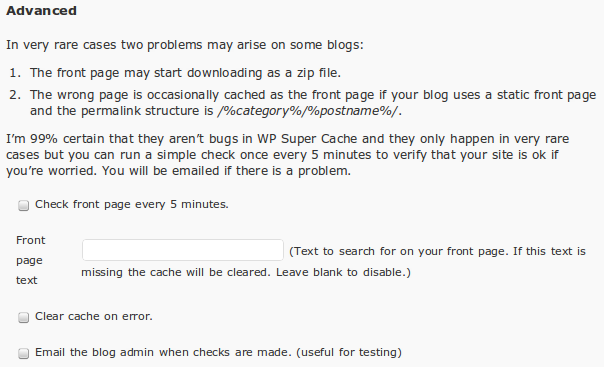
The second major feature to go in is an “advanced” section to the debugger. This allows the plugin to check the front page every 5 minutes to make sure everything is ok. It monitors for 2 very rare problems:

  1. Very very occasionally, the front page becomes a gzip file that downloads. It happened here once and I examined the cache file. There was nothing wrong with it. It was perfect. I suspect Apache and mod_rewrite got confused somehow but clearing the cache fixed it. The file generated after was exactly the same size as the old one, so no chance it got “double gzipped”.
  2. In certain rare cases, where a blog has a static front page, and uses a permalink structure of /%category%/%postname%/, the wrong page may be cached as the front page. Even if your blog satisfies the two conditions above it may not suffer from this problem. I tried it on this blog for a few days and couldn’t reproduce it at all!

Nevertheless, if you’re concerned edit your wp-cache-config.php and add this line:

$wp_super_cache_advanced_debug = 1;

Reload the admin page and you’ll see this added to the debug section:

advanced-debug

If activated, it will check your front page every 5 minutes. It’s not activated by default because these errors only happen to a small number of blogs. I’ve also noticed that WordPress seems to randomly forget to run the page checker from time to time. I debugged it and the job simply disappears from the wp-cron system! I’ve no idea why, but reloading the admin page schedules it again.
If you’re still paranoid, set your cache expiry low so at least the cache files will be recycled quickly.

Caching, Minification and CDNs

Oh, there’s a new caching plugin on the scene. W3 Total Cache works like Supercache’s half-on mode but can store to memory as well as disk (like Batcache) but also does minification and supports CDNs. I’ve been asked a few times if I’ll support those features too but I don’t see why as other plugins already have that covered (and frankly, I don’t have time to maintain such complex features):

  1. WP Minify “integrates the Minify engine into your WordPress blog. Once enabled, this plugin will combine and compress JS and CSS files to improve page load time.” Thaya is very responsive and fixed a bug I reported quickly.
  2. There are any number of CDN plugins for WordPress. I don’t use a CDN so I can’t recommend one but OSSDL CDN Off Linker might be worth a shot. This post on it mentions Supercache plus, a fork of this plugin.

Traffic Spikes and Benchmarks

I really should collect more of these. A few weeks ago Mark Pilgrim blogged about how his book had been republished by a 3rd party and put up for sale on Amazon. His book was published under the GNU Free Documentation License so that’s perfectly legal to do, even if a little unusual as it can be downloaded from Mark’s website and is for sale by his publisher. The blog post generated a lot of interest and a few days later I received a donation from Mark, followed by a thank you email. I’m a big fan of what Mark does, so if it had been a physical cheque or a letter I’d have framed it!
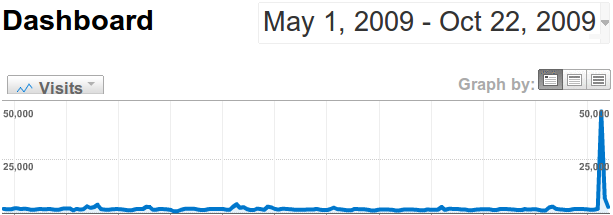
A few days after that he tweeted the following graph. Nice spike of traffic eh? His server held up fine with help from WP Super Cache.

diveintomark.org-dashboard

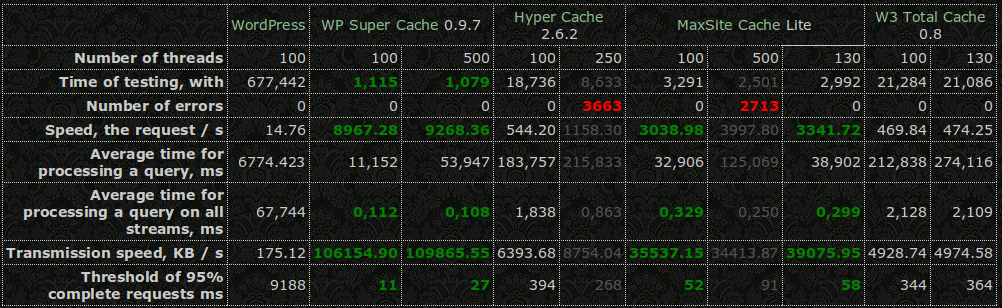
And finally, some benchmarks, in Russian unfortunately but the pages translates well.

caching-benchmarks

Summary of changes in 0.9.8:

  • Added Spanish translation by Omi.
  • Added Italian translation by Gianni Diurno.
  • Addded advanced debug code to check front page for category problem. Enable by setting $wp_super_cache_advanced_debug to 1 in the config file.
  • Fixed wordpress vs wordpress_logged_in cookie mismatch in cookie checking function.
  • Correctly check if WP_CACHE is set or not. PHP is weird.
  • Added wp_cache_clear_cache() to clear out cache directory.
  • Only show logged in message when debugging enabled.
  • Added troubleshooting point 20. PHP vs Apache user.
  • Fixed problem deleting cache file.
  • Don’t delete cache files when moderated comments are deleted.

PS. WordCamp Ireland is on in early March next year in picturesque Kilkenny. Here’s Sabrina’s launch post. Sign up! I’ll be going!

WP Super Cache Developer Documentation

I’ve finally found the time to write up some documentation for developers who want to work with WP Super Cache.

It’s a work in progress but should help other plugin developers who want to interact with the cache.

Suggestions and comments welcome.

PS. If you’re in Cork on November 14th, head along to BarCamp Cork III. I’ll be giving a talk, “How WP Super Cache Works”. It’ll be less technical than this but I’ll answer questions too. Check out the other sessions too.

WordPress MU 2.8.5.1

Update! WordPress MU 2.8.5.2 has a tiny fix for a post publish bug. You can download it from the usual place.

WordPress MU 2.8.5.1 has just been released and may be downloaded immediately.

This is a security and bugfix release and a recommended upgrade for every WordPress MU site. What happened to 2.8.5? I had it tagged and ready for release when Luke reported a little problem. It wasn’t possible to edit blogs! It was an easy bug to fix but code had been tagged and zip/tarball archives created so I had to create new ones. Thanks Luke! Saved the day. 🙂

Thanks to everyone else who contributed and helped in any way during the making of this release. Your help is invaluable.

This release also fixes a problem with slashes in blog and site options. You’ll be prompted to run the site upgrader. Please run it on all your blogs. For a more comprehensive look at what has changed recently, take a look at the Trac Timeline.

Exploit Scanner 0.5

The WordPress Exploit Scanner has been updated, with lots of help from Jon and Ryan.

In recent weeks blogs running older versions of WordPress were exploited. If you’re concerned that your blog might have been broken into, download the plugin and run it. It will find false positive results but it will do a reasonably good job of finding the code that’s inserted into a hacked site.

The plugin works by scanning every directory on your site. This is done recursively which unfortunately takes up quite a bi of memory. If you get an out of memory error please read the readme.txt as it has a suggestion for fixing the problem.

PS. WordPress 2.8.5 was released last night. Make sure you upgrade! A WordPress MU release will follow shortly.

WP Super Cache 0.9.7

WP Super Cache version 0.9.7 is now available. WP Super Cache is a page caching plugin for WordPress that will significantly speed up your website.

Since the last release of the plugin a number of new features have been adding, bugs fixed, and documentation updated. For a taster, here are the changes from the readme.txt:

  1. Fixed problem with blogs in folders.
  2. Added cache file listing and delete links to admin page.
  3. Added “Newest Cached Pages” listing in sidebox.
  4. Made admin page translatable. (work in progress)
  5. Added “How do I make certain parts of the page stay dynamic?” to FAQ.
  6. Disable supercaching when GET parameters present instead of disabling all caching. Disable on POST (as normal) and preview.
  7. Fixed problem with cron job and mutex filename.
  8. Warn users they must enable mobile device support if rewrite rules detected. Better detection of when to warn that .htaccess rules must be updated (no need when rewrite rules not present)
  9. Use the wordpress_test_cookie in the cache key.
  10. Show correct number of cache files when compression off.
  11. Fixed problem with PHP safe_mode detection.
  12. Various bugfixes and documentation updates. See Changelog.txt
  13. Advanced: added “late init” feature so that plugin activates on “init”. Set $wp_super_cache_late_init to true in config file to use.
  14. Advanced: Added “wpsupercache_404” filter. Return true to cache 404 error pages.

If you’re upgrading and your blog is installed in a sub directory the mod_rewrite rules may not have been created correctly. You’ll know this because the timestamp on your cached pages will change on every load. If that happens, remove the Supercache rewrite rules and recreate them through the admin page.

wp-super-cache-list

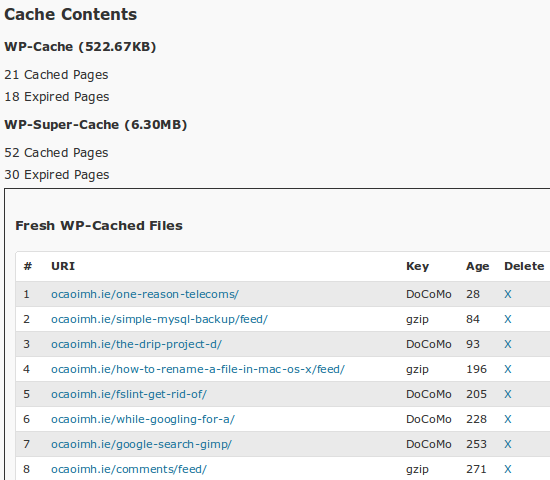
You can list all the blog’s cache files now, ordered by generation time. From that listing you can delete individual files.

wp-super-cache-debug

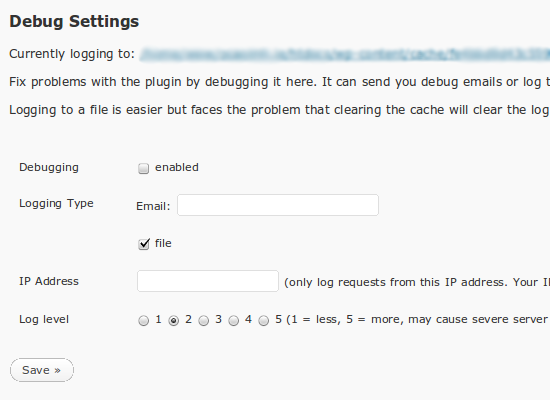
The debug function is very powerful. You can choose the level of logging. Level 1 logs errors and warnings of a serious nature. Level 5 logs them plus lots of normal functions. Here’s what level 5 logging looks like for one single request:

20:49:34 /was-the-janitor-really-in-the-fugitive/ No wp-cache file exists or user agent rejected.
20:49:35 /was-the-janitor-really-in-the-fugitive/ In WP Cache Phase 2
21:49:35 /was-the-janitor-really-in-the-fugitive/ Setting up WordPress actions
21:49:35 /was-the-janitor-really-in-the-fugitive/ Created output buffer
21:49:35 /was-the-janitor-really-in-the-fugitive/ supercache dir: /www/wp-content/cache/supercache/ocaoimh.ie/was-the-janitor-really-in-the-fugitive/
21:49:35 /was-the-janitor-really-in-the-fugitive/ Output buffer callback
21:49:35 /was-the-janitor-really-in-the-fugitive/ supercache dir: /www/wp-content/cache/supercache/ocaoimh.ie/was-the-janitor-really-in-the-fugitive/
21:49:35 /was-the-janitor-really-in-the-fugitive/ Anonymous user detected. Only creating Supercache file.
21:49:35 /was-the-janitor-really-in-the-fugitive/ Gzipping buffer.
21:49:35 /was-the-janitor-really-in-the-fugitive/ Writing non-gzipped buffer to supercache file.
21:49:35 /was-the-janitor-really-in-the-fugitive/ Writing gzipped buffer to supercache file.
21:49:35 /was-the-janitor-really-in-the-fugitive/ Renamed temp supercache file to /www/wp-content/cache/supercache/ocaoimh.ie/was-the-janitor-really-in-the-fugitive/index.html
21:49:35 /was-the-janitor-really-in-the-fugitive/ Renamed temp supercache gz file to /www/wp-content/cache/supercache/ocaoimh.ie/was-the-janitor-really-in-the-fugitive/index.html.gz
21:49:35 /was-the-janitor-really-in-the-fugitive/ Sending buffer to browser

That’s a lot of text. Keep an eye on the load on your server because logging that much data on a busy server will add extra load. Start by limiting the logging to your own IP and test with various browsers.
The error messages that are normally sent to the browser about “missing html tag”, “404 error” and “blank page” are now only shown if debugging is enabled. This will hopefully avoid problems with PHP scripts that generate Javascript.

This release adds a new “late init” feature. This is only useful in half-on mode however. This causes the plugin to create the “cache key” and display the cached page at the end of the “init” action, after all WordPress include files and plugins have been loaded. This is very useful if your application needs to interrogate the database to modify the cache key. Activate it by setting $wp_super_cache_late_init to true in the config file.

Lots to digest and new toys to try out. Hope you enjoy this new version of the plugin!

Pigs help translate your plugin

I’m in the middle of translating the WP Super Cache plugin (one of my goals before a 1.0 release). The docs make it easy to understand how to do it, but it is such a chore when there is so much text. According to Vim, I’m about 25% of the way through wp-cache.php

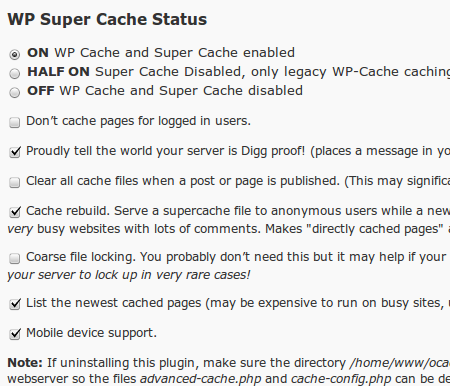
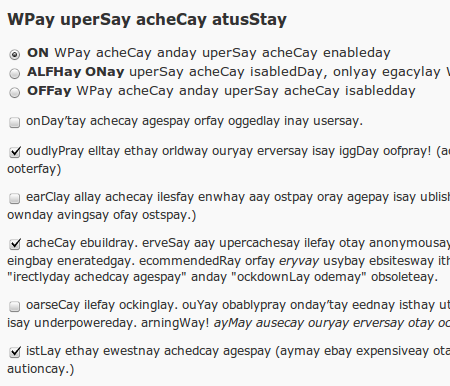
Checking to make sure that all the strings are translated is tiresome but the Pig Latin plugin makes it easier to spot untranslatable strings:

supercache1

supercache2

There will be a new release of supercache soon, but check out the download page and grab the development version if you want an exclusive look at the new debugger, “newest cached files” listing and bug fixes.

WordPress Upgrade Notifications by Email

This weekend will go down in history. It’s the first time I’ve been seriously sick in well over 5 years. A bug infected my son on Wednesday, but he got over it quickly enough. Then the same bug hit my wife and I on Sunday morning and we’re just getting over it now.

Odd that a worm attacks software I work on and I get very sick at the same time. Unfortunately I couldn’t run an exploit scanner and remove the bug but my body’s defenses took care of the bugs eventually.

All this leads me to a handy little plugin called Upgrade Notification by Email written by Konrad Karpieszuk. Install it on your blogs and it will check once a day if a new version of WordPress is out. When that happens it will email the admin with a message saying the blog must be upgraded.

It’s odd that the plugin itself contacts WordPress.org instead of relying on the built-in version checker but it’s only one request a day.

What I’d like to see next is a direct link to the upgrade page on the blog.

Far more challenging would be a plugin to auto upgrade a blog. In case a theme or plugin breaks things the plugin should probably deactivate all plugins and change the theme back to the default theme. Once the upgrade is complete, all plugins should be reactivated and the theme too. The admin has to be emailed before and after the upgrade.

It’s easy to say what it should do, but doing it is another thing altogether. The reactivation process has to be sandboxed in case of failure so the plugin doesn’t die. The plugins page already does this so at least there’s example code to work from. Anyone up for coding it?

WordPress MU 2.8.4

WordPress MU is a multi user or multi blog version of WordPress that is used to run sites like WordPress.com.

Today’s WordPress MU release is 2.8.4, a security release that fixes an annoying bug that allowed any user to reset the admin password. Your password was never at risk however so it’s more an annoyance than anything else.

Oh, thanks to everyone who tested the exploit on my blog. See? You didn’t get my password! 😛

Upgrade automatically from within your dashboard (first fix the upgrader if you haven’t updated to 2.8.3 yet), or download the new release from the download page and upgrade manually, overwriting your current install with the new files.

Edit: James Collins noticed that line 164 of wp-login.php wasn’t merged properly. If you downloaded 2.8.4, please grab 2.8.4a. Thanks James for the prompt feedback!