Stopping Web Server Abuse with Fail2Ban

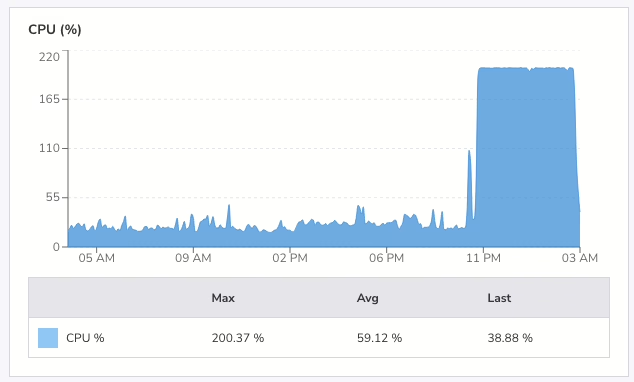
At 4am yesterday morning I was awake. Luckily so, as I checked my email and saw a warning that my VPS had been running at 199% CPU for two hours. I went into my office and checked the logs. Someone had been hammering this site with HEAD requests since just after midnight with nearly 30,000 requests across different URLs in four hours.

If they’d hit the same page repeatedly, cached responses would have handled it. But by requesting thousands of distinct URLs, each request generated a fresh cache file, forcing PHP and the database to do real work every time. My small server was coping, but the load average was high.
I blocked the offending IP in .htaccess immediately. That stopped requests from reaching PHP, but I wanted a proper defence, something that would catch this kind of abuse automatically next time.

I already had Fail2Ban installed. I’d just never configured it for web server attacks. Time to do that.

Fail2Ban works by watching log files for patterns, then banning IPs that match too often. I needed two files: a filter to match Apache access log lines, and a jail to define the thresholds.

First, the filter at /etc/fail2ban/filter.d/apache-ratelimit.conf:

[Definition]

# Matches any request line in Apache access log (combined/common format)
failregex = ^<HOST> -."(GET|HEAD|POST|PUT|DELETE|OPTIONS) .

ignoreregex =

This matches every request in the log.

The jail decides what volume of requests counts as abuse. It lives at /etc/fail2ban/jail.d/apache-ratelimit.conf:

[apache-ratelimit]
enabled = true
filter = apache-ratelimit
logpath = /var/www/logs/access.log

# Triggers a ban after too many requests in a short window
maxretry = 500
findtime = 30

# Ban for 24 hours
bantime = 86400

# Use iptables to drop packets from banned IPs
banaction = iptables-multiport
port = http,https
protocol = tcp

# Allowlist trusted networks
ignoreip = 127.0.0.1

The logic: if a single IP makes more than 500 requests in 30 seconds then ban it for 24 hours. Adjust maxretry and findtime to suit your traffic patterns. Legitimate crawlers and real users won’t come close to these numbers, but an attacker blasting thousands
of requests will trip the threshold fast. These are not the numbers I’m using.

The ignoreip directive keeps trusted networks (monitoring services, your own IPs) from getting caught.

The changes to Fail2Ban are activated with the following command (as root):

systemctl restart fail2ban

And I verified it was running by checking the status:

fail2ban-client status apache-ratelimit

Within a couple of minutes, the offending IP appeared in the banned list. I checked the access log, and there was nothing more from that IP. The requests weren’t just being rejected by Apache; iptables was dropping the packets before they reached the web server at all.
That’s the key advantage over an .htaccess block: banned traffic never touches Apache.

A VPS with limited resources can’t absorb a flood of uncached requests. Caching helps with repeat visits to the same page, but an attacker who rotates URLs defeats that entirely. Fail2Ban shifts the defence from the application layer down to the network
layer, where it’s cheap to enforce.

If you run a small site on a VPS, configure fail2ban for your web server. It takes ten minutes and it works.

Anyway, I presume whoever did that attack is reading this post since they seem to like my blog so much. Why did you do it?

I’m Deleting Google Photos

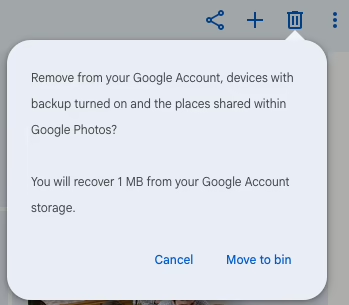
popup dialog saying "Moving 3290 to bin..." with a progress meter

If you look at r/googlephotos on Reddit you’ll come across several posts from people who have had their accounts banned because of photos they have in their accounts. Most of the time it’s because of family photos of children. I have also seen posts from people who unwisely backed up their WhatsApp images folder, or backed up a drive without looking at what was on it first. Remember that researcher who lost their Google account because they had WWII Nazi documents in their Google Drive?

I have photos there going back to the year 2000, but I never regarded Google Photos as a backup service. It was a fabulous photo-sharing site, but I have barely used it since 2024 and now have my own self-hosted Immich server instead.

Last week I did a Google Takeout of everything, just in case, as it will also download any photos I saved from shared albums.

Today I went to the large photos and videos page and deleted almost every item off that page.

Unfortunately, there isn’t a “delete everything from Google Photos” button. You’ll have to visit photos.google.com and select an image and then scroll down, and down and down… and then with shift pressed, click on the last image to delete. It then may take some time for Google to mark the images as deleted.

Honestly, I expect that the automatic CSAM detection they’re using has already scanned every single photo I’ve uploaded so I’m not worried about that. I’m not uploading anything else there either, but I’ve been meaning to move off Google Photos entirely for a long time.

It is really difficult to do. In my head I know that I have a Takeout backup of everything. I know that all the original photos are on my computer at home, and they’re on Immich now, but selecting photos of familiar smiling faces, of birthday parties, of holidays and festivals, and then clicking DELETE is hard.

They’re my photos. It was nice knowing you Google Photos.

If you want an alternative, self-host Immich or use Pixel Union, a hosted version of Immich where you get 16GB free before you have to pay for more storage. It’s also hosted in the EU, which is even better! I have an account there. I uploaded a few recent photos in this album for you to see what it looks like.

The Enshittificator

He comes from a family with a proud tradition of enshittification, making the world worse.

Here is how platforms die: first, they are good to their users; then they abuse their users to make things better for their business customers; finally, they abuse those business customers to claw back all the value for themselves. Then, they die.

I call this enshittification, and it is a seemingly inevitable consequence arising from the combination of the ease of changing how a platform allocates value, combined with the nature of a “two sided market,” where a platform sits between buyers and sellers, holding each hostage to the other, raking off an ever-larger share of the value that passes between them.

Cory Doctorow, 2023.

You can also find it on YouTube.

TIL there are people who can’t burp

It never occurred to me that a person couldn’t burp, but it’s a rare condition that was only diagnosed in the last ten years. The host of Vox podcast Unexplainable, Sally Helms suffers from this condition and shared how it affected her life, and how a simple Botox injection to the upper esophageal sphincter in the throat, right behind the larynx, can cure it!

Another sufferer is a sky diver, which caused serious problems for him when he flew into the sky and couldn’t burp.

The show has a transcript, which is worth looking at, if only for the adorable and wholesome times when Sally discovered her burps. 🙂

SALLY: Okay, so also often during this time, I would like get into this really weird position. Like I would, I would do the basically like backing out in the car thing, but I would put my arm on the wall and then I would like, turn my head around and like, dip my chin and crank my head. Um, my family was very supportive, but they were also confused. Like, I burped while I was hanging out with my sister and my dad.

SALLY:  Are you proud of me?

ELIZA: That was a real burp! 

SALLY: I just did a little sputter burp, and you heard, do you, are you proud? 

ELIZA: Oh my God. Yeah. But why did you have to do it in that weird contortion? 

SALLY: I have to to make it come out.

ELIZA: Wow.

<<burp>>

<<laughter>>

MARK HELM (SALLY’S DAD): Good going, Sal!

ELIZA: That was such a weird one!

MARK: Did it come out? 

SALLY: Yeah. Well…

BTW, if you suffer from this condition, join the r/noburp Reddit.

From Screen to Tmux to Zellij

I used GNU screen for years. I don’t think alternatives existed when I started using. It worked everywhere, and I only needed a few features.

The insides of an old PC thrown on the ground outside. Weathered.

Eventually, curiosity pushed me to try tmux a few years ago but I didn’t see what advantage it had over the older software I knew already, so I went back to screen.

So it went for several years, until in the last few days I decided to try tmux again, and I even configured it to use the same CTRL-a shortcut as screen and it worked well! I configured it to switch between tabs like in screen using the 1-0 keys. I could scroll back, just like in screen. It even had a session manager that let me choose which tab to use, although I’m annoyed I had to tap right arrow to expand the list first.

I announced on Slack that I was moving to tmux, and shortly after, someone casually asked, “if you are doing the switch now, have you tried zellij?”

Life with screen

My screen usage was almost aggressively simple:

  • Ctrl-a c to create a new window
  • Ctrl-a 1–0 to jump between windows
  • Ctrl-a a to toggle to the last window
  • ESC and page up to view the scroll back.

That was it, but I used it all the time. The first thing I did on connecting to a server was screen -D -r to connect to screen.

I wasn’t using splits. I wasn’t scripting layouts. Screen was effectively a tab manager for shells, and it did that job reliably for decades. It’s still running like that on my servers, for the moment.

Moving to tmux

The first pleasant surprise was that tmux doesn’t force you to relearn anything.

With a small config change, tmux can behave almost exactly like screen:

  • Ctrl-a prefix
  • number-based window switching
  • last-window toggle
  • better copy/paste
  • better session handling

At that point, tmux felt like screen, but actively maintained. Tmux felt like the natural evolution of screen. I only used it for a day or so, but then I tried Zellij.

Discovering Zellij

Zellij describes itself as a “Terminal Workspace with Batteries Included”. Zellij doesn’t feel like a screen or tmux replacement. It is quite different. Instead of a simple bar at the end of the screen showing the tabs, there’s a menu with keys. Tapping the key combination updates the menu, showing new options. At the top of the screen are the tabs you’ll use. Unlike screen and tmux, there’s no one single shortcut like CTRL-a or CTRL-b, there are multiple. There’s one for each mode: panes, tabs, search and session (plus a few more).

The biggest conceptual shift is this: tmux is tab-first. Zellij is pane-first.

In tmux, I naturally created lots of windows, like I did with screen. I split one or two, but Zellij takes that to the next level.

In Zellij, the expectation is:

  • One tab = one context
  • Panes = the work inside that context

This sounds subtle, but it changes everything. You’re encouraged to create new panes in each tab before you make new tabs.

Discoverability over memorization

Zellij uses modes (pane mode, tab mode, scroll mode), and it shows you available keys on screen.

You don’t need a cheat sheet taped to your monitor. You look down, and the UI tells you what’s possible.

This is something tmux simply doesn’t try to do.

Pane-centric workflows

Zellij really shines when you stop creating tabs constantly and instead:

  • edit code in one pane
  • run or build in another
  • tail logs in a third
  • fullscreen a pane temporarily when you need focus

It feels closer to an IDE or a tiling window manager than a tabbed terminal.

Modern assumptions

Zellij assumes:

  • a modern terminal
  • Unicode support
  • decent fonts
  • OSC 52 clipboard support

That’s great locally. I’ll be interested to see how well it works on my VPS.

The Terminal

I use iTerm2 on a Mac and there were a few things to set up before I could use Zellij fully.

  • In Preferences → Profiles → (your profile) → Terminal make sure that “Mouse Reporting” is checked. That lets you click panes to select them, scroll up a pane, and select text to copy it.
  • Zellij uses the ALT key, but if you use CMD on a Mac the operating system will intercept that. Instead use the Option key. In Preferences → Profiles → Keys set “Left option key” to “Esc+”. That may interfere with copying and pasting though. Now type Option-n to open a new pane!
  • I was seeing odd characters in the UI. Little “?” characters in boxes. I needed a new font: brew install --cask font-jetbrains-mono-nerd-font
    Then in Preferences → Profiles → Text set the font to “JetBrainsMono Nerd Font Mono” or whichever one you prefer. You may have to restart Zellij to see the change.

This is barely touching the surface of what Zellij can do. If you use screen or tmux give it a go.

Walking the Coumloughra Horseshoe hike

I’m not much of a hill walker but John Finn is and filmed a walk there, up Carrauntoohil, the tallest mountain in Ireland and onwards.

It’s a spectacular walk with breathtaking scenery.

John’s video was voted best video of the year by the Mountain Views website (page 58 of the newsletter).

Start something new

I like this. Buy a red chair. Go on adventures.

I found this video on Facebook, on a page that shares highly compressed videos that have been “borrowed” without credit, so I was curious about where it came from. The video was cropped top and bottom with the text “life is short” added in the top border. The video ends in a rather unsatisfying way and I hoped there would be more to it.

A search on YouTube didn’t return any good results, but searching for a screenshot of the “final” frame did. I found a couple of websites talking about it, here and here. Unfortunately the videos embedded in both sites were not working but knowing it was an Ikea video helped me find it on Vimeo, which I have embedded above. It’s been sitting there since 2013. Hopefully it’ll last another few years.

The original video stops a few seconds before the end, leaving the viewer wondering what happened to our adventurer. I can see now he was going on more adventures!

Google Play Services Goes Wild

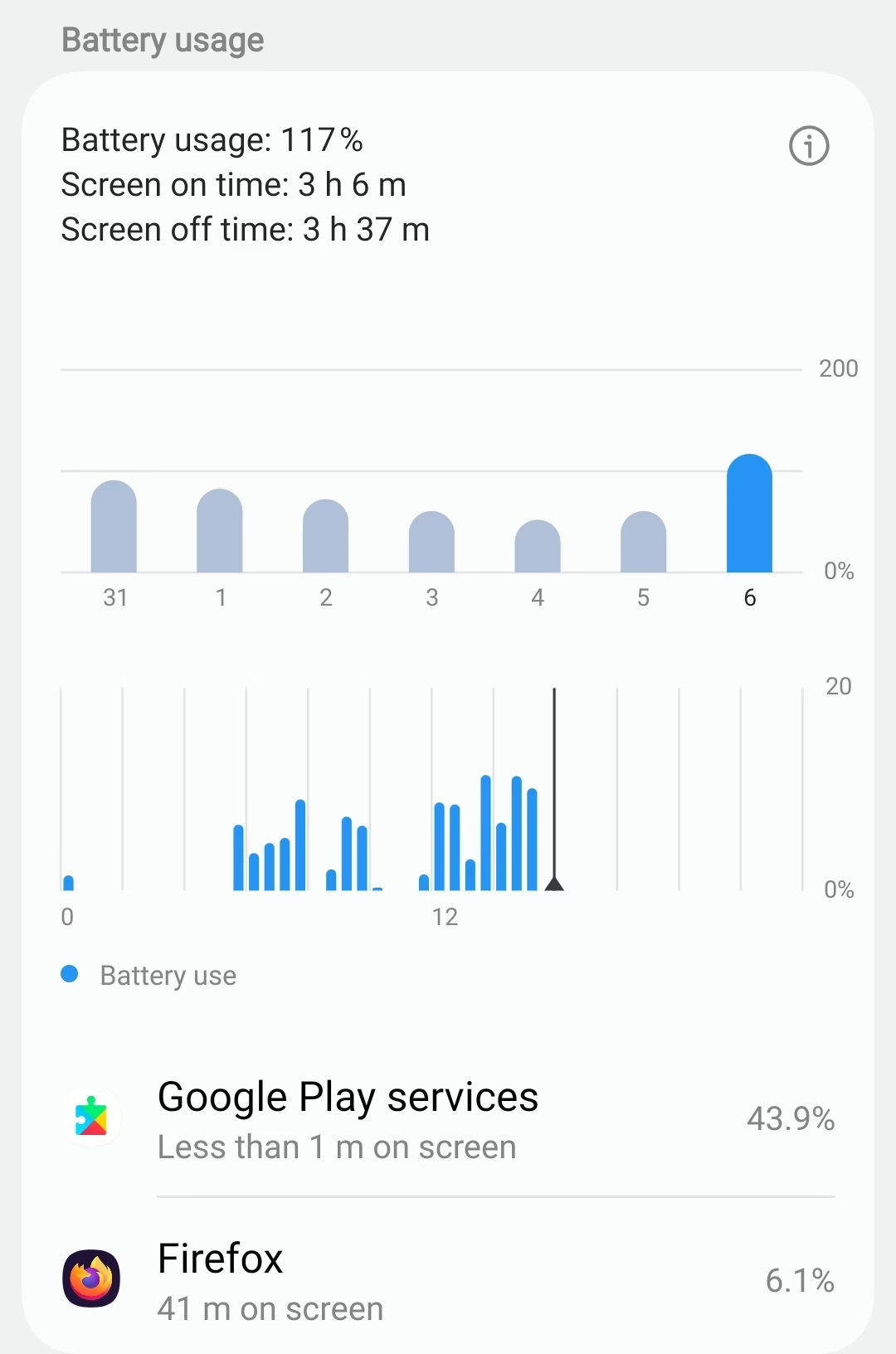
It doesn’t happen often at all but sometimes Google Play services on my Android phone goes wild and chews through battery power, often while I’m charging.

It started this morning when I noticed the battery was below 50%, and my slow charger wasn’t making much of a dent in changing that. Over breakfast I saw it drop a percentage point or two while the phone was basically idle.

There was a queued firmware update, which I applied thinking that might help (I’ve noticed in the past that the phone battery starts to noticeably get worse if I don’t immediately install an update) but it didn’t. Placing it in airplane mode didn’t make any difference, I think, but it’s difficult to know.

It’s fast charging now but I wouldn’t call it fast. I guess I’ll just have to wait it out and hope Google Play Services calms down again.

I don’t know how to fix it. I just make sure my phone is charging and make sure it doesn’t get too hot which might damage the battery.

macOS Stats on Brew

Stats widgets used to be all the rage twenty years ago in the Linux world when people would theme them with extravagant graphics as part of a window manager I no longer remember.

The irony was, unless you had a reasonably powerful machine your desktop was slightly slowed down by displaying stats on it continuously. It wasn’t much, but if you had a bunch of Netscape windows open at the same time the RAM and swap stats would invariably end up red.

I guess people still use them as I read someone recommended iStat Menus a week or two ago and I installed it. Yesterday I noticed the “15 days left warning” and remembered reading this thread on replacing paid macOS apps with free & open-source alternatives.

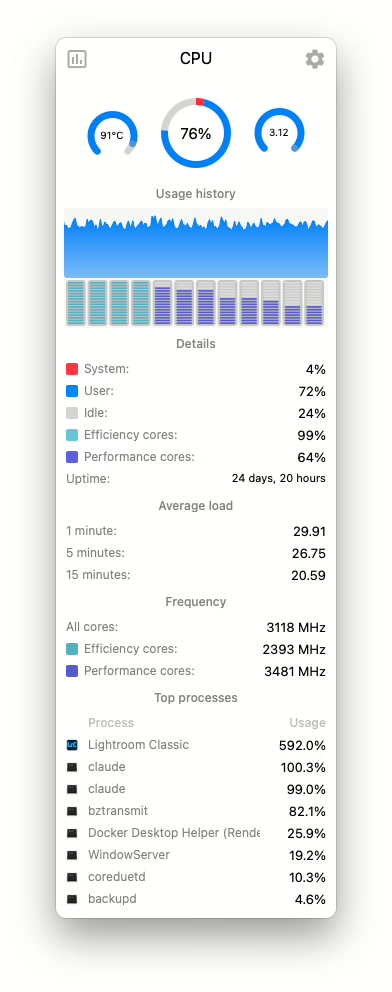
The alternative here is Stats, and the CPU display is shown in the screenshot here.

Install it with this command:

brew install --cask stats

You can see Lightroom Classic converting a bunch of huge ARW files to lossy DNG, but also that, while idling, Claude Code really likes to trounce the CPU. Ouch.