WP Super Cache 0.8.9

WP Super Cache version 0.8.9 is now available. WP Super Cache is a page caching plugin for WordPress that will significantly speed up your website.

This version fixes a number of bugs and adds two new features, but in case you run into problems upgrading, make sure you delete wp-content/advanced-cache.php before copying plugins/wp-super-cache/advanced-cache.php over it. Go on, read that again. Delete that file. Jonathan Dingman didn’t and when he copied the file over the symlink he overwrote wp-super-cache/wp-cache-phase1.php. His site went belly up and he started screaming for my head!!! Err no, he appeared on asking why it didn’t work. Thanks Jonathan for working through the problem with me. My fault for not making the instructions clearer!

If this happens to you, take a deep breath and unzip the plugin again in the plugins folder and delete wp-content/advanced-cache.php

Anyway, the new features are:

  1. Cache rebuild. Serve a static cache file to anonymous users while that file is being generated.
  2. Disable the large global lock that makes every access to the cache atomic.

Besides those, I got rid of the symlinked file in wp-content/, and the plugin now copies a file called “advanced-cache.php” from the plugin directory to simplify things. Especially on operating systems where symlink isn’t available. Yes, that’s Windows.

If your site is horrendously busy and you get a ton of comments every day and you’re too broke to buy a new server, then the cache rebuild feature will help you a lot. You should see the load on your server go way down if you enable this. Anonymous users who visit a page where a comment has just been left will be served a static cache file from the supercache instead of all the requests trying to generate a brand new page. The page served to them might be a few seconds out of date but that trade off is worth it.
Here’s the original thread that inspired the idea. Thanks Tigertech for writing the patch and for sharing the performance graphs. Check out the load on his server, before and after the rebuild function was switch on:

wp super cache load graph

If you’ve had problems with deleting the cache on your blog it *might* be because of file locks. Some hosts just have problems with them. The file locking in the plugin is very coarse. When the plugin wants to do any sort of write operation it grabs a lock, does the writes (which could include clearing expired files, or creating wp-cache and supercache cache files), and then releases the lock.
Any other process running the plugin that tries that won’t get a lock: new cache files won’t be created, and cache files won’t be cleared.
It isn’t a huge problem that the lock is so coarse because the writes don’t take very long (the lock is enabled after the page is generated), but some very busy sites take quite a while to clear their cache files.
On the downside, disabling the file lock won’t stop multiple cached files being generated simultaneously (great), but it also won’t stop multiple “clear cache” attempts either (boo!)
From what I recall of looking at the other cache plugins for WordPress, most of them don’t have any file locking and seem to do just fine.

I almost forgot! There is also a new debug mode. Edit wp-content/wp-cache-config.php and look for “$wp_cache_debug” and follow the instructions. It will send you a few emails when things don’t go right and may help track down any problems.

As a final note, I would like to sincerely thank Robert Wolf who spruced up the admin page and gave it a nice lick of paint and Michael Torbert for helping me debug the plugin a while back.

WordPress MU 2.7 beta

A beta version of WordPress MU 2.7, the multi blog version of WordPress that runs on such sites as WordPress.com has just been uploaded and is available here.

This is quite a stable release and has been tested by many but it’s not the final 2.7 release so there are probably bugs we haven’t found yet. Don’t put it into production just yet, but if you’re working on a new site, you’re better off using this rather than 2.6.5 as the final WordPress MU 2.7 will be along soon.

Check the timeline for more info, there are still plenty of open tickets and keep an eye on the forums and please help out if you can.

I also want to extend a big thank you to everyone who has helped with this release, be it entering tickets, updating them, creating patches, or helping out on the forums and of course the WordPress community. This software wouldn’t be where it is today without you.

Lots of Irish in Texas

After I found out that Waterford had moved to Kilkenny (thanks ILUG!) on Google Maps I became curious and searched for Blarney and found Blarney Stone Street in Tyler, Texas. Check out all the street names!

Irish in Texas

You could travel all over Ireland by walking up and down a few streets in that town! Dublin, Limerick, Ulster, Blarney. I have to wonder who named a street, “Irish Moss St.” Sounds like something you get at a garden centre!

You never know, I might visit Tyler in Texas some day.

Zavvi

zavvi

Sometime last year Virgin sold it’s retail music business and was renamed Zavvi. The first I knew of it was when the Cork store had this strange forgettable green brand name plastered over the door. I could never remember the name, not a good sign for a retail chain.

They didn’t last long unfortunately. The notice above is displayed in their front window. The company appointed a liquidator on December 30th. If you go in there now they have some great sales. 30% off games, lots of DVDs and CDs slashed in price. Long queues at the cash registers though and I wouldn’t count on getting a refund quickly if they’re liquidating stock.

Control Ubuntu and Mac OS X from one computer

I just installed Synergy on my Ubuntu and Mac OS X laptops and now I can control both from one keyboard and mouse. It works fairly well, although I do wonder:

  1. What are the special Mac keys mapped to on my beige PC keyboard?
  2. I’ll have to stretch if I move my Macbook away from my desk. (joking)

It’s easy enough to install, on Ubuntu the Linux version is already in the repositories, so the following will install a simple gui tool to configure and run a server.

aptitude install quicksynergy

That will install Synergy as well.
Run “quicksynergy” from a terminal, go to the “Use” tab and give it the IP address of your machine. Then enter the hostname of your second (or third or fourth..) computer in whichever direction you want. My Macbook is on the left.
screenshot-quicksynergy

Before clicking “Execute”, I downloaded the Mac OS X version of Synergy, untarred it and after reading the documentation, fired up the client with:

./synergyc -f 192.168.1.20

Moments later, the following message popped up on my Ubuntu terminal,

NOTE: CServer.cpp,278: client “donncha-o-caoimhs-macbook.local” has connected

Now I can move the mouse cursor off the left side of my Ubuntu screen and it starts moving on my Macbook!

I don’t think I’ll use it full time as I’d strain my back or neck typing on a keyboard in front of me and twisting my neck to see my Macbook but it’s a nice tool to have. Over WiFi moving the mouse cursor stuttered a small bit, so it’s unlikely you’ll want to do intricate pixel work with it.
I’ll have to try a day’s work with it to judge it properly.

Stop the Killing

gaza-protest

A protest march in Cork today against the Israeli invasion of Gaza. Plenty of photographers covering the event, I wouldn’t be surprised to see photos appear on Flickr soon.

gaza-protest-23

A leaflet urged the reader to boycott Israeli products and listed many well known brands. Unfortunately if I was to do that I wouldn’t be able to use my Intel powered laptop, and I wouldn’t be able to use WordPress because Israeli citizens have contributed to it. Oh wait, you probably shouldn’t even use the Internet. Log off now please.

gaza-protest-16

At the end of the march, the speaker pictured above told the crowd that there would be another march next weekend. Ominously he said all shops in Cork should not sell Israeli produce and whatever it takes will be done to force them to do that. He added that only lawful pressure would be applied, that “we must stay on this side of the law”.
How is that really going to hurt Israel? The produce is already bought and paid for by the retailer. Irish shop keepers are reeling from the worst Christmas sales in years and they want to put more pressure on them? You’re only going to hurt the local economy if you go ahead with that boycott. Insane!

I have so much sympathy for the people in Gaza and Israel. Innocent people get killed and maimed on both sides and the cycle of violence goes on and on and on and …

WP Super Cache 0.8.7

WP Super Cache version 0.8.7 is now available. WP Super Cache is a page caching plugin for WordPress that will significantly speed up your website.

This release addresses some issues large or busy sites had with deleting expired cache files. Some sites generated so many cache files that there were two many files generated, even when those files were cleared out every hour. To fix that I limited the recursive function that deletes the files to 100 deletions at a time. That function is called until all the cache files are deleted (or strictly speaking, no files are deleted. That’s how the expired file cleanup works).
It’s also possible to set the garbage collection interval to 10 minutes now which will also help.

Metal Slug Anthology

Metal SlugThe Metal Slug series of games is over 10 years old now but I only came across them for the first time last year through MAME, the arcade emulator. The games are run and gun shoot em ups with great hand drawn graphics, and frenetic gameplay. You can read about the first game on Wikipedia.

Metal Slug is a series of run and gun video games first released on Neo-Geo arcade machines and game consoles created by SNK. It was also ported to other consoles, such as the Sega Saturn, the PlayStation, the Neo-Geo Pocket Color and more recently, the Game Boy Advance, PlayStation 2, Xbox, Xbox 360 and Nintendo DS. There is also an anthology of the first 7 games in the main series (including Metal Slug X) available for the Wii, PlayStation Portable, and PlayStation 2.

They’re great fun to play, and with an Xbox 360 controller hooked up to my computer the experience in SDLMame was as close to perfect as it could be. When I saw Metal Slug Anthology for the Wii in Gamestop and for only 25 Euro last weekend I had to buy it! All those games in one package, on one CD? How could I resist? Unfortunately I should have checked the reviews first. Metacritic gave it 73%, but the first user review points out the huge flaw that makes all the games totally unplayable.
Metal Slug

Once you’re in a game, the default control has grenades set to motion control. If you’ve ever played a metal slug, you’d know that these games are hard, and require split second reactions. There isn’t time to shake the controller up and down. Fortunately there’s 1 control setup that uses the gamecube controller. But with just 3 buttons, it’s baffling why they couldn’t have used 3 buttons on the wiimote.

There are a number of different control configurations, but all are just as hopelessly bad as each other and I don’t have a Gamecube controller. A shame really because they’re arcade perfect conversions. As they should be. Credits for the game include M68k emulation so I presume the exact same code is running on the Wii. Why oh why did they screw it up with a crap control system?

If you really must play Metal Slug, the first game in the series was also released on the Wii virtual console and supports the classic controller. There’s also SNK Arcade Classics Volume 1 but besides Metal Slug it doesn’t seem to be a good value compilation.

Even though the control system is all messed up in the Wii version of Metal Slug Anthology, I’m glad I could support SNK in some small way. Back to SDLMame for me though.

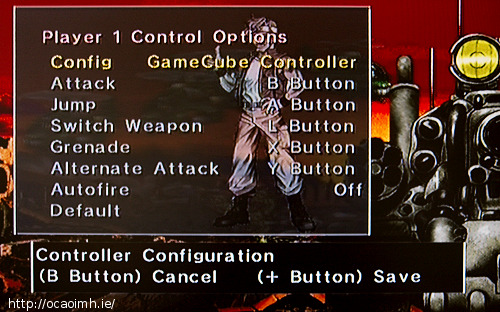
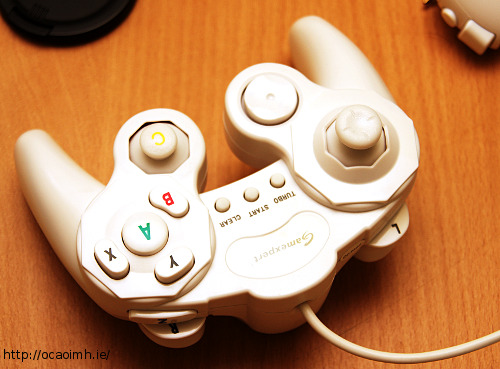
Update! This morning I played Metal Slug on the Wii using a knock off Gamecube controller and it rocks. Sure, you still have the lengthy loading times at the start but otherwise the controllers are fine. Here’s the controller screen and a shot of my “Gameexpert” Gamecube controller. Bought that in Zavvi at a knock down price!

metal-slug-wii-controls

gamecube-controller

VirtualC64 for Mac OS X

VirtualC64 is a new Commodore 64 emulator for Mac OS X. It’s a promising project, let down by the fact that it’s still in beta but by the looks of things development is moving at a steady pace.

When you first run the emulator it will ask you for C64 roms: basic, kernal, chargen and vc1541. Ironically, you can find all these roms inside Vice, another C64 emulator. Look in /Applications/VICE.app/Contents/Resources/ROM/. The 1541 ROM is DRIVES/dos1541.

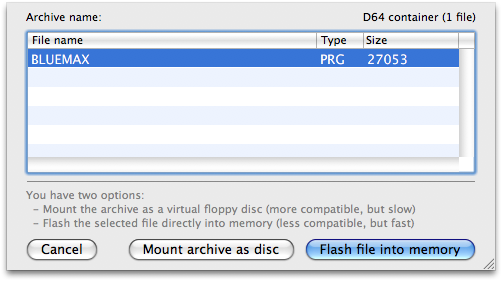
Loading a game or demo is as easy as dragging the d64 or t64 image into VirtualC64. When you do you’ll see a dialog like this.

picture-6

“Flash file into memory” works great for single load programmes but multiload could be a problem. I tried Armalyte. Mounting the d64 as a disk didn’t work. I couldn’t type anything. Loading the first file on the disk by flashing it brought up the crack intro but failed to load. The neat integrated debugger (click “Inspect”) showed the emulator had died doing jsr $2020 and unfortunately at 2020 was another jsr … ($20 is the character code for a space if memory serves, and the machine code for jsr was $20, so memory was full of spaces!)

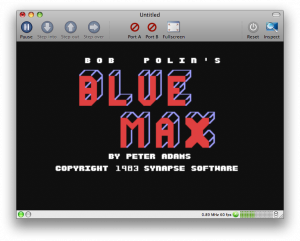
picture-3

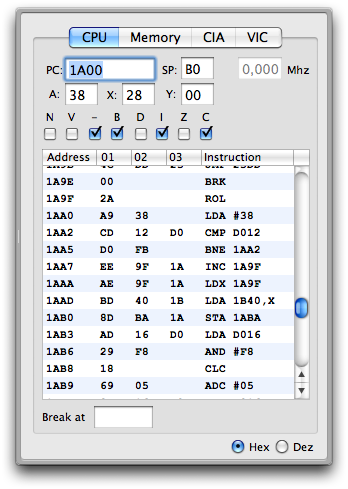
Blue Max worked much better, as did a 3D Pool game I tried. the crack by Remember included the documentation and again using the debugger I watched as the programme checked for the various key presses. Geeky I know but it brought a smile of recognition to my lips. Here’s that debugger in all it’s glory. Anyone familiar with the C64 should recognise the code beginning at 1AA0. (I had to look up what D016 does. It’s the screen mode. I had completely forgotten. It’s only been 16 years.)

picture-10

One thing it has going for it over Vice, is a real fullscreen mode. The current version of Vice uses some dodgy resolution changing in Linux (that I rarely got to work properly without screwing up my desktop) and I couldn’t get to work in Mac OS X at all. Fire this baby up in fullscreen mode and you’ve got your very own C64 laptop! Cool or what eh?

As luck would have it VirtualC64 has blown a fuse just as I finish this post. If you have a usb joystick plugged in and activated in port 2 it does strange things. First the keyboard wouldn’t work, and flashing a file didn’t run it automatically. Then the keyboard sort of worked but the left arrow character appeared for most key presses. Odd stuff. Unplugging the joystick and restarting the emulator fixed that problem.
Even my Bits ‘n’ Bobs demo worked in it! (Bah, all my screenshots failed. They only show white. I wonder if the emulator does strange things to the Mac while emulating mixed video modes? I mixed character and video modes in the screens I tried to capture, ah well.)

VirtualC64 is a very promising C64 emulator, and it’s GPL too! I’ll certainly be keeping an interested eye on it, and I wish Dirk and the other project members the best of luck with it.