Sometimes you accidentally dive down a rabbit hole of your own making. I came across the Retro Computer Scene search engine a few days ago and accidentally clicked on a link to a Commodore 64 disk image. Those files are small at 175KB so I decided to keep it and look at it later.
This morning I did and found Noice Driver v3.0a, a music disk for the Commodore 64 released in 1993. There are some great tunes on there but the name JEDININJA leapt out at me. It’s a good tune too!
The filename of the disk image is sb130978-1fbef9.d64 so I guessed it might have something to do with Scene Base. I downloaded their metadata list and found it there in the c64disk set!
Listening to it in a Youtube video doesn’t have quite the same impact. It cuts off a bit too early as well. Perhaps rose tinted glasses and all that? It does bring back memories of typing “left arrow” L to load games from a tape and “Turbo Tape by Jeff”, the tape loader used to pack more games on to one cassette. Piracy was rife on the C64, but I still have a box of (original) game cassettes and disks in the attic.
Vice, the Commodore 64 emulator is a cross platform emulator that works on Windows, Linux, MacOS and other operating systems. It also allows you to emulate the Vic 20, C128 and other early Commodore machines.
Double clicking on a Commodore d64 disk image file will load x64, the Commodore 64 emulator and load the first programme on the disk image.
LOAD”*”,8,1
Quite often I want to look at a D64 image directory listing instead of running the first programme on the disk.
You can do this by unchecking the “autostart” box on the file open box of course but it’s not as convenient.
So, last Friday I asked on Twitter if it was possible to drag and drop a D64 image onto Vice to display the disk contents. Logiker replied and helped me by DM to handle double clicking on a C64 disk image.
What I needed to do was load the disk image and then feed the directory listing command to the C64.
LOAD"$",8 LIST
LOAD”$”,8
Getting MacOS to accept the command line was harder to achieve. In Windows you can change the start up parameters for a programme. In MacOS it should be possible to modify the emulator “package” with a script that calls the real executable but I couldn’t get that working. In Linux I would have just created a shell script that called the emulator. 🙂
What did work in MacOS was using Automator. I created a “Run Shell Script” action and filled it in with the following. If you want to follow along at home you’ll have to change the path to x64.
I saved that as a new app in ~/bin/ called “Vice64”, and associated all D64 images with that application. Now double clicking on a disk image shows me a directory listing!
It doesn’t work unfortunately when I have an Action Replay cartridge loaded. Maybe I need to add F3 or F7 to the keyboard buffer?
One of the advantages of looking at the directory structure is the directory art some demos have. Here’s one from Pearls for Pigs, a D64 I happened to use while testing this but there are loads of them. I saw that Logiker has a page dedicated to directory art!
Maze of the Mummy, rare “purple” Freeze64 and my regular Freeze64
Look what the postman delivered last week! I entered a competition held by Freeze64 author/publisher Vinny for C64 game Maze of the Mummy and a rare misprint of the Freeze64 fanzine and I won! You should watch the live video of Vinny picking the winner, if only to wonder at everything he has plugged into his C64 and a preview of issue 18 of Freeze64. He pronounced my name wrong too, but that’s to be expected. 🙂
I have yet to play Maze of the Mummy as it’s been a hectic few days here but I’m going to get my 1541-II down out of the attic and make a backup d64 image to play in Vice this week.
I think the last boxed C64 game I ever bought was Creatures 2 which was a long time ago so handling a physical copy of a new game sets off a mix of nostalgia for the old and eagerness to try something new. I’m looking forward to trying this game!
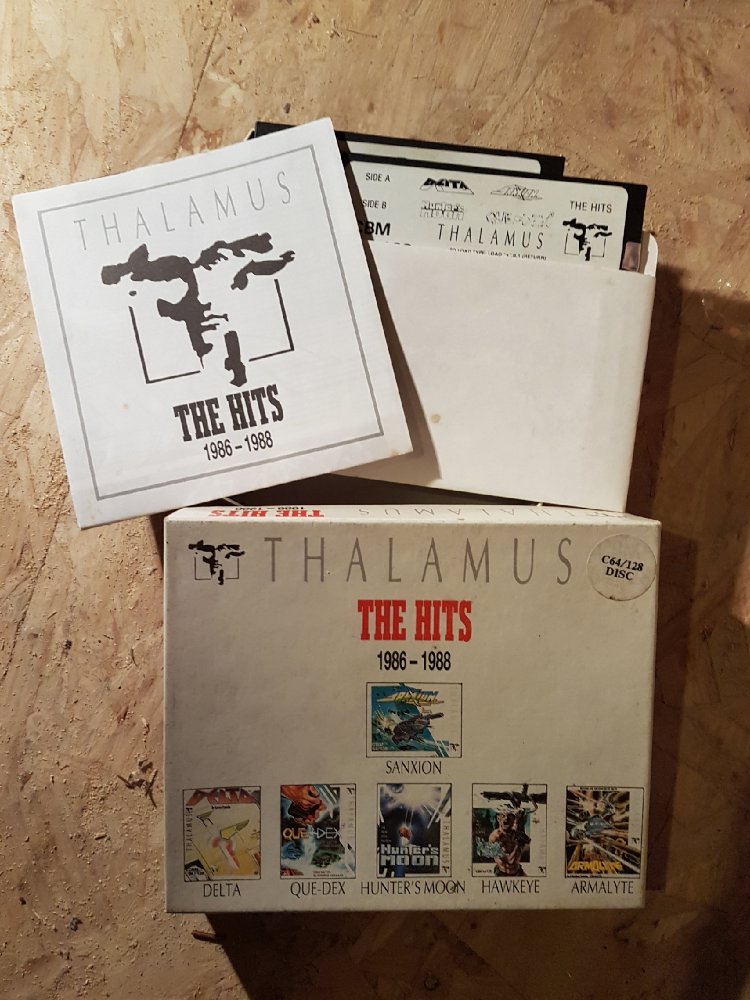
Thalamus was a game developer based in the UK in the mid 80s to early 90s. They had a reputation for flashy games and and pounding soundtracks. Most of their games were highly rated and their first compilation, The Hits, had some amazing games.
Sanxion and Armalyte were among my favourite shoot ’em ups while Hawkeye had great looking parallax scrolling. I thought the Delta theme music was great but the game didn’t grab me like Armalyte did. I’m going to get that game out again later..
Still have the receipt from Turbosoft in the box too!
While in Eason newsagents today I glanced over at the gaming magazines and something caught my eye and brought me back almost 30 years to when my brother and I bought our first copy of Zzap! 64.
The RETRO title will be familiar to Speccy owners, as it looks very similar to the title graphic of Crash magazine, another Newsfield publication from long ago.
I had a quick look through the magazine. Not much in the way of C64 games. It did have a bit about the Amiga 500, but the paper felt cheap, and I knew it would only end up collecting dust if I bought it.
I’ve only watched twenty minutes of this presentation but I’m blown away already. Up to about 15 minutes and a bit I was familiar with what he was talking about but then he got to the part about abusing the stack (neat way of saving cycles), and the jitter counter. That counter is insanely clever. I used to add small loops to wait for the right cycle or raster point in my demos.
I’m looking forward to watching the rest!
Edit (November 2017): Updated the Youtube link as the original channel was deleted!
This is a good explanation of how old computer systems generated their graphics.
I remember drawing sprites in the same way until I found programs to make that process much simpler!
Close
Ad-blocker not detected
Consider installing a browser extension that blocks ads and other malicious scripts in your browser to protect your privacy and security. Here are a few options.
uBlock Origin is a free, open source, ad blocker for your browser.
Use pi-hole if you have a spare Raspberry Pi on your network.
Set the private DNS settings on your phone to dns.adguard.com to block adverts and trackers.