Stopping Web Server Abuse with Fail2Ban

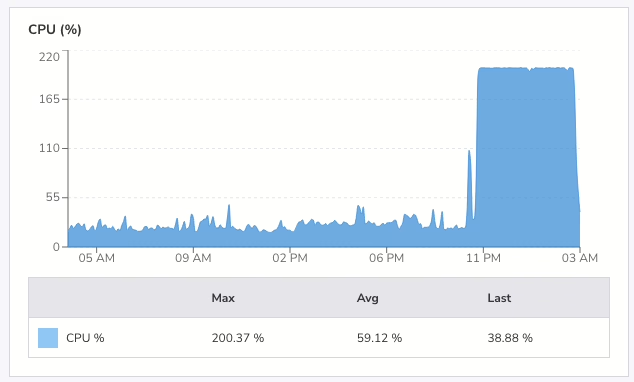
At 4am yesterday morning I was awake. Luckily so, as I checked my email and saw a warning that my VPS had been running at 199% CPU for two hours. I went into my office and checked the logs. Someone had been hammering this site with HEAD requests since just after midnight with nearly 30,000 requests across different URLs in four hours.

If they’d hit the same page repeatedly, cached responses would have handled it. But by requesting thousands of distinct URLs, each request generated a fresh cache file, forcing PHP and the database to do real work every time. My small server was coping, but the load average was high.
I blocked the offending IP in .htaccess immediately. That stopped requests from reaching PHP, but I wanted a proper defence, something that would catch this kind of abuse automatically next time.

I already had Fail2Ban installed. I’d just never configured it for web server attacks. Time to do that.

Fail2Ban works by watching log files for patterns, then banning IPs that match too often. I needed two files: a filter to match Apache access log lines, and a jail to define the thresholds.

First, the filter at /etc/fail2ban/filter.d/apache-ratelimit.conf:

[Definition]

# Matches any request line in Apache access log (combined/common format)
failregex = ^<HOST> -."(GET|HEAD|POST|PUT|DELETE|OPTIONS) .

ignoreregex =

This matches every request in the log.

The jail decides what volume of requests counts as abuse. It lives at /etc/fail2ban/jail.d/apache-ratelimit.conf:

[apache-ratelimit]
enabled = true
filter = apache-ratelimit
logpath = /var/www/logs/access.log

# Triggers a ban after too many requests in a short window
maxretry = 500
findtime = 30

# Ban for 24 hours
bantime = 86400

# Use iptables to drop packets from banned IPs
banaction = iptables-multiport
port = http,https
protocol = tcp

# Allowlist trusted networks
ignoreip = 127.0.0.1

The logic: if a single IP makes more than 500 requests in 30 seconds then ban it for 24 hours. Adjust maxretry and findtime to suit your traffic patterns. Legitimate crawlers and real users won’t come close to these numbers, but an attacker blasting thousands
of requests will trip the threshold fast. These are not the numbers I’m using.

The ignoreip directive keeps trusted networks (monitoring services, your own IPs) from getting caught.

The changes to Fail2Ban are activated with the following command (as root):

systemctl restart fail2ban

And I verified it was running by checking the status:

fail2ban-client status apache-ratelimit

Within a couple of minutes, the offending IP appeared in the banned list. I checked the access log, and there was nothing more from that IP. The requests weren’t just being rejected by Apache; iptables was dropping the packets before they reached the web server at all.
That’s the key advantage over an .htaccess block: banned traffic never touches Apache.

A VPS with limited resources can’t absorb a flood of uncached requests. Caching helps with repeat visits to the same page, but an attacker who rotates URLs defeats that entirely. Fail2Ban shifts the defence from the application layer down to the network
layer, where it’s cheap to enforce.

If you run a small site on a VPS, configure fail2ban for your web server. It takes ten minutes and it works.

Anyway, I presume whoever did that attack is reading this post since they seem to like my blog so much. Why did you do it?

Make Photo Competitions Simple

Running a photography club competition used to mean juggling spreadsheets, chasing emails, and manually tallying votes. I built Photo Competition Manager to change that.

This free WordPress plugin handles everything your club needs: member management, secure uploads, flexible voting, and beautiful results displays.

This will suit a photography club that uses WordPress for their website and that has a projector for their meetings. If you already run a photo league with projected images or prints but collect votes from your club members using pen and paper you’re the perfect candidate to try this plugin.

This is the very first release of this plugin. It has been used a couple of times to run several test photo competitions and one monthly league competition. However, bugs happen. I would love if your photography club used this plugin but I will need feedback to improve it. Run a couple of test competitions first to get used to how it works.

Getting Started in Minutes

The setup wizard creates all the required pages automatically. Select the pages you need, click a button, and you’re ready to go.

Manage Your Membership

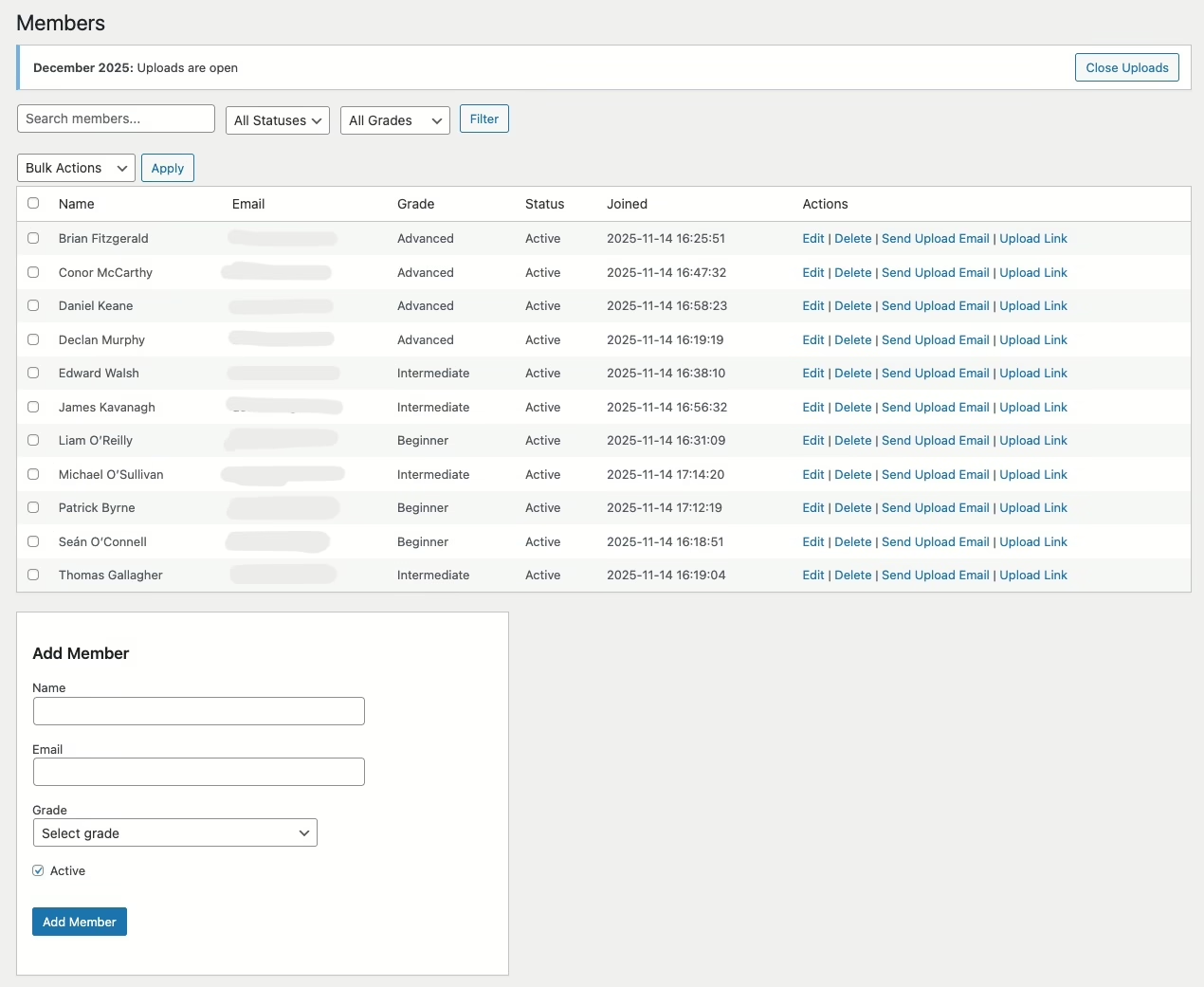
The Members page is your central roster. Add members individually or bulk import from CSV. Assign grades, track status, and send magic-link upload invitations with a single click.

Each member gets a unique upload URL—no passwords to remember, no accounts to create. They click the link and upload.

Create and Track Competitions

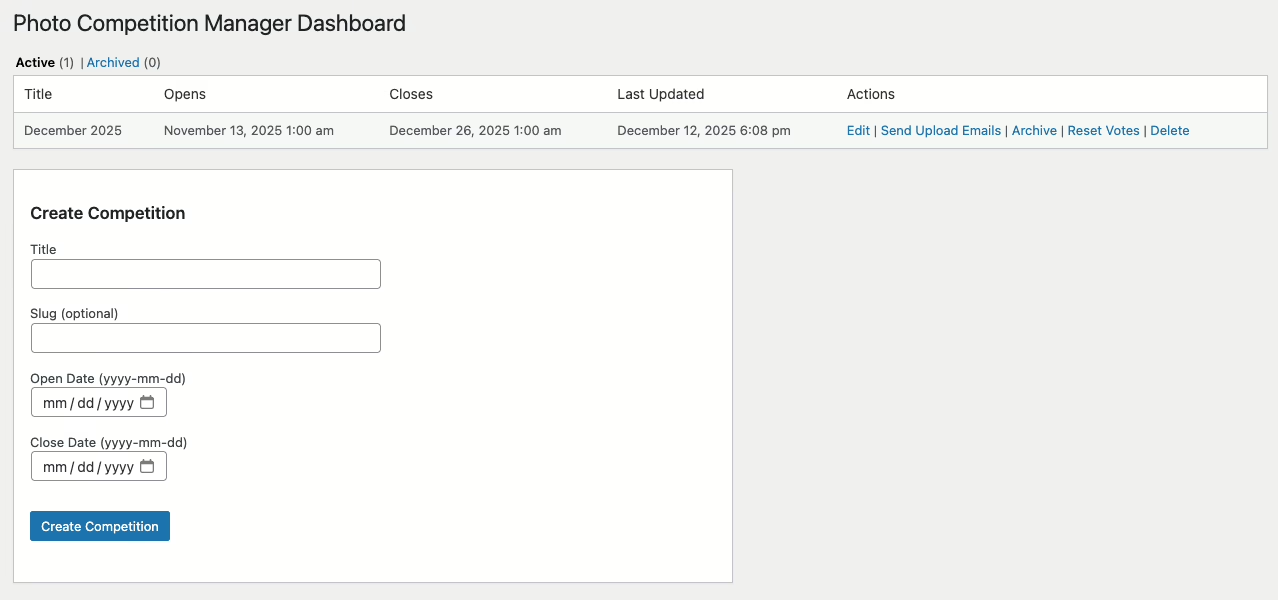
The competitions dashboard shows a list of competitions, allowing you to edit them and send out upload emails to members. Only one competition may be active at a time, but a competition may have more than one category.

Create competitions with custom categories (Colour, Mono, Projected, etc), grade divisions (Beginner, Intermediate, Advanced), and submission quotas. Each competition can have its own rules without affecting your defaults.

Watch Submissions Roll In

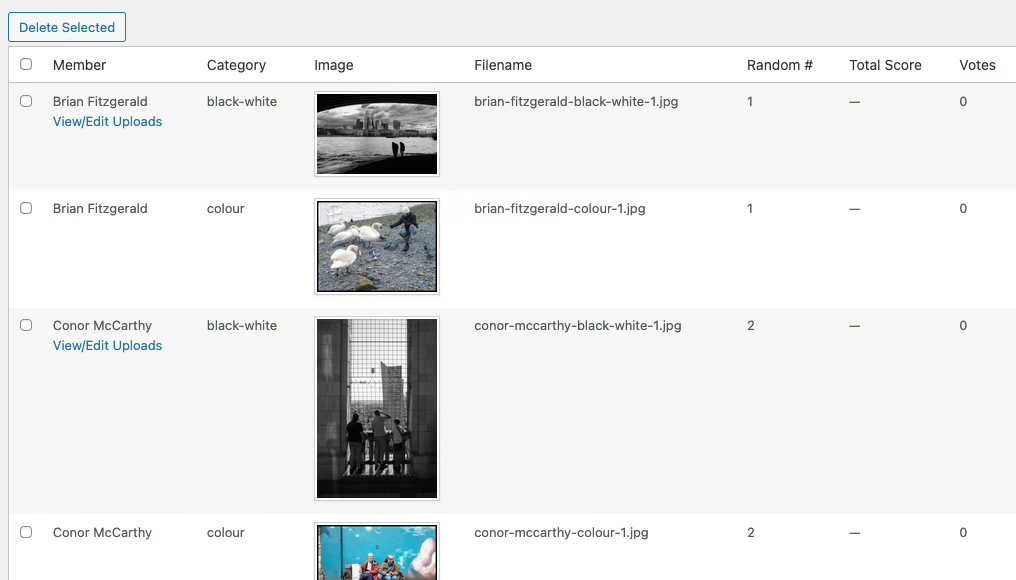
As members upload, the submissions page displays thumbnails of every entry. You’ll see who’s submitted, which categories are filling up, and whose photos are still missing.

A Frictionless Upload Experience

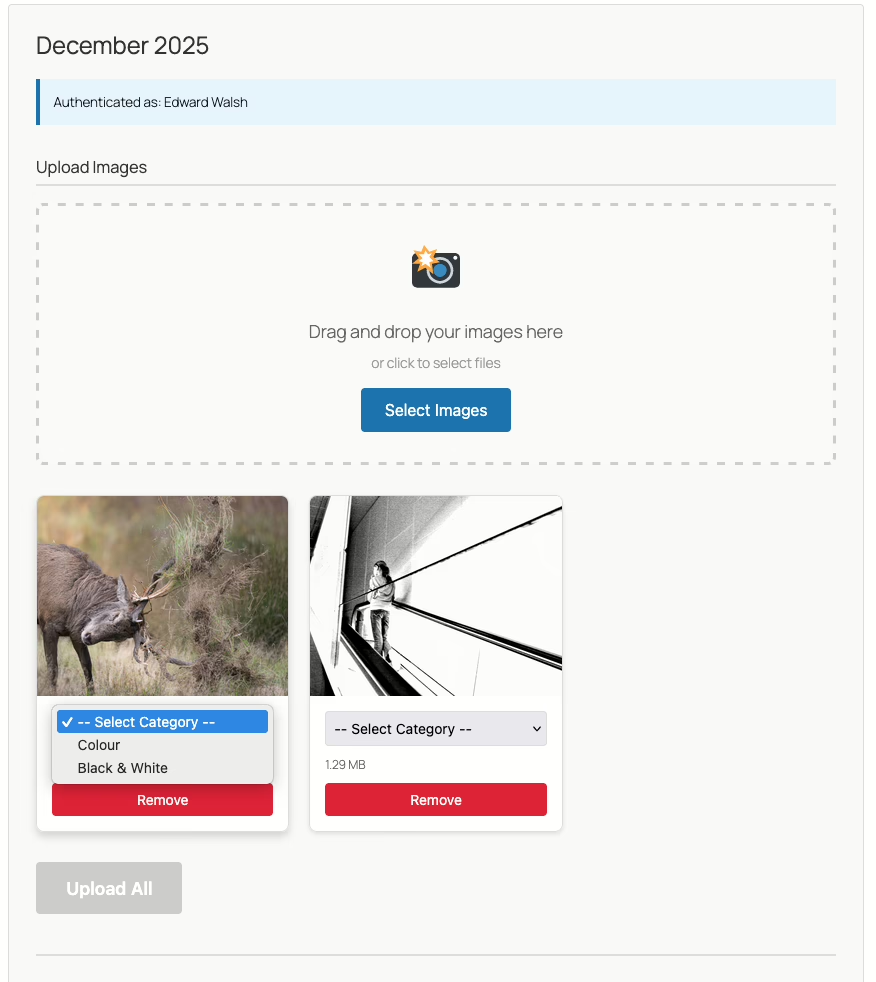
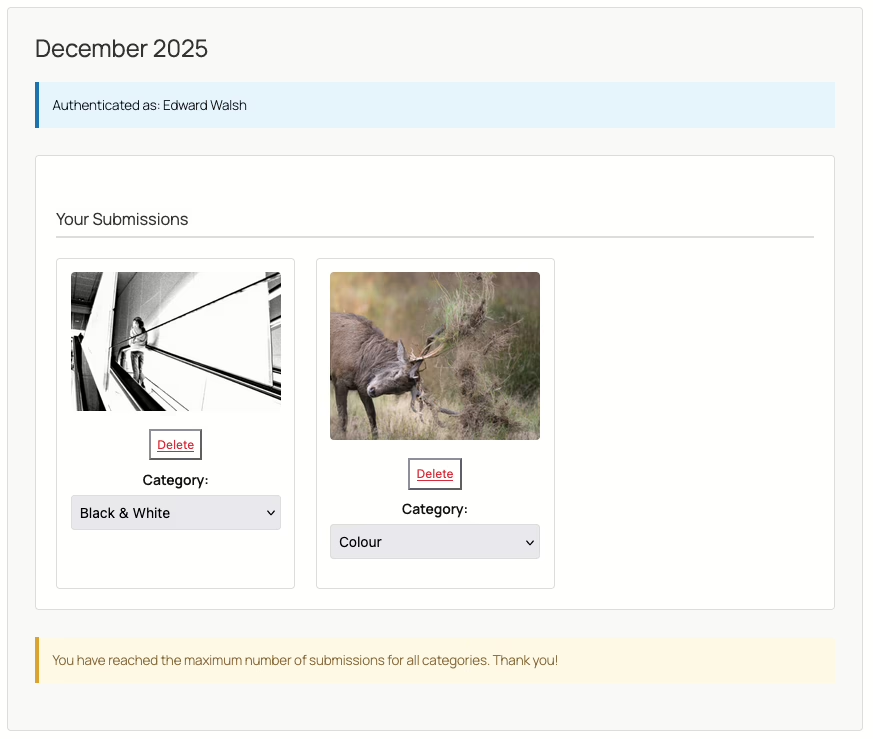
When members click their magic link, they land on a clean upload form. They select their category, choose their image, and submit. The progress banner shows upload status in real time.

The plugin handles validation automatically—file types, dimensions, and quota limits are all enforced before the image is accepted.

Complete Control Over Voting

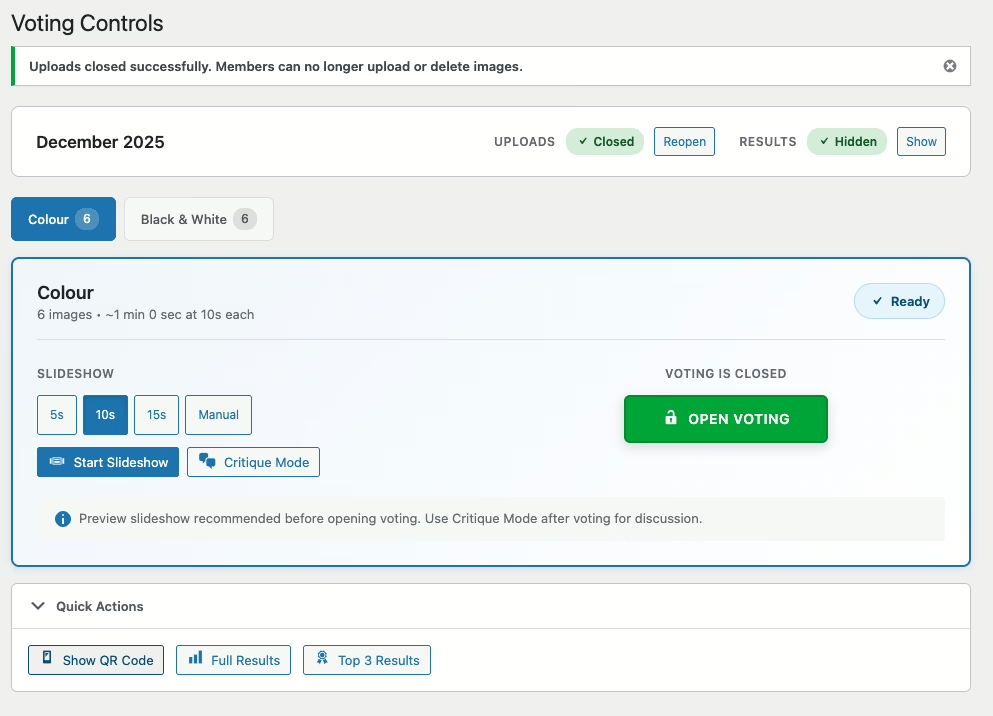
The voting controls page is your competition command centre. From here you can:

  • Open and close voting for each category independently.
  • Toggle the results display on or off.
  • Enable slideshow mode for in-person club nights.
  • Disable uploads once the submission deadline passes.
  • Show a QR code for members to scan with their phones to vote.

In the competition settings, you choose between token-based voting (unique links per member) or password-protected public voting. The voting controls page features a full-screen slideshow mode where members can vote together during meetings.

On the night of the competition we do the following:

  • Close uploads and hide results.
  • Show the slideshow with a 10 or 15-second delay as a preview.
  • Display the QR code and make sure every member can scan it and open the voting page.
  • Open voting and show the slideshow again.
  • When everyone has voted, close voting.
  • 2 members of the club will then go through the images and offer a critique, using the slideshow again but in manual mode this time.
  • Repeat for the next category.
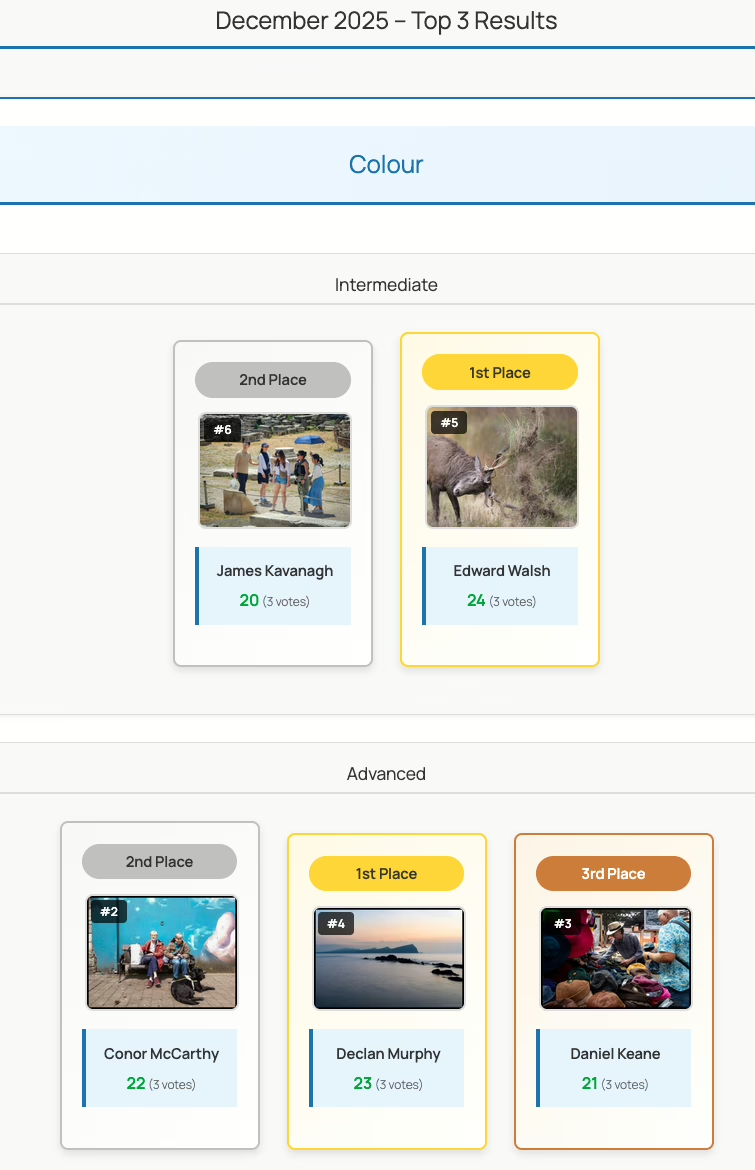
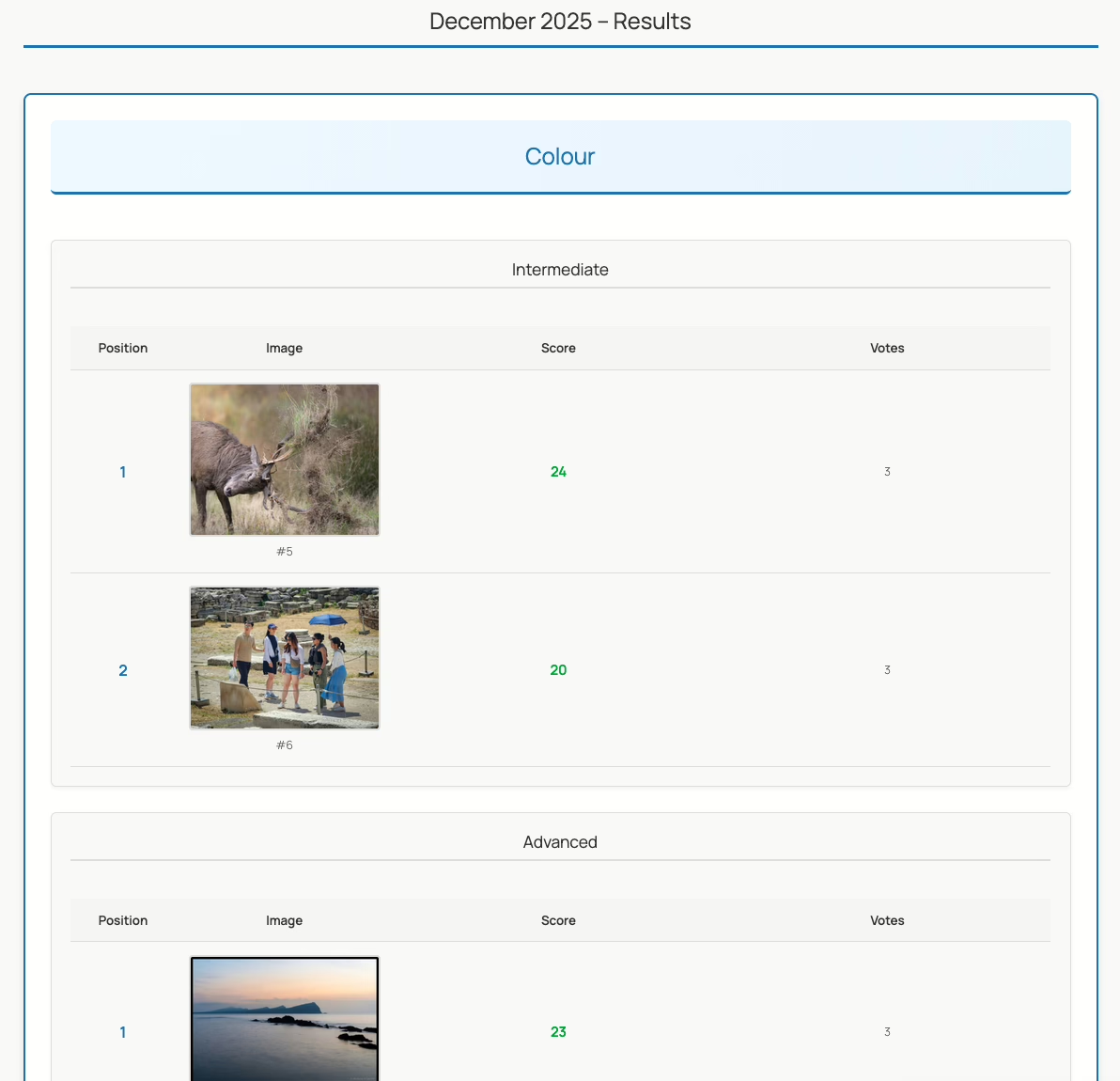
  • When all the voting is done, toggle the results page on and display the “top 3” results, and then the anonymous results page on the projector.
  • Finally, an email is sent out to all members showing their score, ranking in their grade and the votes they received. Names are not attached to the votes for obvious reasons.

Voting By Phone

Members can vote on the competition using their phones after they have scanned the QR code on the voting controls page.

Results That Make Sense

When voting closes, the results dashboard breaks down every score by member grade. See vote distributions, identify your winners, and export everything to CSV for your records.

The frontend includes a responsive top-3 podium display perfect for announcing winners, plus full results tables with filtering by grade and category.

Built for Photography Clubs

Photo Competition Manager was built specifically for the way camera clubs actually run competitions:

  • Magic-link authentication means members don’t need WordPress accounts to upload.
  • Grade-based scoring supports clubs that split their membership by experience level.
  • Slideshow mode turns any screen into a projection-ready display.
  • CSV export keeps your archives intact.

Get Started Free

Photo Competition Manager is free and GPL. Install it from the WordPress plugin directory or from the plugins page on your WordPress site in the usual way. Navigate to the Competitions menu to get started.

Download Photo Competition Manager

The source code is available on GitHub if you want to contribute or customise:

View on GitHub

Questions? Open an issue on GitHub or post in the WordPress support forum. I’d love to hear how your club uses it.

Twenty Years at Automattic

When I started working at Automattic, it was just me and Matt, and two servers. A web server and a MySQL server. I knew the root password to WordPress.com. I needed it as I spent a lot of time tuning the MySQL server in those days, but I was thrilled when we got some real systems people on board like Barry. I have to admit to a certain sadness when I ran sudo and the password didn’t work, however.

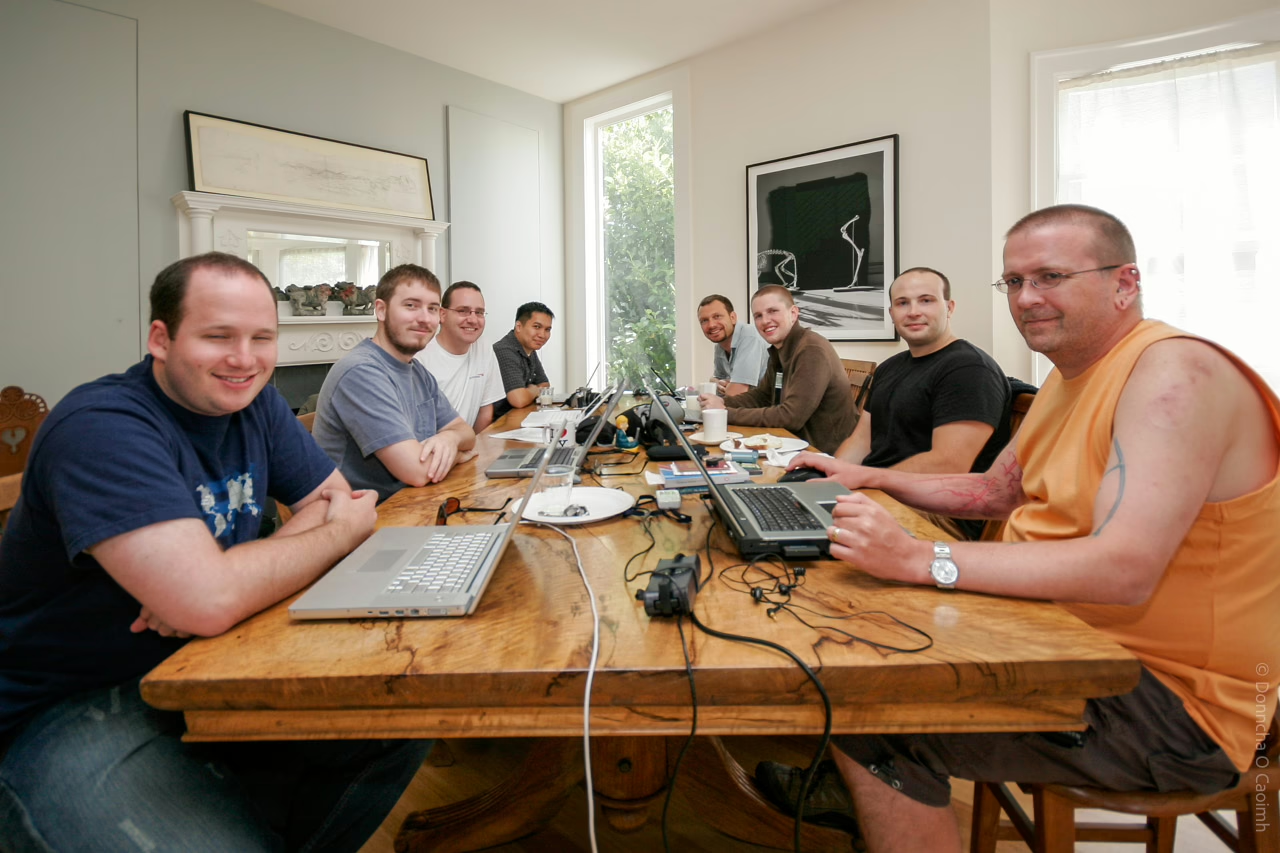
Automattic in 2006, when my luggage was delayed and I was wearing a British Airways tshirt.

When I started working at Automattic, many of my colleagues I work with now, were still in school. There was a time at the start of this year that my team had the first employee and the latest employee on it. I didn’t have any grey hair then, and well, I have some now, and I make jokes about the “old days” but there are quite a few of us boldermatticians.

I spent most of my time working in Vim, in an SSH session, but that’s changed to VS Code and Cursor in recent years. I tried the Vim extensions for those, but they never felt as good as the original.

Now, it’s the upstart AIs that are disrupting everything related to my job, but while it certainly feels like it’s making me a lot more productive, apparently it’s making me dumb too. Time will tell. Andrej Karpathy uses a number of analogies in this video at Y Combinator, but one thing that resonated with me was his comparing the state of AI to computing in the 60s. There were massive mainframes that people used thin clients (or punch cards!) to interact with them. In 2025, the AI is this brain in the cloud we talk to and ask questions of in a chat window. What’s it going to be like in another twenty years?

Anyway, I’m looking forward to seeing what happens in the next twenty years at Automattic!

Speculating on what to load next

The Speculative Loading plugin for WordPress is a plugin you should probably try out on your site, especially if you use WP Super Cache or Jetpack Boost to cache things. It uses the new speculation API that Chrome/Edge supports to load pages in the background if you even hover over a link.

It will dynamically prefetch or prerender pages before they’re requested by the visitor on your site, which means that the page will show instantly when the visitor actually clicks the link.

It doesn’t work in Firefox yet, but it won’t hurt either, as the browser will just ignore the extra bits and pieces added to the page.

The default “moderate” eagerness works fine for me. The “eager” setting appeared to load links if the cursor got anywhere near them, which was a little too aggressive.

You won’t notice your browser loading the page in the Network tab of the webdev tools, but if you tail your access_log, you’ll see the requests go through when you hover over the links.

Browse around this site, or take a look at my photoblog for a feel of what it does.

There’s more info in the make blog post about it, and this insightful comment about the wastefulness of loading pages that might not be used, especially for visitors on limited data plans, or low powered devices. That’s definitely something to think about before using this plugin. I may yet remove it later, and I’ll update this post if I do.

Gimme all your cache!

Today saw the release of updates to two plugins I work on. The first, unsurprisingly, is WP Super Cache, and it’s a bug fix release. It fixed a PHP8.2 warning, adjusted some labels on the settings page, solved a problem with “late init” and POST requests, and some other changes, but the major news I want to share is not about that plugin at all.

I’m on the Jetpack Boost team in Automattic, and for the last month or so, we’ve been working on adding a full-page cache to the plugin!

Jetpack Boost is already a pretty remarkable plugin, with what it does to CSS, JavaScript and images, so a page cache was an obvious next step.

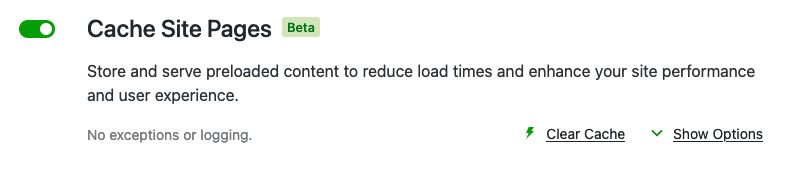
Screenshot from the Jetpack Boost settings page.
It shows the "Cache Site Pages" module, with a checkbox to enable.
Text says, "Store and serve preloaded content to reduce load times and enhance your site performance and user experience."
"No exceptions of logging"

A link says, "Clear Cache" and there's a down arrow with another link saying, "Show Options"

If you’re already using WP Super Cache, but you’re not using any of the advanced features, I think you should give Jetpack Boost a go. It works really well at serving cached pages fast. Jetpack Boost will be a drop-in replacement if you have these features enabled in WP Super Cache:

  1. Simple caching
  2. Caching Disabled for logged in visitors
  3. Garbage collection set to one hour.

You’ll have to disable WP Super Cache first before trying Boost Cache, as they both rely on the same mechanism to load. Disable Jetpack Boost to go back to WP Super Cache. You can enable Boost again, without using the Cache module, and the two plugins will happily co-exist.

I’ve been using it here for the last two weeks, and it has worked flawlessly. I post images daily on my photoblog, and they get shared to Mastodon, where the expected deluge of requests from hundreds of servers happens each time. Between Jetpack Boost and WP Rest Cache, my server barely noticed. Just like with WP Super Cache.

“If it performs just like WP Super Cache, why should I use Boost?” I hear you asking. For some, you’ll need the extra features of WP Super Cache, but otherwise, Boost may be just what you need. Apart from the cache, it also has remarkable features that will squash your CSS and JavaScript in various ways that load super quick. Give it a go, and let WP Super Cache handle the cache if you need to.

If you’re still here, read on, and I’ll give you a whirlwind tour.

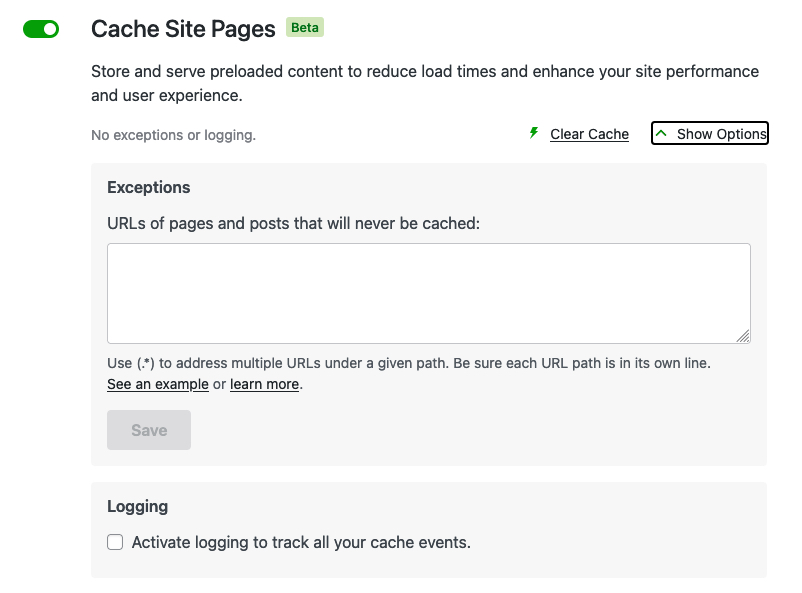
The Cache module enabled with the expanded view showing the exceptions textarea and logging checkbox.

Boost supports an exception list like WP Super Cache does, and logging of activities in a similar, but easier to use way.

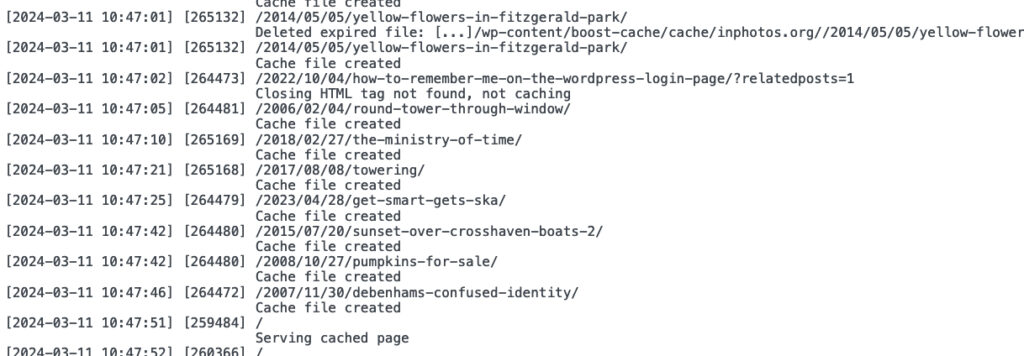
Output from the logging feature of the plugin shouwing date, pid, URL and description.

To simplify caching, only requests by logged out visitors are cached now, but that’s the recommended way of using WP Super Cache too.

Developers: like WP Super Cache, it also supports the “DONOTCACHEPAGE” constant. If you define that while a page is being created, then Jetpack Boost won’t cache it. If you can enable it before the page loads, then the plugin won’t serve a cached page either, but that will be difficult since the cache system loads so early.

To learn more, there’s a fine manual to read. It explains in detail how to enable the cache and how to use it. Yes, I’m biased, but I think you should give Jetpack Boost a go! Caching helps a lot, but the extra CSS and JavaScript features help render the page quickly once loaded.

Bye bye Pebble!

Pebble, aka t2.social, was a short lived social network like Twitter. Last week they sent out emails to all their users to tell them that the site was shutting down on November 1st. I first came across it thanks to Topgold, but it was always a small site. In a crowded section of the Internet, another Twitter clone would have a tough time competing.

I hadn’t posted much there and wasn’t going to download my data, but this post by Eugen Rochko caught my attention and reminded me to go visit.

If #Pebble was part of the social web, they would have had a network of 1.8M active users, not 1,000, and perhaps wouldn’t have had to shut down.

Eugen Rochko

Maybe it would have survived, but it would have had to be extra special and offer some compelling features to compete with all the “free” Fediverse servers out there. The Activity Pub plugin for WordPress recently hit version 1.0 and was launched on WordPress.com too, so potentially millions of new Fediverse sites are coming online, all of which are on more mature software.

Eighteen Years at Automattic

I started work at Automattic 18 years ago today. Matt offered me a job working on a new WordPress based website a few weeks before. I had just bought a house the year before, I had become engaged the month before, and left my old job at the same time, so I jumped at the opportunity to work on WordPress full time!

It started out small with us working on 2 servers and an invite system. I felt I was doing as much admin on MySQL and Apache as coding. More people were hired. Many of them are still at Automattic. We worked on lots of cool little things like the global tag system, and so much else that I’ve forgotten about. Then moving onto the billing system because I had done billing at my previous job, then on to Crowdsignal, on to Jetpack Forms and finally onto the team working on Jetpack Boost and WP Super Cache.

WordPress.com is unrecognisable from what it was 18 years ago, but if I run “blame” on the right files, I’ll sure I’ll still see my name on some ancient code nobody has touched in all that time.

Fast forward 18 years, and I’m in the same office at home. I definitely made the right decision that day in 2005.

Thanks, Matt.

WordPress at 20

Happy birthday, WordPress!

What does that even mean, though? WordPress is the community of people who have built it and contributed to it over the last two decades, and before that, when it was a little known blogging package called b2. So, thank you so much to everyone who has contributed to WordPress over the years.

WordPress has given me, and countless others, many opportunities we couldn’t have dreamed of. Just over two years after WordPress was first released, I joined Automattic. Working on two machines, Matt and I started work on the first WordPress.com. Here I am, almost 18 years later, and still working on WordPress related software. What a journey. Matt marked the occasion by announcing a generous scholarship programme. Matt was also on stage in London with Mike Little and Dries Buytaert last week in a conversation I must listen to yet, but I’ve heard some good things about it WRT Gutenberg.

Anyway, it’s almost midnight here, but I wanted to get some words down on this blogging platform we all love. May we all be here for the next twenty years.

Oh, and before I go, you can hear me say a few words about meetups at Automattic in the latest episode of the Distributed podcast. It’s edited well, that’s all I’ll say!

Redirecting ?replytocom so bots go home

Earlier this month I noticed that a particular bot that likes to visit my website, “MJ12bot/v1.4.8” seems to be particularly attracted to the “reply to comment” links generated by my blog. Those are links that bots see, but we see the “Reply” button that uses JavaScript to reply to a comment.

To be honest, it’s pretty annoying to see a bot constantly fetching those URLs from my website. Earlier this month, it was on a roll and grabbing several dozen at a time. While my server can handle the traffic without any issues, who wants a bot trampling over their server?

I decided to stop them in two ways:

  • Redirect them back to the post in a mod_rewrite rule.
  • Block them in robots.txt and hopefully the bots will go away.

Coming up with a mod_rewrite rule was surprisingly hard, but after mentioning this on Mastodon I received a reply from Jos Klever who figured out I needed the QSD flag. So, to spare you the hassle of researching it, here are the mod_rewrite rules that worked for me. It causes a 301 permanent redirect to the anchor tag of the comment. Add this to your .htaccess file.

RewriteCond %{QUERY_STRING} replytocom=(.*)$
RewriteRule ^(.*)/          $1/#comment-%1 [NE,QSD,L,R=301]

Blocking requests like this in the robots.txt is much simpler. WordPress can generate the robots.txt file for you using the robots_txt filter. Add the following to a mu-plugin PHP script.

function disallow_replycom_urls( $output, $public ) {
    $output .= 'Disallow: ?replytocom';
    return $output;
}
add_filter( 'robots_txt', 'disallow_replycom_urls', 10, 2 );

I haven’t received many comments on my posts lately. However, I stumbled upon some interesting posts by clicking the RANDOM link above, which I decided to examine as part of my research. During my search, I delved deep into the blogosphere of the past, almost like being an archaeologist, because some links were no longer available, and I had to search for them on archive.org. I was also pleasantly surprised to find that a link to a GIF from 2005 was still alive!