
I wasn’t sure what to expect when I started watching this video, but it is so sweet and lovely, you have to watch it.
Author Archives: Donncha
Kennedy Quay development on hold?
Today I learned that the development of Kennedy Quay in Cork is on hold because An Bord Pleanála decided to refuse permission to develop Marino Point. To save you a click, it’s because they never had any plans for improving the roads in the area.
An Bord Pleanála decided this week to refuse planning to agricultural and chemical firm Goulding to develop port facilities at Marino Point in Cork Harbour, a decision that was two years overdue.
Despite being located in Cobh, the impact of this decision will be felt most harshly in the city centre, with hopes that these proposed developments at Marino Point would pave the way for the wider regeneration of Cork’s docklands and the construction of hundreds of new homes.
However, ABP refusal has brought ambitious redevelopment plans to a standstill and the construction of more than 1,300 city apartments indefinitely on hold.
That area is ripe for redevelopment. When everyone saw the massive R&H Hall building go down, we were sure it was only a matter of time before badly needed homes were built there.
Here’s a great video showing some of the development around the harbour in the last year. Things are moving slowly, elsewhere.
Queen of the Cold Feet
My wife and I have started rewatching Cold Feet, and I couldn’t help but notice that we’re now older than the characters during their original run at the turn of the century. It’s a strange sensation to watch characters who are at a younger stage of life than I am now, especially since I once thought of them as older, embarking on family adventures that I wouldn’t consider for several more years.
Anyway, in season 3, one of the characters is getting IVF, and they want some music. It’s weird how the nurse got the name of the song wrong, but I guess they weren’t able to license that one, and the music would have been added later…
There’s a funny meme about that song. If I find it, I’ll add it to this post.
Eon: the making of an Amiga 500 demo
Eon is an astonishing Amiga demo released a few years ago. It runs on a bog-standard Amiga 500, a machine that first saw the light of day in 1985. Here’s how it was made.
Andreas shared a comparison that will make it clear to any developer on a modern machine just how much slower the Amiga 500 is compared to a modern machine.
Let’s MD5 ~800Kb data, using reference RSA MD5 code.
- On an old, but modern, Surface Laptop 2 that took 2ms.
- The Amiga 500 took 29 seconds.
This CPU is more than 10,000x slower than the CPU in your PC or Mac.
One of my WordPress plugins will do an MD5 calculation of the URL on every request, and it’s like nothing. It’s not a big job for a web server to do. An Amiga could not do that.
However, it can, in the right hands, seemingly perform miracles and create cool looking demos that even today impress! There’s something to be said for programming in a constrained environment.
TIL Firefox debugger can edit JavaScript files
I’ll spare you the long story of why I had to edit a JavaScript file, but today I learned that since Firefox 128 you can add a script override in the browser Debugger Panel. This downloads the JavaScript file in question, where you can edit it with your favourite editor.
- Open DevTools by hitting F12 and select the Debugger.
- Right-click on the JavaScript file in the source list and select “Add script override”.
- Save your file somewhere and edit.
- Reload the page to apply changes.
- Remove the override by right-clicking on the file again and selecting “Remove script override”.

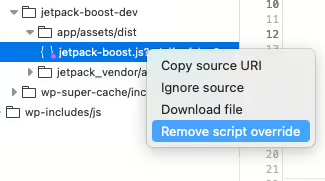
The file I was editing was minified, so Firefox doesn’t save the nicely unminifed file you were looking at, but it’s not too hard to unminify it. It was a small change I was making, so it wasn’t too difficult to find the right place to edit.

Yes, yes, Chrome has been able to do this for a long time, apparently. Thanks for letting me know.
Pause Time Machine for large files?
Warning: this is potentially terrible advice as it disables your backup system temporarily, or until you remember to enable it again. It also deletes backups which might be needed if you need to restore a file that was modified during this period.
When downloading massive files like the 50GB tgz archives from Google Takeout on your Mac, you might consider temporarily pausing Time Machine backups. This can help avoid the creation of enormous snapshots that quickly consume your free space. It’s a bit perplexing, though—my Time Machine backup disk is always connected, so I’m unsure why snapshots are generated at all.
In theory, the operating system should delete or move those snapshots to your backup drive, but it seems to take its time. While most advice suggests leaving snapshots alone, some external tools can be finicky about free space. For example, Backblaze has complained when my internal drive space got too low.
To get an accurate picture of your available space, check the Storage Settings in System Settings. However, it can be disconcerting when the df -h command shows a much smaller figure. To quickly recover space, you can use Disk Utility’s “Show APFS Snapshots” feature to examine and delete any large backups.
Just remember to re-enable Time Machine as soon as you’ve moved those large files elsewhere. This approach does carry some risks: disabling your backup system leaves you vulnerable to data loss, and deleting backups may prevent you from restoring files modified during this period. Proceed with caution!
Playing around with Immich again

Immich is a self-hosted Google Photos. That’s the simplest way to describe it. It can run in a Docker container and will happily live on your local network, without access to the Internet unless you want to. They do warn you that, “The project is under very active development”, so bugfixes are happening all the time. At the same time, bugs are sometimes introduced, and breaking changes are sign posted weeks in advance.
Immich. How do you pronounce it? I say it with a hard “CH” at the end, but others will say it sounds more like “image”, which leads me to think that’s probably the way to pronounce it.
It looks uncannily like Google Photos. It doesn’t have all the bells and whistles of it’s older, proprietary inspiration, but it does have some very useful features.
I love the face and object recognition in Immich. I can search by people on the Explore page, and search for objects too. It doesn’t present animals on the Explore page, but searching for “chihuahua” leads me to lots of photos of Diego. It’s face recognition that doesn’t go to feeding a gigantic corporation too. It works pretty well, but make sure your Docker install has enough RAM, or it will silently fail.
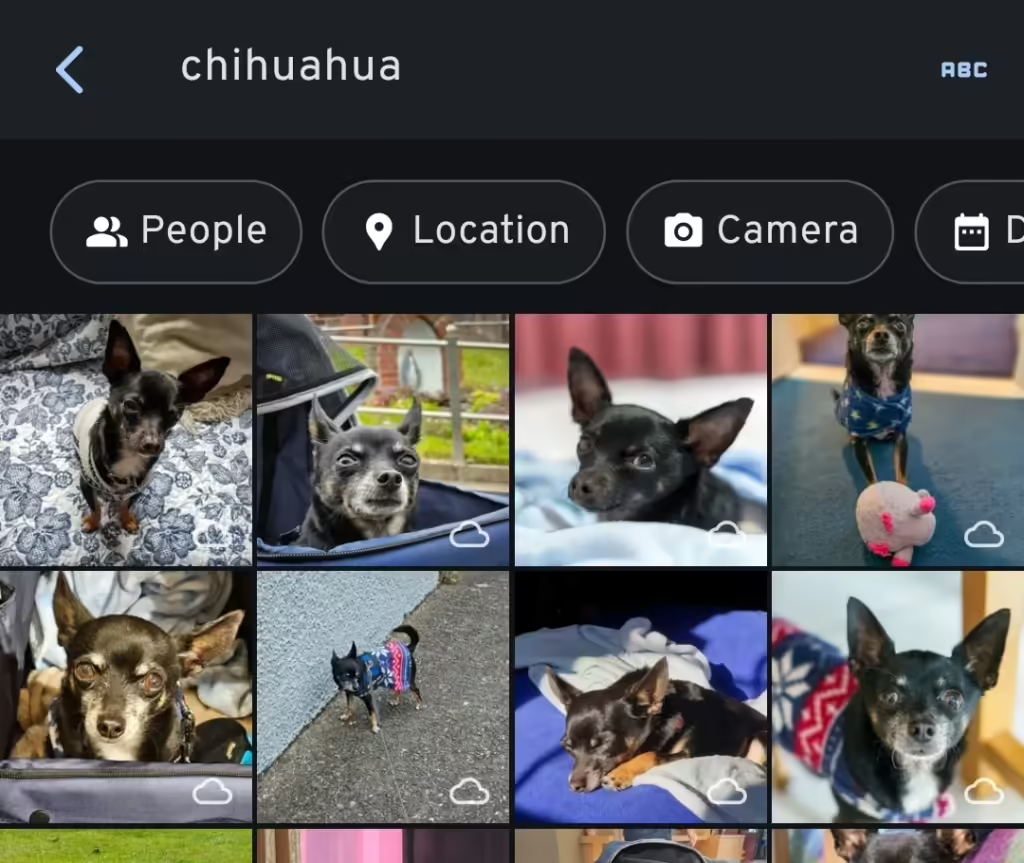
It has partner sharing too, which is of course a handy feature for families. I noticed that partner shared photos can’t be discovered through the Explore page, where you find face recognition and places. There’s a GitHub issue about this, so it’s something they’re aware of. To be fair, Google Photos has the same limitation (I think) unless you’ve copied the photos to your account, using your precious free space.
To get around this limitation, I symlink any shared photos to my wife’s account. I use External Libraries for 99% of my photos, and 100% of the photos that come from Adobe Lightroom. I export photos to “single” or “shared” directories, and a shell script moves them all to my Immich External Library, and symlinks the shared photos to my wife’s one. On the External Libraries admin page, I simply “Scan new library files” to import the symlinked files. Immich is smart enough to pick up the new files in my External Library. Files are scanned twice, with thumbnails made twice, and face recognition done twice, but the overhead in space used isn’t too bad.
The Quick Start docs tell you to use Docker to install, and if you are at all familiar with Docker, this should be easy enough to follow.
When you do get Immich installed, make sure you perform backups. I have all the images stored elsewhere, but I back up the database file with the docker command listed on that page. Syncthing copies it to another machine, where it’s backed up daily.
Another option is the Nextcloud Memories app which is very slick and looks great. It has face and object recognition too, but it depends on another Nextcloud app to do those jobs. It doesn’t have partner sharing, however, which is the main reason I tried out Immich.
If you do decide to expose your Immich install to the Internet, take a look at Cosmos Cloud. There are other options too, like Caddy or Nginx Proxy Manager. Getting an HTTPS certificate has never been easier. If you don’t know your IP, have a look at https://checkip.amazonaws.com too.
Organic cows suffer without medicine
TIL that “organic cows”in the US can’t be given antibiotics. If they are, they are never “organic”, ever again.
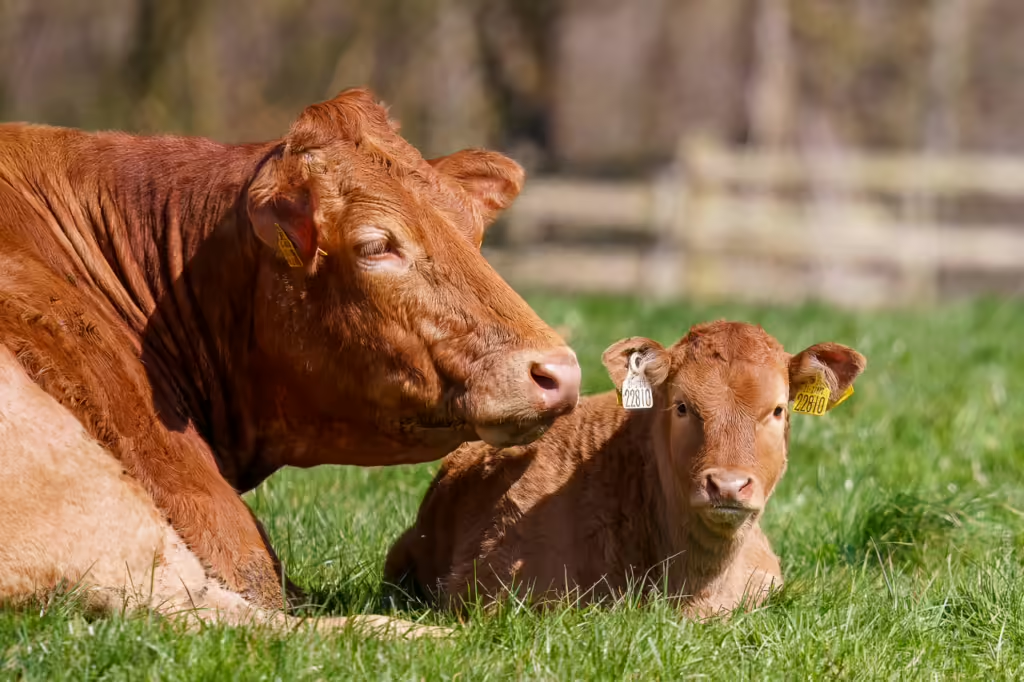
In the EU and Canada, farmers aren’t allowed to sell the milk until there’s no sign of antibiotics.
Personally, I’d prefer if an animal was correctly treated for any ailment they might be suffering from. And antibiotics might be the correct course of action. Feeding antibiotics to healthy animals in their feed is ridiculously irresponsible, however.
How do you microdose veganism? Try eating less meat and dairy products. Go meat free once or twice a week. There are plenty of delicious vegan meals to be made, and you won’t miss the meat.
In the follow-up podcast mentioned, they guide the listener through how someone who wants to reduce animal suffering (but also still eat animals) might think through their dinner menu. They recommended eating good quality beef, which surprised me, but given how prevalent battery hens are, it might be easier to discover if a cow was grass fed.
We’re spoiled in Ireland. Most cows are grass fed, and the EU has laws regarding how densely packed chickens can be. EU MPs voted in favour of banning caged farming by 2027 after intense lobbying by activists.
Choo! Choo! Freeze64!

Well, chug along and check this out! Freeze64 Issue 68 steamed its way into my mailbox, featuring a review of a train robbers game I never knew existed. Plus, there’s another captivating instalment in Andrew Braybrook’s Uridium “making of” series. I always enjoy diving into the technical details of retro development. You’re constrained so much, it’s a challenge fitting a game into such an environment.
Impossible Mission III looks great too. I wish I was able to get further in the original game. Maybe this one will be easier. C64 games are hard as nails, aren’t they? Quite unforgiving compared to (many of) today’s games.
Lossy DNG isn’t so bad
Have you ever converted a RAW file to lossy DNG and noticed how much smaller it was? You can make the RAW file 80-90% smaller! I always thought of lossy DNG files as JPEG files saved at a compression level of 10 or 100%. In other words, with barely anything stripped, but it’s more interesting than that.

I discovered that a panorama I made in Lightroom was a lossy DNG. After I made it, I tried converting it to lossy DNG, and the new file was the same size as the old one. So, panoramas are lossy DNG. They used to be huge files, but, in Lightroom 13.0 that changed. Adobe started using Jpeg XL instead of Jpeg to store data in lossy DNG files. Even though the files are smaller, they are higher quality than older panoramas! It’s the same with HDR and Denoise. Remember when Denoise was introduced and the files it made were gigantic?
HDR images created by Lightroom are also now saved using the same lossy DNG format. An HDR image I created in 2017 on my 24MP Sony A7III is 77MB, but using Lightroom 13.3.1 that file is only 11.9MB. When I convert the image manually to lossy DNG with an embedded medium Jpeg and fastload data, the file reduces further to 8.1MB and looks practically the same at 100%.
I haven’t noticed any major problems fixing highlights or shadows in panoramas, so lossy DNGs are pretty good, but not without their own drawbacks, which I’ll get to later.

On the Adobe forums someone noticed this last year, and received a few interesting replies:
The compression method for derived DNGs has been changed from JPEG to JPEG-XL, which provides a smaller data footprint without loss of quality.
Creating a merged DNG such as a panorama is already a “lossy” process because the merged pixel data has been demosaiced, aligned, and blended from the original photos. Using JPEG XL compression makes a much smaller visual change.
Do not look at the words ‘lossy’ and ‘lossless’, look at your image and see if there is any visible effect of this new compression method. Recreate an older panorama and compare the old massive DNG with the new, much smaller DNG. Do you have any reason to be concerned?

Before you convert all your RAW files to lossy DNG, be aware that it will affect how Lightroom treats your file in ways you mightn’t think of. Years ago, I noticed that the Transform tool worked differently on lossy DNG files. It straightened walls slightly differently, not that it looked wrong, just different. You also can’t feed DNG files to Topaz Photo AI (Files->Plugins Extra->Process with Topaz Photo AI) or Lightroom Denoise, so use those before making your panorama or making the file a lossy DNG.
This is an example of a simple image that transforms differently when it was converted to a lossy DNG file. Lens correction has been applied to both images, and they are identical then. However, when “auto” transform is applied, the lossy DNG is modified differently. This bug has been there for years. If you want to compare yourself, here is the before image, and here’s the after image.


Greg Benz has published a post on the subject too and came up with the idea of exporting images to lossy DNG “to the same folder” and adding them back to the catalogue, making it easier to compare before and after images before you delete files. He points out some other problems I never noticed with lossy DNGs, such as haloing and colour tones, and other unspecified issues with older RAW images imported before 2012.
Is it worth converting your RAW files to lossy DNG? You’ll make savings of up to 90% and that’s very tempting. A 66MB RAW file may become a 9MB lossy DNG file. If you don’t like deleting, but you’re sure you’re not going to use an image, then it may be an option for you. On the other hand, use with caution on photos you want to edit and publish.
A comment on this video suggests loading the original photo and the lossy version into Photoshop as layers and use the “difference” blend more on the top layer. You’ll notice tiny changes between the images. Since I have deleted the original RAW file of the photo above, here’s one of the lighthouse at Ballycotton.


Here’s what the difference looks like in Photoshop.

There are obvious differences when you look at it like this, but I still think it’s worth considering. Today’s photo on my photoblog, The Rocks of Ballycotton, is a lossy DNG file for example.
And finally, one thing to consider is that third-party software support for lossy DNG files might not be what you expect. I haven’t tested any of the open-source software out there, so I’m not sure how good it is. A comment on that video I linked to above says RawTherapee handled them, and that was 6 years ago, so I’m sure the situation has improved since then.
While in the process of researching this, it has been so nice to find actual open, public, online forums and blogs talking about this, and not just on Reddit either. I bet there must be plenty of conversation about it hidden in Facebook groups too. Hidden from prying eyes.